
MCP server · Notes
weighted-compact MCP server
by zzallirog
Lets your AI read your own Claude Code session logs and build a local, inspectable recap you can audit.
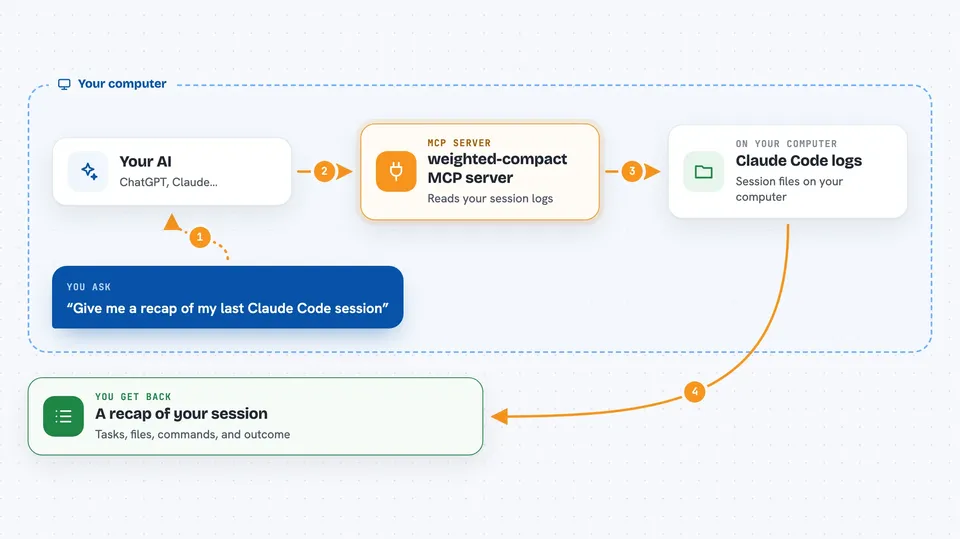
weighted-compact is a small helper that reads the session logs Claude Code already keeps on your computer. It turns them into a task-by-task recap you can read and check, and it can also help your AI pull out the important parts of a long session. It is handy if you use Claude Code a lot and want to understand what happened, without sending anything to the internet.
What is an MCP server? The 30-second version
On its own, your AI can only chat with you. An MCP server is a small helper program that gives your AI a new skill. This one gives your AI a way to look at your local Claude Code session files and build recaps or compacted summaries from them. When you ask, your AI uses this helper to read those files and bring back an answer, all on your own machine.
What this MCP server does
You ask your AI something about your past Claude Code sessions. The AI passes that request to this helper. The helper reads the session log files stored in your Claude Code projects folder. It parses them into tasks, files touched, commands run, and outcomes. Then it hands back a recap or a compacted set of important turns for your AI to show you.
 Click to zoom
What you can do with it
- Get a task-by-task recap of any Claude Code session
- Audit a recap to check it faithfully matches the original session
- Build a compacted context of the most important turns from a session
- Mark certain turns as keep or skip so they are honored during compaction
- Extract reusable rules from your memory folder
- Run a nightly refresh that ages older content so recent work stands out
- Inspect the local signal data behind the ranking
Try asking your AI
- “Give me a recap of my last Claude Code session”
- “Audit the recap for session abc123 and tell me if it passes the checks”
- “Compact this session down to the most important turns and keep anything I marked as keep”
- “What files did I touch in yesterday's session and what commands did I run”
What it gives back to you
You get back a written recap that lists the tasks in the session, the files changed with add and remove counts, the commands that were run, and the outcome line. For compaction, you get a shorter markdown summary of the top-ranked turns plus a note about how much budget was used. The audit returns a pass or fail for each of the four faithfulness checks. Everything appears as text in your chat.
Before you start
What you need
- Claude Code installed and used at least once so session logs exist
- Python 3.10 or newer
- pipx or pip to install the package
Good to know
It reads your private Claude Code session logs from your own computer, so only run it on a machine where you are comfortable with that, and remember the recap is a lossy map, not a full copy of the session.
Install it with your AI
Add weighted-compact MCP server to your AI, no technical skills needed
You don't install anything by hand. You copy one prompt, paste it into an AI that can work on your computer, and it checks, installs and connects the server for you, asking you when it needs something.
Sign in to get the install prompt
Members get a ready-made prompt that lets the Claude desktop app check weighted-compact MCP server, install it and connect it for them, step by step. You don't need any technical skills: you copy, paste and answer a few questions. Your connected AI can also find and install any of the 4,609 MCP servers here for you.
Who it's for
People who use Claude Code regularly and want a local, checkable record of their sessions without sending data anywhere.





