AI agent for motion graphics designers
Freelance Animation Milestone Payment Agent
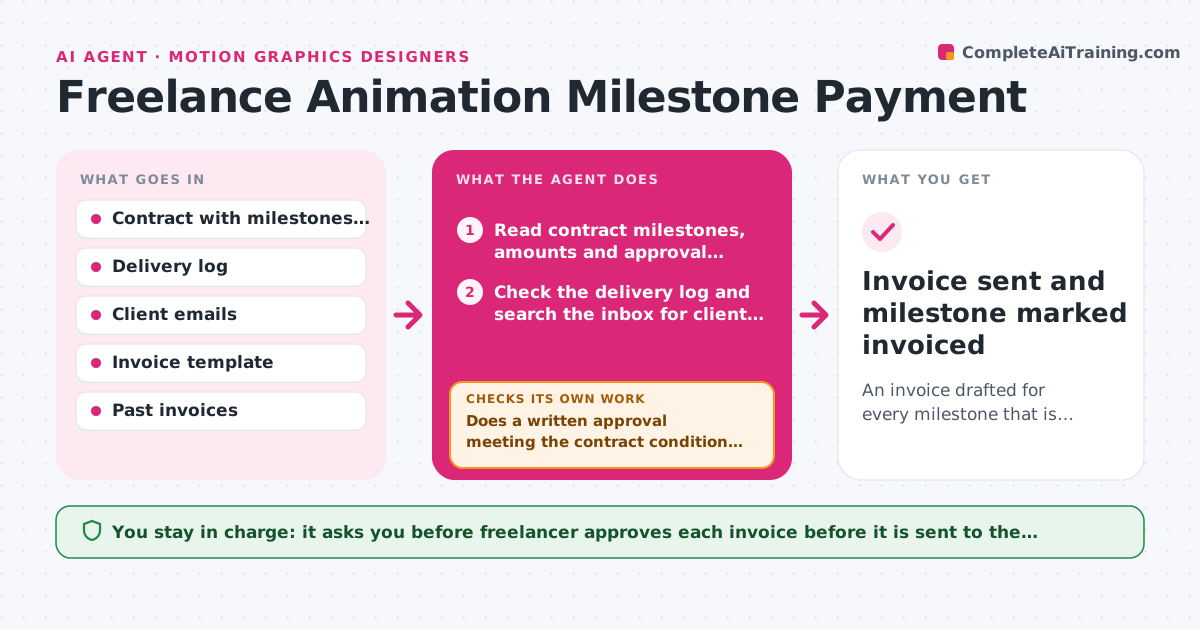
An invoice drafted for every milestone that is truly complete and approved, with evidence attached
What it does
A freelancer finishes the animatic on Tuesday, gets a 'looks great' email on Thursday, and forgets to invoice for three weeks. The agent keeps the contract, the delivery log and the inbox in step. It reads the contract milestones with their amounts and conditions, checks the delivery log and client approval emails for each one, and decides which payments are now due. If approval evidence is missing, it asks the person to confirm, then rechecks the inbox before drafting each invoice. It drafts the invoice using the contract amount, tax details and payment terms and compares the total against the milestone schedule. The freelancer approves every invoice before it is sent. Edge case: a client replies 'approved with small tweaks', so the agent asks whether the milestone counts as approved or not.
How it works
Follow the arrows from top to bottom. The orange dashed arrow is the loop: when a check fails, the agent goes back and tries again.
Read the steps as a list
- Delivery logged or weekly check
- Read contract milestones, amounts and approval conditions
- Check the delivery log and search the inbox for client approval
- Match each milestone to its delivery and approval evidence
- Does a written approval meeting the contract condition exist for each completed milestone?If not: Ask the freelancer to confirm or request the approval, then search the inbox again. Back to step 3.
- Calculate the invoice amount, tax and due date from the contract
- Draft the invoice with the evidence listed
- Does the invoice total match the milestone schedule and payment terms?If not: Correct the amount or terms and redraft. Back to step 6.
- Freelancer approves each invoice before it is sentThe agent waits here for your OK.
- Invoice sent and milestone marked invoiced
How it decides
A milestone is due only when the delivery is logged and the contract's approval condition is met by a written message. Anything vaguer is held until the freelancer confirms.
- Treat approval with conditions as not approved until confirmed
- Invoice within 2 business days of a confirmed approval
- Never invoice a milestone twice; check past invoices first
- Add late fee terms only if the contract states them
Make it yours
Every agent is a starting point. You choose these settings for your own situation.
- Contract and invoice template
- Approval wording that counts as approved
- Tax rate and payment terms
- Day of the weekly check (default Monday)
- Reminder schedule for unpaid invoices
What keeps you in control
It always asks you first
- Freelancer approves each invoice before it is sent to the client
Hard limits
- Never send an invoice without approval
- Never invent a milestone or amount not in the contract
It stops when
- Done: All completed milestones are invoiced or waiting on named approvals
- Stop: Contract terms are unclear, so the agent asks the freelancer which clause applies
Set it up
We guide you through the set-up, step by step
Members get the full set-up guide for this agent. No technical skills needed: you copy, paste and upload.
- One set of instructions to paste into your AI, with the clicks for ChatGPT, Claude, Microsoft 365 Copilot, Gemini and Grok
- The agent then walks you through connecting your own data, one source at a time
- A downloadable copy with the flow chart, the rules and the full guide