AI agent for research scientists
Statistical Power and Sample Size Replanning Agent
Choose a sample size and design that give adequate power within the available limits
What it does
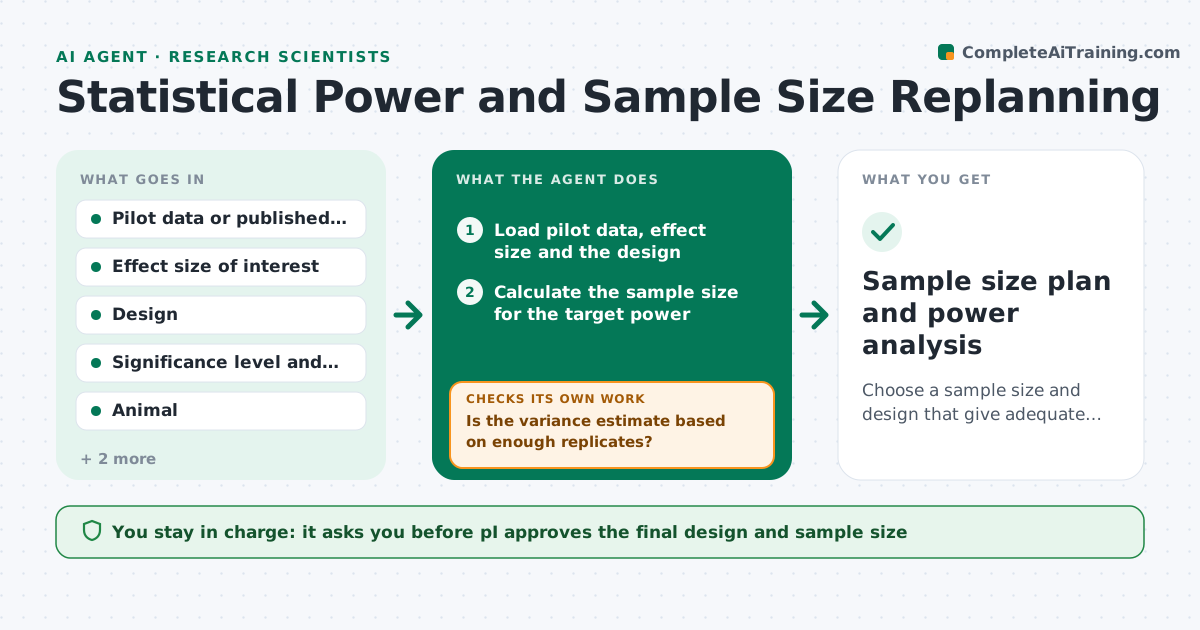
A researcher plans 6 animals per group because that is what the lab always uses, and after months the study cannot detect the effect. Or they plan 20 when 10 would do and spend animals and reagent money. This agent plans the sample. It takes the pilot variance and the effect size of interest, calculates the sample needed, tests how sensitive the answer is to assumptions and checks against animal, reagent and cost limits. If the limits are exceeded, it proposes design changes such as a paired design or fewer groups, and recomputes the power. The PI approves the design. Edge case: the pilot has only 3 replicates. The agent warns that the variance estimate is uncertain and uses a conservative value.
How it works
Follow the arrows from top to bottom. The orange dashed arrow is the loop: when a check fails, the agent goes back and tries again.
Read the steps as a list
- Experiment design drafted
- Load pilot data, effect size and the design
- Is the variance estimate based on enough replicates?If not: Use a conservative variance estimate and flag the uncertainty. Back to step 2.
- Calculate the sample size for the target power
- Test sensitivity: higher variance and smaller effect
- Does the needed sample fit within the animal, reagent and cost limits?If not: Propose design changes such as paired design or fewer groups and recompute. Back to step 4.
- Write the design summary with assumptions and the power curve
- PI approves the designThe agent waits here for your OK.
- Sample size plan and power analysis
How it decides
It computes the sample size for the target power, and repeats with a higher variance and smaller effect. If the needed size exceeds limits, it tests design changes that raise power.
- Target power is 80 percent at 0.05 significance unless the PI sets another
- Pilot variance from fewer than 5 replicates is inflated by 20 percent
- A plan that falls below 70 percent power under pessimistic assumptions is flagged
- Limits are checked for animals, reagents and cost
Make it yours
Every agent is a starting point. You choose these settings for your own situation.
- Target power and significance level
- Variance inflation for small pilots (default 20 percent)
- Resource limits
- Designs to consider
- Report format
What keeps you in control
It always asks you first
- PI approves the final design and sample size
Hard limits
- Never changes the research question
- States all assumptions in the plan
It stops when
- Done: design approved with power analysis
- Stop: no feasible design reaches the target power, discuss feasibility with the PI
Set it up
We guide you through the set-up, step by step
Members get the full set-up guide for this agent. No technical skills needed: you copy, paste and upload.
- One set of instructions to paste into your AI, with the clicks for ChatGPT, Claude, Microsoft 365 Copilot, Gemini and Grok
- The agent then walks you through connecting your own data, one source at a time
- A downloadable copy with the flow chart, the rules and the full guide