
AI tool
Smart Finder
Smart Finder uses advanced AI to quickly locate files, emails, and data across multiple platforms, saving you time and boosting productivity with accurate, efficient search results.

About Smart Finder
Smart Finder is an AI-powered search tool designed to enhance the traditional find-in-page experience. It replaces the standard Ctrl+F function with advanced features such as pattern detection and multi-color highlighting, making it easier to locate information within web pages.
Review



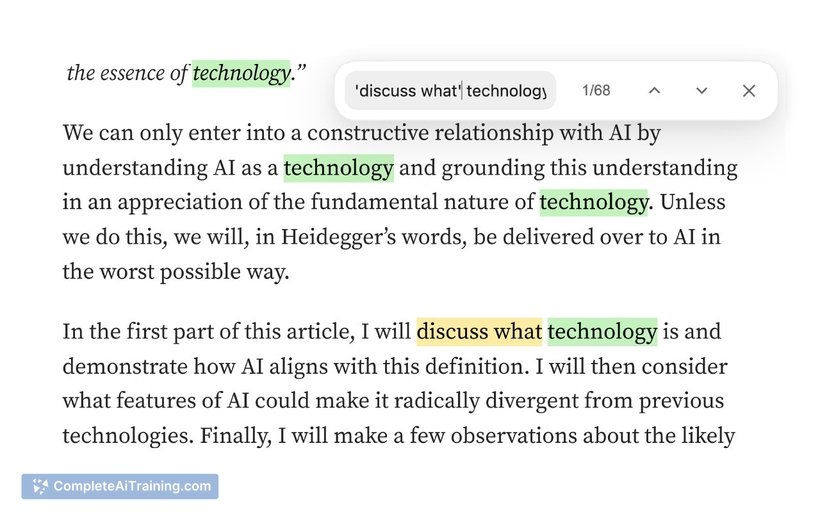
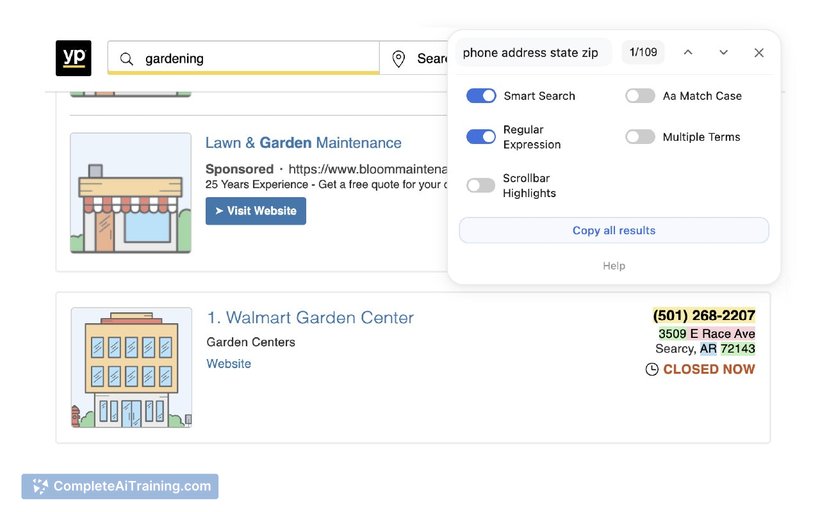
Smart Finder offers a fresh approach to searching text on web pages by integrating artificial intelligence into a familiar tool. It aims to improve efficiency and accuracy in finding relevant information, especially on lengthy or complex documents. This Chrome extension brings useful enhancements that can benefit a wide range of users.
Key Features
- AI-powered search that goes beyond exact keyword matching
- Pattern detection to identify related terms and concepts automatically
- Multi-color highlighting for distinguishing between different search results
- Seamless replacement of the traditional Ctrl+F shortcut
- Easy-to-use interface integrated within the browser environment
Pricing and Value
Smart Finder is available for free as a Chrome extension, making it accessible for anyone looking to improve their on-page search capabilities without additional cost. Given its advanced features and no price barrier, it offers excellent value for users seeking a more intelligent search experience while browsing.
Pros
- Enhances the standard find-in-page tool with intelligent search capabilities
- Color-coded highlights improve visual clarity of search results
- Easy to install and integrates smoothly into Chrome
- Free to use with no hidden charges
- Helps save time when searching through large amounts of text
Cons
- Currently limited to Chrome browser users only
- May have a slight learning curve for users unfamiliar with AI-enhanced tools
- Advanced features might not be necessary for users with simple search needs
Overall, Smart Finder is a practical tool for anyone who frequently searches through extensive online documents or web pages. It is particularly suitable for researchers, students, and professionals who value enhanced search precision and visual organization. Its free availability also makes it a low-risk option to improve browsing productivity.
Jobs Smart Finder suits
We checked Smart Finder against 500+ jobs; these get the most out of it.



