AI tool
Wordin
Wordin is an AI writing assistant that edits your text in place, understands your current paragraph, and updates outlines in real time—making quick tweaks and structuring your document seamless without losing your flow.
About Wordin
Wordin is an AI-powered writing tool designed to help authors, bloggers, and screenwriters create polished long-form content without losing track of context. It offers a seamless, real-time editing experience that keeps the entire document structure visible and editable from one interface.
Review
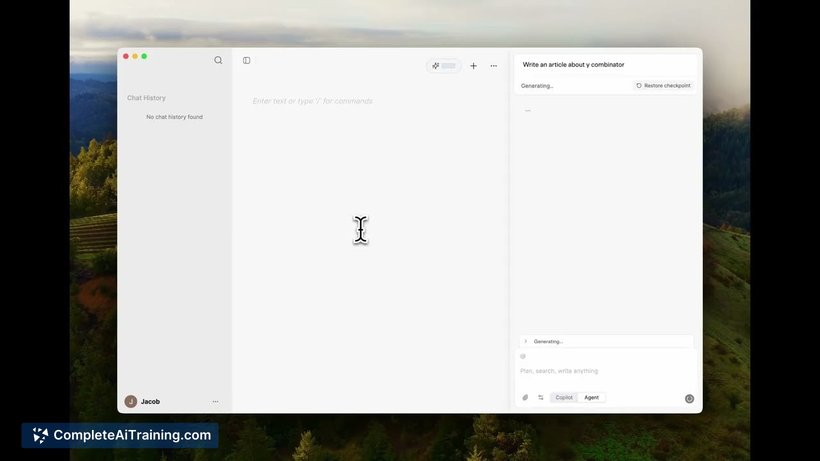
Wordin presents an innovative approach to AI-assisted writing by embedding live context directly into the document. This allows users to make precise edits and additions without the tool rewriting entire sections unnecessarily. Its intuitive design supports a smooth writing flow, making it easier to focus on content creation rather than formatting or managing drafts.
Key Features
- Live Context Embedding: Every keystroke is instantly embedded, ensuring the AI understands the exact position in the document for relevant output.
- Highlight and Patch: Users can select any passage and request targeted edits like tightening text or adjusting tone, which Wordin applies directly in place.
- Outline Timeline: A continuously updated panel displays all headings and subheadings, allowing quick navigation and clear structural overview.
- Seamless Interface: Inspired by tools used in coding environments, it keeps the writing process fluid and uninterrupted.
- Beta with Free Credits: New users can try the tool with up to 25,000 token credits to explore its capabilities without initial cost.
Pricing and Value
Wordin currently offers a beta version that includes free usage with a generous allocation of up to 25,000 token credits. This allows users to experiment with the tool and assess its benefits before committing to any paid plans. While detailed pricing for future plans has not been disclosed, the free tier provides considerable value for those looking to enhance their writing process with AI assistance.
Pros
- Maintains real-time context, preventing loss of flow during writing and edits.
- Allows fine-grained control with natural language commands for text improvements.
- Clear document structure visibility aids in better organization and navigation.
- User-friendly interface inspired by familiar coding tools makes adaptation quick.
- Free beta access with substantial token credits encourages risk-free trial.
Cons
- As a new tool in beta, it may still have some rough edges and limited integrations.
- Pricing details beyond the free tier are not yet available, making long-term costs uncertain.
- Currently focused primarily on prose writing, so may lack features for other content types.
Overall, Wordin is well suited for writers who want to keep their creative flow uninterrupted while benefiting from AI assistance that understands context in real time. It works particularly well for authors, bloggers, and screenwriters looking for an intelligent, in-place editing experience that respects the structure of their work.
Jobs Wordin suits
Useful in almost any job. We checked Wordin against 500+ jobs; these get the most out of it.
Alternatives to Wordin
Other tools that do the same main job. Our AI compared Wordin with similar tools and kept the ones you could use instead.