
MCP server · Video editing
atsurae MCP server
by 1000ri-jp
Edit videos by chatting: your AI cuts clips, adds music, and renders a finished 1080p MP4 for you.
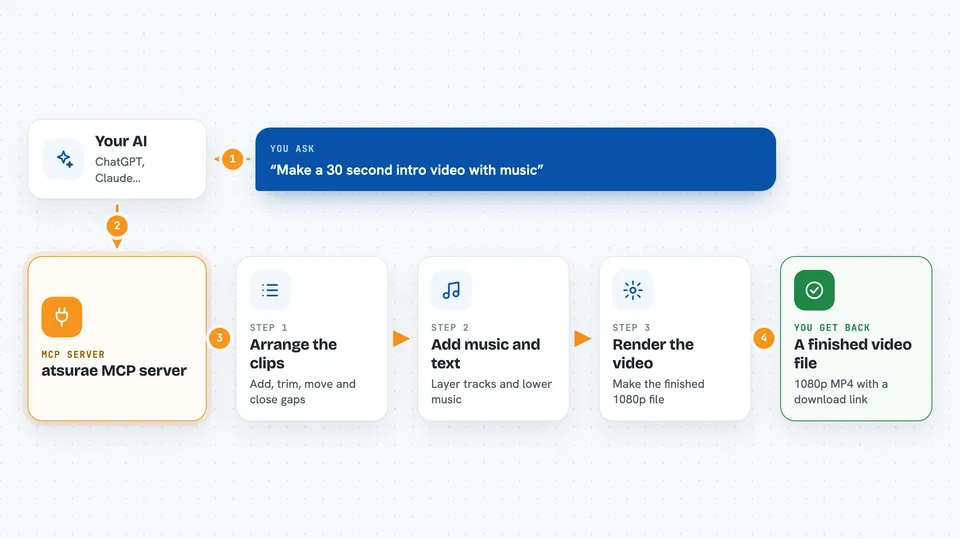
atsurae is a helper that lets your AI assistant edit videos for you, just by talking. You describe what you want, like a 30-second intro with your avatar and background music, and the AI does the cutting, layering, and rendering. It is handy for people who make short videos but do not want to learn a full video editor.
What is an MCP server? The 30-second version
On its own, your AI can only chat. An MCP server is a small helper program that gives your AI a new skill or a connection to an app or service. This one connects your AI to atsurae, a video editing service, so the AI can look at your video project and make changes there when you ask. You stay in the chat, and the helper does the work behind the scenes.
What this MCP server does
You tell your AI what kind of video you want. The AI uses this helper to look at your project and see what clips, images, and audio you have. Then it places clips on a timeline, adds music, adjusts volume, and tidies up gaps. When you are happy, it asks the service to render the video and gives you a download link for the finished file.
 Click to zoom
What you can do with it
- Add, move, trim, and delete clips on a timeline
- Layer up to five tracks, like background, avatar, and text overlays
- Add background music and lower it under narration
- Close gaps and snap clips together automatically
- Check the video for pacing or composition problems
- Render the final video at 1080p and get a download link
- Undo changes by rolling back to an earlier step
Try asking your AI
- “Create a 30-second intro video with the uploaded avatar and background music”
- “Trim the first clip to 5 seconds and move it to the start”
- “Add a text overlay at the top saying Welcome and close all the gaps”
- “Render this project at 1080p and give me the download link”
What it gives back to you
You get answers in the chat, like a summary of your project, a list of clips, or a note that a change was made. It can also show preview frames and before-and-after comparisons so you can check the look. When the video is done, you get the duration, resolution, file size, and a download link.
Before you start
What you need
- An atsurae API key (a kind of password for the service)
- Python installed on your computer
- The Claude desktop app or another AI app that supports MCP servers
Good to know
This helper can change or delete clips in your project and start renders, so check the previews and history before you confirm big changes.
Install it with your AI
Add atsurae MCP server to your AI, no technical skills needed
You don't install anything by hand. You copy one prompt, paste it into an AI that can work on your computer, and it checks, installs and connects the server for you, asking you when it needs something.
Sign in to get the install prompt
Members get a ready-made prompt that lets the Claude desktop app check atsurae MCP server, install it and connect it for them, step by step. You don't need any technical skills: you copy, paste and answer a few questions. Your connected AI can also find and install any of the 4,361 MCP servers here for you.
Who it's for
People who make short videos, like marketers, teachers, or content creators, and want to edit by chatting instead of using a full video editor.





