
MCP server · Video editing · official
Rendobar MCP server
by rendobar · official
Let your AI process video, audio and images for you, then hand back a ready download link.
Rendobar is a service that does media work in the cloud: trimming video, shrinking files, burning in subtitles, generating images. This is the official helper that connects your AI assistant to it. It is handy if you deal with video or image files and would rather describe what you want than learn editing software.
What is an MCP server? The 30-second version
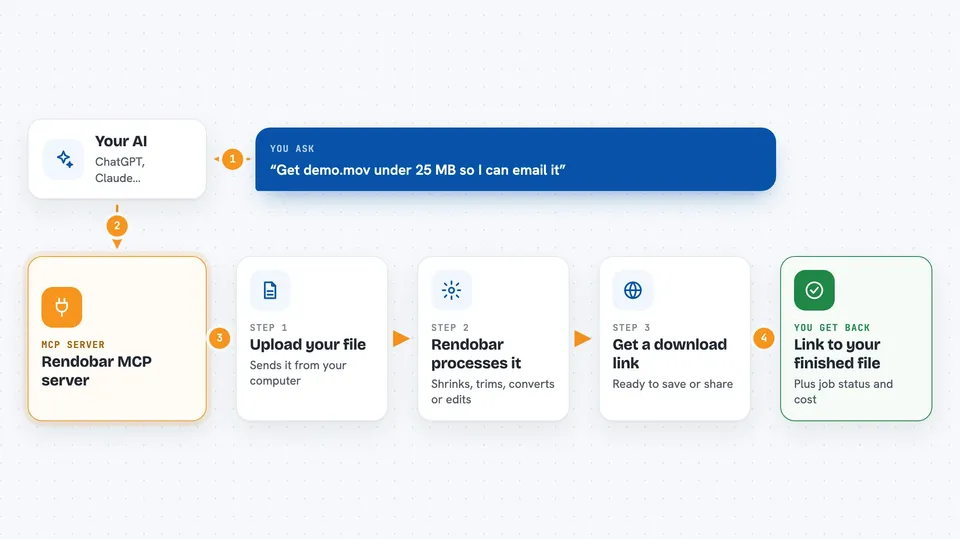
On its own, your AI can only chat. An MCP server is a small helper program that gives your AI a new skill or a connection to another service. This one connects your AI to Rendobar, so it can pick up a file from your computer, send it off to be processed, and bring back a link to the finished result. You just say what you want done, and the helper does the running around.
What this MCP server does
You ask your AI for something like making a video smaller or adding subtitles. The AI uses this helper to upload the file from your computer to Rendobar. Rendobar does the actual processing on its own machines, so nothing heavy runs on your laptop. When it is done, the helper brings back a web link to the finished file, plus the cost of the job. You can then download it or pass it along.
 Click to zoom
What you can do with it
- Shrink a video to fit under a size limit, like 25 MB for email
- Trim, mute or convert video and audio files
- Burn subtitles into a video from a subtitle file
- Generate a new image from a written description
- Edit or upscale an existing image
- Check what a media file contains before you work on it
- Send finished files to a storage bucket you have connected
Try asking your AI
- “Get demo.mov under 25 MB so I can email it”
- “Mute the first 3 seconds of intro.mp4”
- “Make a 1920x1080 title card for a video about deep sea diving”
- “What can Rendobar actually do?”
What it gives back to you
You get back a web link to the finished file, ready to download or share. You also see the job status, and once it is complete, the cost of that job. For some jobs you get a summary of the file, like its format and length. If you asked for a list, such as your recent jobs or your account balance, you get that as a short readable list in the chat.
Before you start
What you need
- A Rendobar account (you can start on the free plan)
- An API key from your Rendobar account settings (a kind of password for apps)
- Node.js 20.10 or newer on your computer
- The Claude desktop app, Cursor, Cline, Zed or a similar AI client
Good to know
Jobs cost money from your Rendobar balance, so check your balance before starting something big, and note that the helper can read files from your computer when you ask it to upload them.
Install it with your AI
Add Rendobar MCP server to your AI, no technical skills needed
You don't install anything by hand. You copy one prompt, paste it into an AI that can work on your computer, and it checks, installs and connects the server for you, asking you when it needs something.
Sign in to get the install prompt
Members get a ready-made prompt that lets the Claude desktop app check Rendobar MCP server, install it and connect it for them, step by step. You don't need any technical skills: you copy, paste and answer a few questions. Your connected AI can also find and install any of the 4,361 MCP servers here for you.
Who it's for
Anyone who works with video, audio or images and wants to describe edits in plain words instead of learning editing tools, like marketers, content creators and small teams.





