MCP server · Design tools
21st MCP server
by 21st-dev
Lets your AI find ready-made website and app design pieces and help build new ones from your description.
This is a helper that connects your AI to 21st.dev, a big library of ready-made design pieces for websites and apps. It is handy if you build screens or pages and want your AI to suggest or fetch design parts instead of you hunting for them yourself. You do not need to be a programmer to try it, though it is mostly aimed at people who work on the look of a product.
What is an MCP server? The 30-second version
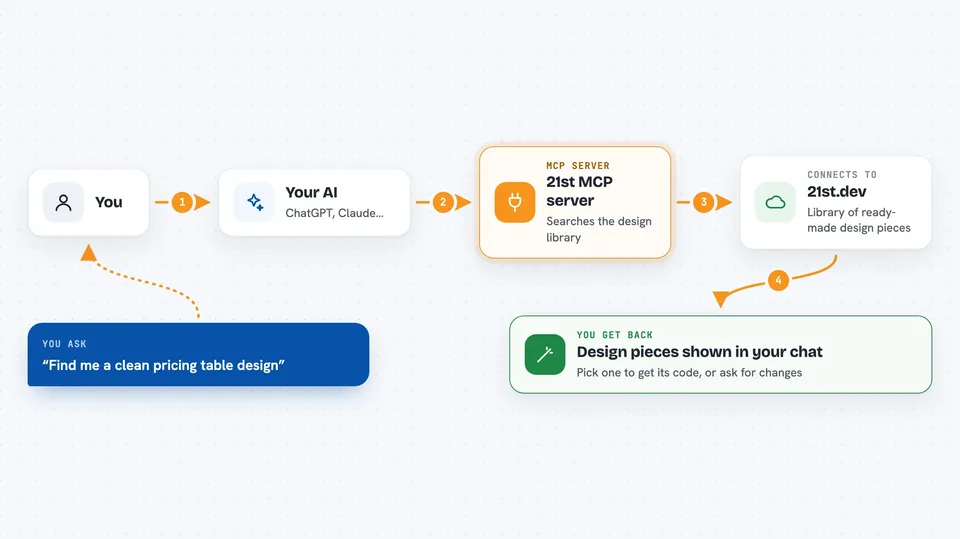
On its own, your AI can only chat with you. An MCP server is a small helper program that gives your AI a new skill or a connection to another service. This one connects your AI to 21st.dev, so when you ask for a design piece, your AI can go look it up there or ask 21st to build one for you. You just talk normally, and the helper does the fetching behind the scenes.
What this MCP server does
You ask your AI for something like a sign-up form or a pricing section. The AI passes your request to this helper, which talks to 21st.dev on your behalf. 21st.dev looks through its library of design pieces and sends back matching ones, or, if that feature is turned on for your account, creates a fresh one based on your words. Your AI then shows you the results in the chat so you can pick one or ask for changes.
 Click to zoom
What you can do with it
- Search 21st.dev for design pieces that match what you describe
- Fetch the code for a specific design piece you like
- Ask for a brand new design piece built from your description, when AI generation is turned on for your account
- Look up logos by name
- Save design pieces to your bookmarks for later
- Browse team libraries and shared collections
- Manage your 21st.dev profile details
Try asking your AI
- “Find me a clean pricing table design with three plans”
- “Show me a few sign-up form designs I could use”
- “Get me the code for that hero section you just showed”
- “Make a simple dashboard card that shows a number and a small chart”
What it gives back to you
You get back lists of matching design pieces with short descriptions, and when you pick one, the actual code for it. If you asked for something new, you get a freshly made design piece with a few variations to choose from. Everything shows up right in your chat, so you can read it, copy it, or ask your AI to adjust it.
Before you start
What you need
- A free account at 21st.dev
- An API key from 21st.dev (a kind of password for apps; the site gives you one for free at 21st.dev/mcp)
- An AI tool that supports MCP servers, such as Cursor, Claude Code, VS Code, Windsurf, or Codex
Good to know
Some design pieces are paid and some actions can use up your AI credits, so keep an eye on what you ask for and check your account settings first.
Install it with your AI
Add 21st MCP server to your AI, no technical skills needed
You don't install anything by hand. You copy one prompt, paste it into an AI that can work on your computer, and it checks, installs and connects the server for you, asking you when it needs something.
Sign in to get the install prompt
Members get a ready-made prompt that lets the Claude desktop app check 21st MCP server, install it and connect it for them, step by step. You don't need any technical skills: you copy, paste and answer a few questions. Your connected AI can also find and install any of the 4,361 MCP servers here for you.
Who it's for
Designers, front-end developers, and anyone who builds or tweaks the look of websites and apps and wants a faster way to find or create design pieces.