MCP server · Design tools
Genable MCP server
by musepy
Let your AI build and edit real Figma designs, then check the result with screenshots.
Genable is a helper that lets your AI create and change designs inside Figma, not just talk about them. It builds real, editable layers like frames, text, and components, and it can look at a screenshot to check its own work. It is handy for designers and anyone who wants a first draft of a screen without clicking every box by hand.
What is an MCP server? The 30-second version
On its own, your AI can only chat with you. An MCP server is a small helper program that gives your AI a new skill or a connection to an app. This one connects your AI to Figma, so when you ask for a design, the AI can actually build and change things on your Figma canvas. You keep using the AI you already have, and Genable does the Figma part.
What this MCP server does
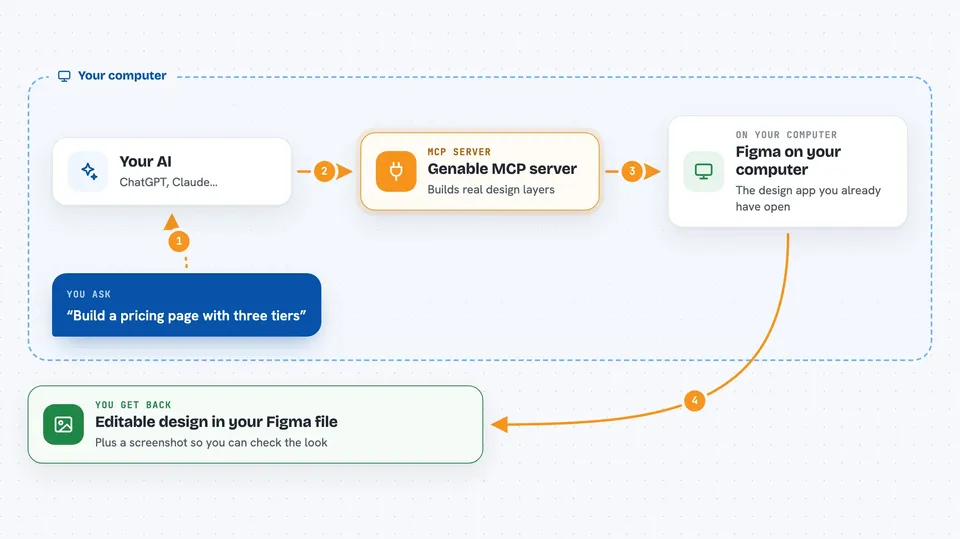
You describe the design you want in plain words, like a pricing page or a dashboard. Your AI sends that request to Genable, which talks to the Figma plugin running on your computer. Genable then creates real Figma layers, such as frames, text, and components, in your file. It can also read back what it made and take a screenshot to check how it looks. Then you keep chatting to refine it, and every layer stays editable in Figma.
 Click to zoom
What you can do with it
- Build a new screen or page layout from a written brief
- Create and edit frames, Auto Layout, text, and vectors
- Add and use variables, design tokens, and components
- Move between pages and work across a whole file
- Inspect the structure it created and read back its own changes
- Take a screenshot to visually verify the result
- Keep refining the same design in an ongoing conversation
Try asking your AI
- “Build a SaaS pricing page with three tiers, a monthly and annual toggle, and a featured Pro plan”
- “Make an analytics dashboard with a sidebar, a KPI grid with sparklines, and a compact table”
- “Create a mobile onboarding flow with three screens and a clear primary action”
- “List the pages in my current Figma file and tell me what is on each one”
What it gives back to you
You get real Figma layers added or changed in your file, not a flat picture. In the chat, your AI can also give you lists of pages or layers, short summaries of what it did, and screenshots when it checks the look. Everything it creates stays editable, so you can adjust it yourself afterward.
Before you start
What you need
- The Figma desktop app with the Genable plugin installed and running
- An MCP client like Claude Desktop or another tool that supports MCP
- Node.js installed on your computer (the setup uses npx)
- A model provider set up in your MCP client (Genable does not need its own separate key)
Good to know
It makes real changes to your Figma file, so work on a copy or a safe file until you trust the results.
Install it with your AI
Add Genable MCP server to your AI, no technical skills needed
You don't install anything by hand. You copy one prompt, paste it into an AI that can work on your computer, and it checks, installs and connects the server for you, asking you when it needs something.
Sign in to get the install prompt
Members get a ready-made prompt that lets the Claude desktop app check Genable MCP server, install it and connect it for them, step by step. You don't need any technical skills: you copy, paste and answer a few questions. Your connected AI can also find and install any of the 4,361 MCP servers here for you.
Who it's for
Designers, product people, and founders who want a fast first draft of a screen in Figma without building every layer by hand.