
MCP server · Research
Open-WebSearch MCP server
by Aas-ee
Lets your AI search the live web across many search engines and read the pages it finds.
Open-WebSearch is a small helper that gives your AI the ability to search the web and open pages for you. It works with several search engines, including Bing, DuckDuckGo, Brave, Baidu, Exa and CSDN. It is handy if you often ask your AI about something recent and it says it cannot look things up.
What is an MCP server? The 30-second version
On its own, your AI can only chat with what it already learned. An MCP server is a small helper program that gives your AI one new skill. This one gives your AI a connection to web search engines and web pages. So when you ask a question, your AI can actually go and look it up instead of guessing.
What this MCP server does
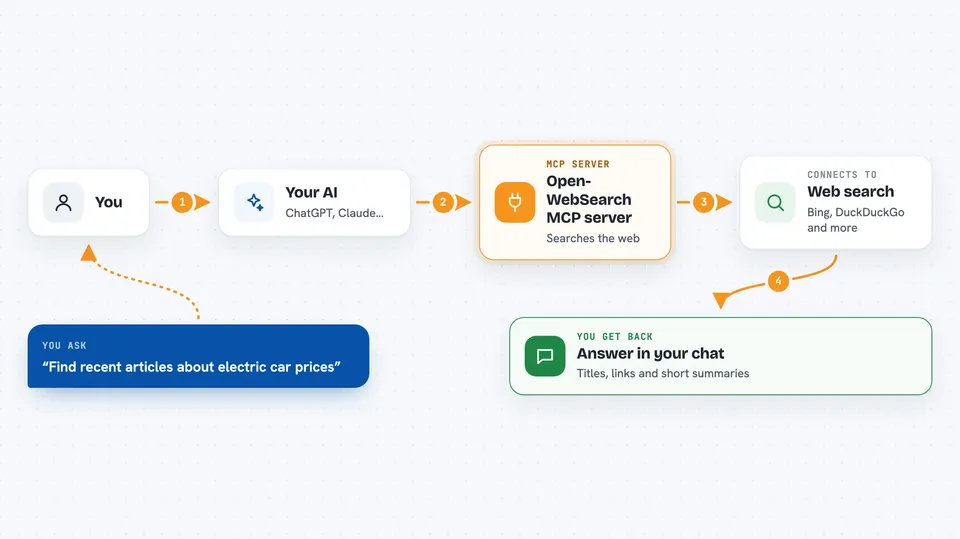
You ask your AI a question that needs fresh information. Your AI passes your question to this helper. The helper sends it to a search engine like Bing or DuckDuckGo and collects the results. If you want more detail, it can also open a specific page and pull out the readable text. Then your AI reads all of that and writes you an answer in the chat.
 Click to zoom
What you can do with it
- Search the web across Bing, DuckDuckGo, Brave, Baidu, Exa and more
- Choose which search engine to use by default
- Limit how many results come back per search
- Fetch the readable text of a web page or Markdown file
- Read a GitHub project's README file
- Pull the text of a CSDN or Juejin article
- Run searches through a proxy if some sites are blocked for you
Try asking your AI
- “Search the web for the latest news about electric car prices in Europe”
- “Find three recent articles about remote work and summarize them”
- “Look up what people are saying on Hacker News about the new Python release”
- “Fetch the README from the github repo facebook/react and tell me what it does”
What it gives back to you
You get back a short list of results, each with a title, a link and a short description. If your AI also fetched a page, it will quote or summarize the text from that page. Everything shows up right in your chat as a normal answer. You do not have to open a browser yourself.
Before you start
What you need
- Node.js installed on your computer (version 18 or newer)
- The Claude desktop app or another app that supports MCP servers
- A proxy address only if some websites are blocked where you are
Good to know
It reads public web pages, so anything you search or fetch is sent out to those search engines and websites.
Install it with your AI
Add Open-WebSearch MCP server to your AI, no technical skills needed
You don't install anything by hand. You copy one prompt, paste it into an AI that can work on your computer, and it checks, installs and connects the server for you, asking you when it needs something.
Sign in to get the install prompt
Members get a ready-made prompt that lets the Claude desktop app check Open-WebSearch MCP server, install it and connect it for them, step by step. You don't need any technical skills: you copy, paste and answer a few questions. Your connected AI can also find and install any of the 4,609 MCP servers here for you.
Who it's for
Anyone who asks their AI about current events, prices, news or technical topics and wants real answers from the web instead of guesses.


