MCP server · Generative art
Nano Banana MCP server
by AceDataCloud
Let your AI create and edit images, including virtual try-on and product scenes, right in the chat.

This is a helper that lets your AI make and change pictures for you. It uses Google's Nano Banana image model through a service called AceDataCloud. It is handy if you write posts, make product photos, or just want a quick image without opening a design app.
What is an MCP server? The 30-second version
On its own, your AI can only chat. An MCP server is a small helper program that gives your AI a new skill or a connection to another service. This one connects your AI to the Nano Banana image service, so when you ask for a picture, your AI can actually go and make it for you. You stay in the chat the whole time.
What this MCP server does
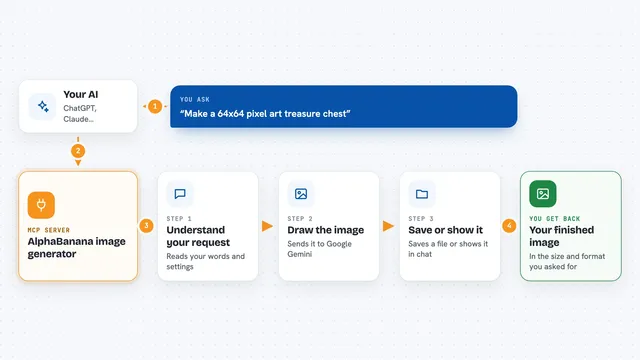
You type a request in plain words, like making a picture or changing one you already have. Your AI sends that request through this helper to the Nano Banana image service. The service creates or edits the image and sends it back. Your AI then shows you the result in the chat. If a picture takes a while, the helper can also check on its progress.
 Click to zoom
What you can do with it
- Create a new image from a text description
- Edit an existing image or combine two images
- Put clothing on a person in a photo (virtual try-on)
- Place a product into a realistic scene
- Check the status of an image job you started
- Look up several image jobs at once
Try asking your AI
- “Create an image of a sunset over mountains, warm golden light, 85mm lens look”
- “Put this shirt on this model, keep the pose and background”
- “Place this product photo in a modern kitchen scene”
- “Check the status of my last image job”
What it gives back to you
You get the finished image back in the chat, plus a short note about what was made. If a job is still running, you get a status update instead. For edits, you get the changed picture. For status checks, you get a short answer about whether it is done or still working.
Before you start
What you need
- An AceDataCloud account (free to sign up)
- An API token from AceDataCloud (a kind of password for apps; the site gives you one)
- An AI app that supports MCP, like Claude, Cursor, or VS Code
Good to know
Image jobs use your AceDataCloud account, so they may cost money or use up credits, and edited images can replace or change the ones you send.
Install it with your AI
Add Nano Banana MCP server to your AI, no technical skills needed
You don't install anything by hand. You copy one prompt, paste it into an AI that can work on your computer, and it checks, installs and connects the server for you, asking you when it needs something.
Sign in to get the install prompt
Members get a ready-made prompt that lets the Claude desktop app check Nano Banana MCP server, install it and connect it for them, step by step. You don't need any technical skills: you copy, paste and answer a few questions. Your connected AI can also find and install any of the 4,361 MCP servers here for you.
Who it's for
People who make images for work or fun, like marketers, small shop owners, social media managers, and anyone who wants quick pictures without design software.