MCP server · Generative art
AlphaBanana image generator
by tasopen
Let your AI create images with Google Gemini, including transparent PNGs and exact sizes.
This is a small helper that lets your AI make pictures using Google's Gemini image models. You describe what you want in plain words, and it creates the image for you. It is handy if you need icons, game art, posters, or quick visuals without opening a design app.
What is an MCP server? The 30-second version
On its own, your AI can only chat and write text. An MCP server is a small helper program that gives your AI a new skill or a connection to another service. This one connects your AI to Google Gemini's image tools. Once it is set up, you can just ask for a picture and the AI will go make it for you.
What this MCP server does
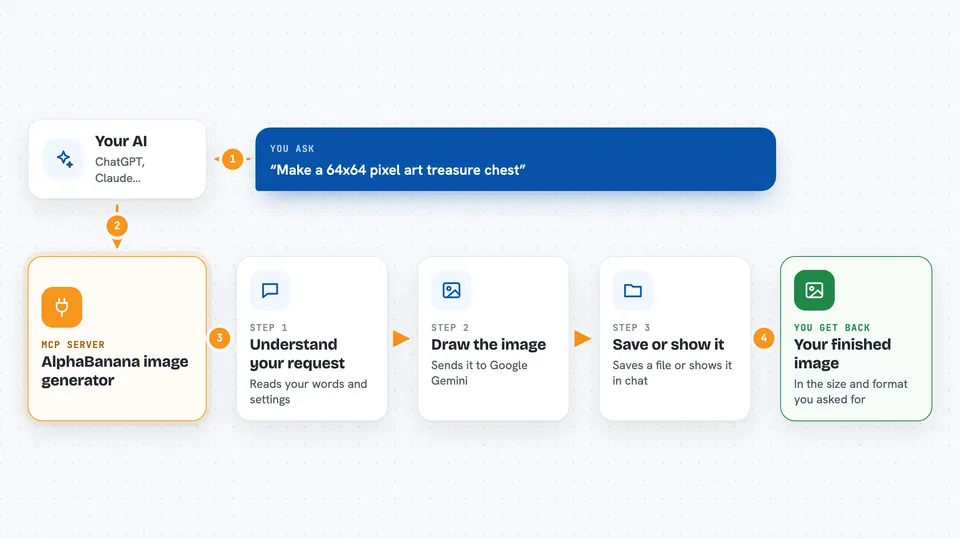
You type a request like make me a pixel art treasure chest. Your AI passes that request to this helper. The helper sends it to Google Gemini, which draws the image. Then the helper saves the picture as a file or sends it back into the chat, at the size and format you asked for. If you want, it can also make the background transparent or use your own reference images for style.
 Click to zoom
What you can do with it
- Generate images from a written description
- Make transparent PNG or WebP files for web or game use
- Resize or crop images to an exact pixel size
- Use your own reference images to guide the style
- Pick between fast, cheap, or high-quality models
- Save the image to a folder or show it in the chat
- Pull in live search results for things like today's weather
Try asking your AI
- “Make a 64x64 pixel art treasure chest with a transparent background”
- “Create a flat app icon with a banana mascot, 512 by 512, save it to my Downloads folder”
- “Use this reference image to draw a dungeon scene in the same style”
- “Make a travel poster featuring today's weather in Kuala Lumpur”
What it gives back to you
You get an image back. Depending on your settings, it appears right in the chat or is saved as a file on your computer. You also get the file name and, if you asked for it, extra details like the model's reasoning or search sources. The image is in the format and size you requested.
Before you start
What you need
- A Google Gemini API key (a kind of password for apps; Google gives you one, though image generation may cost money)
- Node.js installed on your computer
- An MCP-compatible app like Claude Desktop, VS Code, or Cursor
Good to know
Image generation through Google Gemini may cost money depending on your account, and the helper can write files to folders you point it at.
Install it with your AI
Add AlphaBanana image generator to your AI, no technical skills needed
You don't install anything by hand. You copy one prompt, paste it into an AI that can work on your computer, and it checks, installs and connects the server for you, asking you when it needs something.
Sign in to get the install prompt
Members get a ready-made prompt that lets the Claude desktop app check AlphaBanana image generator, install it and connect it for them, step by step. You don't need any technical skills: you copy, paste and answer a few questions. Your connected AI can also find and install any of the 4,361 MCP servers here for you.
Who it's for
Designers, game developers, and anyone who needs quick images without opening a design tool.