MCP server · Generative art · official
Memeboat MCP server
by memebo-at · official
Your AI can search 25,000+ meme templates and turn them into real, shareable meme links for you.
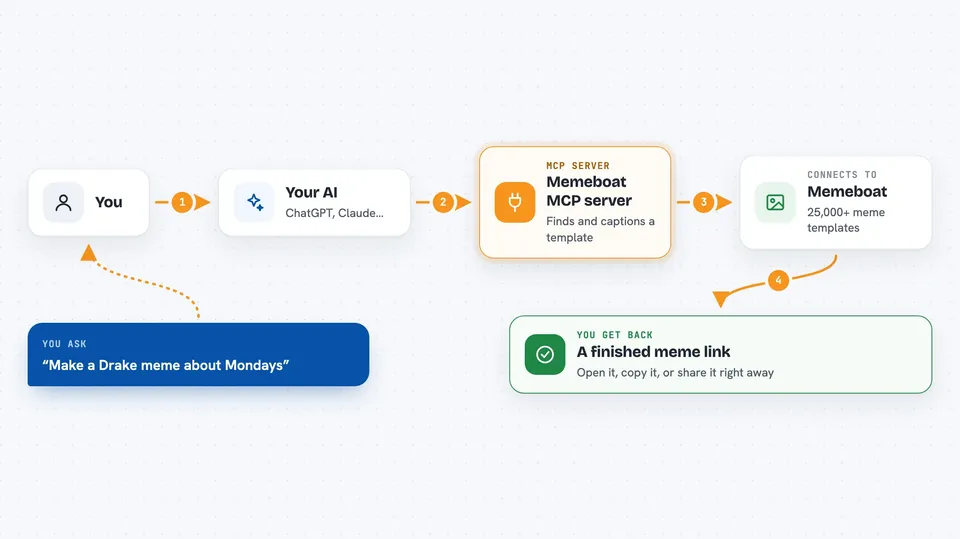
Memeboat is a free meme maker on the web, and this is a small add-on that lets your AI assistant use it for you. You describe the joke you want, and your assistant finds a matching template, writes the captions, and hands you back a link to the finished meme. It is handy for anyone who wants a quick laugh in a chat, a slide, or a team channel without opening an image editor.
What is an MCP server? The 30-second version
On its own, your AI can only chat with you. An MCP server is a small helper program that gives your AI one new skill or one new connection. This helper connects your AI to Memeboat, the meme site, so it can search the template catalog and build memes there. You just ask in normal words, and the helper does the clicking behind the scenes.
What this MCP server does
You tell your AI what kind of meme you want, in plain words. The AI uses this helper to search Memeboat's catalog of over 25,000 templates and pick one that fits. It then fills in the captions on that template, top to bottom, the way the template expects. Memeboat renders the picture on its own servers and the helper sends the finished meme link back to your chat. You can open the link, copy it, or share it right away.
 Click to zoom
What you can do with it
- Search meme templates by name or topic
- Look up the details of one template, like its size and how many captions it holds
- Caption a template with your own text and get a finished meme
- Choose caption colors, fonts, and outlines
- Put captions in a white bar above the image instead of on top of it
- Get both a shareable meme page link and a direct image link
Try asking your AI
- “Make a Buzz Lightyear everywhere meme about code reviews”
- “Find me a Drake meme template and caption it about Mondays”
- “Make a two-caption meme about coffee with a red top line”
- “Search for cat meme templates and make one that says I meant to do that”
What it gives back to you
You get back a link to the meme's page on Memeboat, plus a direct link to the image file itself. Your AI usually shows these in the chat, sometimes with a short note about which template it picked. The meme is already rendered and hosted, so the link works the moment you get it. If you asked for a search, you get a list of matching templates with their names and image links instead.
Before you start
Good to know
Memeboat limits how many memes can be created from one internet address in a given time, so if you make a lot at once some requests may be turned down.
Install it with your AI
Add Memeboat MCP server to your AI, no technical skills needed
You don't install anything by hand. You copy one prompt, paste it into an AI that can work on your computer, and it checks, installs and connects the server for you, asking you when it needs something.
Sign in to get the install prompt
Members get a ready-made prompt that lets the Claude desktop app check Memeboat MCP server, install it and connect it for them, step by step. You don't need any technical skills: you copy, paste and answer a few questions. Your connected AI can also find and install any of the 4,361 MCP servers here for you.
Who it's for
Anyone who wants a quick meme for a chat, a team channel, or a presentation, without design skills or an account.