MCP server · Music
Suno MCP server
by AceDataCloud
Make AI songs, lyrics, covers and vocal tracks from your chat, using Suno through Ace Data Cloud.
This is a helper that connects your AI assistant to Suno, a service that creates music with artificial intelligence. Once it is set up, you can ask your AI in plain words for a song, some lyrics, or a cover version, and it will go and make it for you. It is handy for anyone who needs quick music or lyrics but does not want to learn a music app.
What is an MCP server? The 30-second version
On its own, your AI can only chat with you. An MCP server is a small helper program that gives your AI a new skill or a connection to another service. This one connects your AI to Suno, through a service called Ace Data Cloud, so your AI can ask Suno to create music and bring the results back to you. You just talk to your AI as usual, and it uses this helper behind the scenes.
What this MCP server does
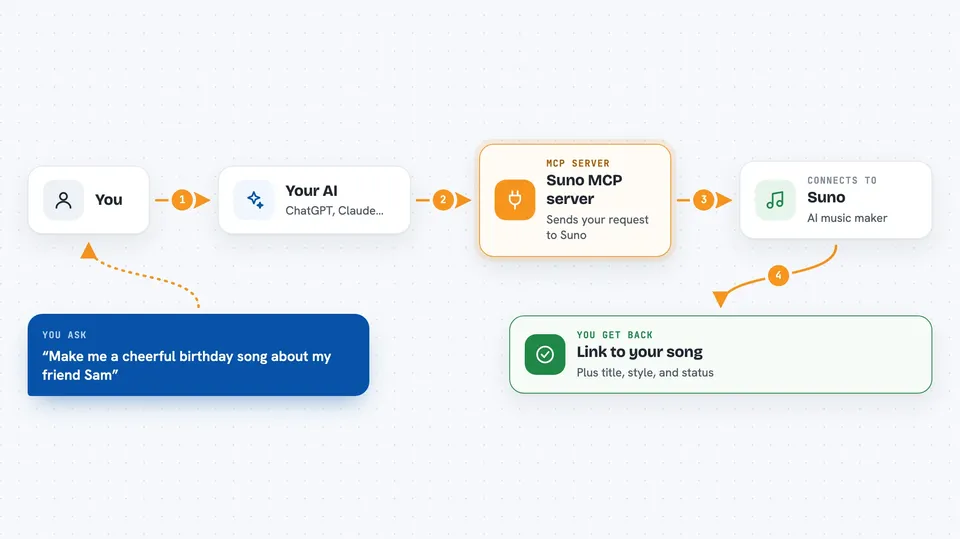
You type a request in your chat, like asking for a birthday song or a set of lyrics. Your AI passes that request to this helper, which sends it to Suno through the Ace Data Cloud service. Suno works on the song and sends back a link and details when it is ready. Your AI then shows you the result in the chat, and you can ask for changes, a cover, or a different format.
 Click to zoom
What you can do with it
- Create a full song from a short text description
- Write lyrics for a song from a topic you give it
- Make a cover or remix of a song in a new style
- Extend a song past where it ended
- Save a voice style and reuse it in later songs
- Pull out the vocals or separate a song into parts
- Get a song as MP3, WAV, MP4 or MIDI
Try asking your AI
- “Make me a cheerful birthday song about my friend Sam”
- “Write lyrics for a slow country song about leaving home”
- “Create a rock cover of this song in a heavier style”
- “Give me the MP3 of the last song you made”
What it gives back to you
You get back a link to the finished audio, plus details like the title, the style and the task status. If you asked for lyrics, you get the words in the chat. If you asked for a file format, you get a link to that file. For longer jobs, your AI can check the task and tell you when it is done.
Before you start
What you need
- An Ace Data Cloud account and an API token (a kind of password for apps; you get it free from their platform page)
- An AI app that supports MCP servers, like Claude, Cursor or VS Code
Good to know
Creating music uses your Ace Data Cloud account, which may cost money or use up credits, so keep an eye on your usage.
Install it with your AI
Add Suno MCP server to your AI, no technical skills needed
You don't install anything by hand. You copy one prompt, paste it into an AI that can work on your computer, and it checks, installs and connects the server for you, asking you when it needs something.
Sign in to get the install prompt
Members get a ready-made prompt that lets the Claude desktop app check Suno MCP server, install it and connect it for them, step by step. You don't need any technical skills: you copy, paste and answer a few questions. Your connected AI can also find and install any of the 4,361 MCP servers here for you.
Who it's for
This suits content creators, marketers, teachers, hobby musicians and anyone who wants quick songs or lyrics without learning music software.