
MCP server · Generative art
Pixelle MCP server
by AIDC-AI
Turn your ComfyUI workflows into tools your AI can run, so it can make images, sound and video for you.
Pixelle MCP is a helper that connects your AI assistant to ComfyUI, the popular free tool for making images, sound and video. It lets you turn a ComfyUI workflow into a tool your AI can use, without writing any code. It is handy for people who already play with ComfyUI and want their AI to run those workflows for them.
What is an MCP server? The 30-second version
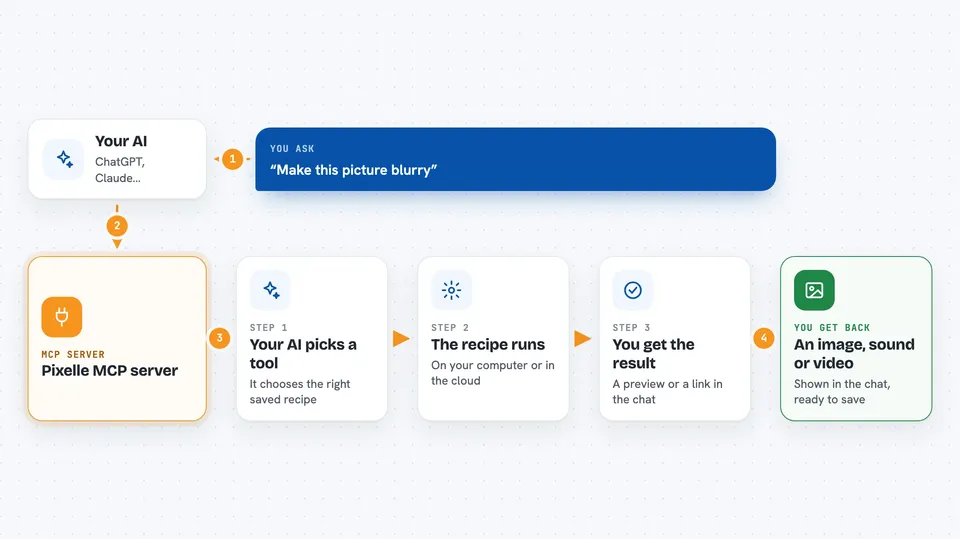
On its own, your AI can only chat. An MCP server is a small helper program that gives your AI a new skill or a connection to another app. This one connects your AI to ComfyUI, either on your own computer or on the RunningHub cloud service. Once it is connected, your AI can run your ComfyUI workflows for you when you ask, and hand you back the image, sound or video they produce.
What this MCP server does
You ask your AI something like make this picture blurry or generate an image of a cat. Your AI looks at the tools this helper offers, picks the right one, and sends the request over. The helper then runs the matching ComfyUI workflow, either on your machine or on RunningHub. When the workflow finishes, the result comes back and your AI shows it to you in the chat. You do not have to open ComfyUI or click anything yourself.
 Click to zoom
What you can do with it
- Turn a ComfyUI workflow into a tool your AI can call
- Generate images from a text description
- Blur, edit or otherwise process an image you send
- Create sound or speech from a workflow
- Create short videos from a workflow
- Run workflows on your own computer or on the RunningHub cloud
- Add new tools later just by adding a new workflow
Try asking your AI
- “Blur this image for me”
- “Generate a picture of a red fox in a snowy forest”
- “Make a short video of ocean waves at sunset”
- “Turn this text into speech”
What it gives back to you
You get back whatever your workflow produces: an image, a sound file, a video, or a short text answer. In the chat it usually shows up as a preview or a download link you can click. If something goes wrong, you get a short message explaining what happened. The helper does not change your files unless the workflow itself is meant to.
Before you start
What you need
- A working ComfyUI setup on your computer, or a RunningHub account with an API key
- At least one AI model provider set up, such as OpenAI or a local Ollama model
- Python 3.11 if you install it with pip, or the uv tool if you use uvx
- A ComfyUI workflow exported in API format (if you want to add your own tools)
Good to know
The tools it offers come from your own ComfyUI workflows, so what they can do and whether they change or delete anything depends on how those workflows are built.
Install it with your AI
Add Pixelle MCP server to your AI, no technical skills needed
You don't install anything by hand. You copy one prompt, paste it into an AI that can work on your computer, and it checks, installs and connects the server for you, asking you when it needs something.
Sign in to get the install prompt
Members get a ready-made prompt that lets the Claude desktop app check Pixelle MCP server, install it and connect it for them, step by step. You don't need any technical skills: you copy, paste and answer a few questions. Your connected AI can also find and install any of the 4,361 MCP servers here for you.
Who it's for
People who already use ComfyUI and want their AI assistant to run those workflows for them, plus anyone curious about making images, sound or video through chat.




