MCP server · Research
Brazilian Public Data MCP server
by alanpcf
Lets your AI look up Brazilian company, address, bank, holiday and currency data for you.
This is a small helper that connects your AI assistant to Brazilian public data. Once it is set up, you can just ask in plain words about a company, a postcode, a bank, a holiday or an exchange rate, and your AI will fetch the answer for you. It is handy for anyone who works with Brazilian records, addresses or official numbers.
What is an MCP server? The 30-second version
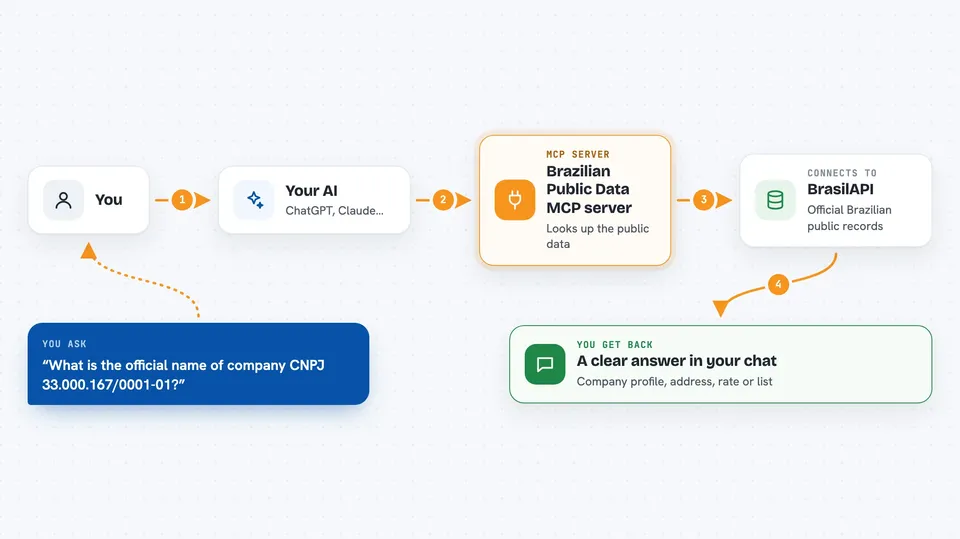
On its own, your AI can only chat with you using what it already learned. An MCP server is a small helper program that gives your AI a new skill or a connection to an outside service. This one connects your AI to BrasilAPI, a free service that gathers Brazilian public data. So when you ask about a company or a postcode, your AI quietly asks this helper, and the helper brings back the real answer.
What this MCP server does
You type a question in normal language, like asking about a company number or a postcode. Your AI recognises that it needs outside data and calls this helper. The helper then contacts BrasilAPI, which holds official Brazilian public records. BrasilAPI sends back the details, and your AI turns them into a clear answer in your chat. You never have to open a website or copy numbers around.
 Click to zoom
What you can do with it
- Look up a company by its CNPJ number (name, status, address, partners)
- Find the full address for a Brazilian postcode (CEP)
- Identify a bank from its code, or list all Brazilian banks
- Check the national holidays for any year
- See which cities use a given area code (DDD)
- Get book details from an ISBN
- Check current economic rates like SELIC, CDI and IPCA
- See exchange rates for the dollar, euro and other currencies
Try asking your AI
- “What is the official name of the company with CNPJ 33.000.167/0001-01?”
- “Which city is the postcode 01310-100 in?”
- “Which bank has code 341?”
- “What are the national holidays in 2026?”
- “What is the SELIC rate today?”
What it gives back to you
You get a clear answer written in your chat, based on official data. Depending on the question, it might be a company profile, an address, a list of banks, a list of holidays, a rate in percent, or an exchange rate. The AI often shows the key facts as a short list or small table so it is easy to read. For some questions it also gives you the source of the data.
Before you start
What you need
- The Claude desktop app, Claude Code, Cursor, Windsurf, or another app that supports MCP
- Node.js installed on your computer (the setup uses npx, which comes with Node.js)
Good to know
The free version only reads public data and does not change anything, but if you turn on the paid provider with a token, each lookup uses credit from your account.
Install it with your AI
Add Brazilian Public Data MCP server to your AI, no technical skills needed
You don't install anything by hand. You copy one prompt, paste it into an AI that can work on your computer, and it checks, installs and connects the server for you, asking you when it needs something.
Sign in to get the install prompt
Members get a ready-made prompt that lets the Claude desktop app check Brazilian Public Data MCP server, install it and connect it for them, step by step. You don't need any technical skills: you copy, paste and answer a few questions. Your connected AI can also find and install any of the 4,361 MCP servers here for you.
Who it's for
Anyone who works with Brazilian company records, addresses, banks or official numbers, such as admin staff, finance teams, journalists and small business owners.