MCP server · Email
Gmail MCP server
by alexneamtu
Let your AI search, read, and draft emails across your Gmail accounts, all from one chat.
This is a helper you run on your own computer or server that connects your AI assistant to your Gmail accounts. Once it is set up, you can ask your AI to find emails, read them, and write drafts for you. It is made for people who are comfortable running a small service themselves and want their email to stay private.
What is an MCP server? The 30-second version
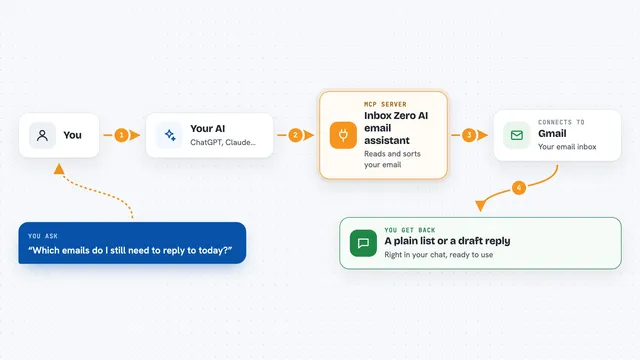
On its own, your AI can only chat with you. An MCP server is a small helper program that gives your AI a new skill, in this case a connection to Gmail. You run this helper yourself, so your email never passes through someone else's service. When you ask your AI about your inbox, it talks to this helper, and the helper talks to Gmail for you.
What this MCP server does
You ask your AI something like "find unread emails from last week in my work account." The AI sends that request to this helper, which is running on your own machine. The helper logs into the Gmail account you set up, runs the search, and sends the results back. Your AI then shows you a summary or the messages themselves in the chat. If you allow it, the helper can also create drafts, send them, and change labels.
What you can do with it
- List which Gmail accounts you have connected
- Search your inbox using normal Gmail search words
- Read a single email or a whole conversation
- Download attachments up to 5 MB
- Create a draft email in the account you choose
- Send a draft you already saved (only if you turn this on)
- Add or remove labels on messages (only if you turn this on)
Try asking your AI
- “Search my work account for unread messages from the past week and summarize the ones that need a reply”
- “In my personal account, draft an email to friend@example.com suggesting lunch on Friday and save it as a draft, do not send it”
- “Show me the whole thread about the budget from my work account”
- “List the labels I have in my personal account”
What it gives back to you
You get answers in plain chat: lists of matching emails, short summaries, full message text, or the contents of a thread. Attachments come back as files or images you can open. When you ask it to make a change, like creating a draft or adding a label, it tells you what it did.
Before you start
What you need
- A computer or server that stays on, running Linux with systemd
- Node.js version 24 installed
- An HTTPS web address (a domain name) pointed at your server
- Your own Google Cloud project with Gmail access turned on, plus OAuth client files from Google
Good to know
If you turn on full mode, your AI can send emails and change labels, so check drafts before sending and be careful with what you ask it to do.
Install it with your AI
Add Gmail MCP server to your AI, no technical skills needed
You don't install anything by hand. You copy one prompt, paste it into an AI that can work on your computer, and it checks, installs and connects the server for you, asking you when it needs something.
Sign in to get the install prompt
Members get a ready-made prompt that lets the Claude desktop app check Gmail MCP server, install it and connect it for them, step by step. You don't need any technical skills: you copy, paste and answer a few questions. Your connected AI can also find and install any of the 4,609 MCP servers here for you.
Who it's for
People who are comfortable running their own small server and want private, self-hosted access to their Gmail from an AI assistant.