MCP server · Email
Inbox Zero AI email assistant
by elie222
Let your AI tidy your Gmail, draft replies, track follow-ups, and give you meeting briefs.
Inbox Zero is an AI helper for your email. It sorts your inbox, writes draft replies in your voice, and keeps track of who owes you an answer. It is handy if your inbox feels like a second job and you want less time spent scrolling through it.
What is an MCP server? The 30-second version
On its own, your AI can only chat with you. An MCP server is a small helper program that gives your AI a new skill or a connection to an app, and here that app is your email. Once connected, your AI can look at your inbox and do things there when you ask. You stay in charge, and the AI does the clicking.
What this MCP server does
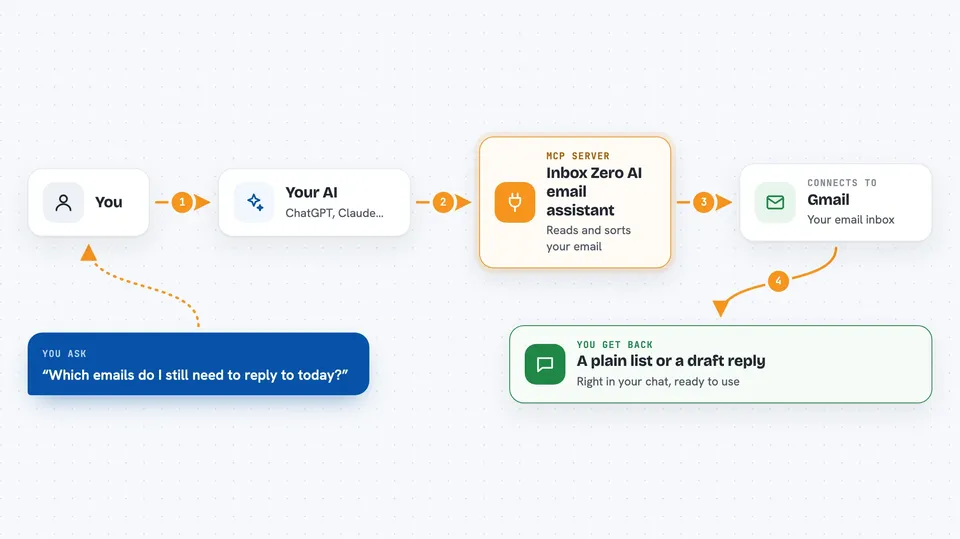
You ask your AI something about your email, like which messages still need a reply. The AI passes your request to this helper. The helper talks to your Gmail account and gathers what is needed. Then you get a plain answer back in the chat, such as a list of emails to reply to or a draft you can send.
 Click to zoom
What you can do with it
- Find emails that still need a reply
- Show emails you are waiting on a response for
- Draft replies in your tone and style
- Unsubscribe and archive emails you never read
- Bulk archive old emails to clean up your inbox
- Block cold emails automatically
- Get a short briefing before a meeting
Try asking your AI
- “Which emails do I still need to reply to today?”
- “Draft a short reply to the last email from my manager”
- “Show me emails I am waiting on a response for”
- “Give me a briefing before my 3pm meeting”
What it gives back to you
You get answers in plain text in the chat. That can be a list of emails, a short summary, a draft reply you can copy, or numbers about your inbox activity. If you ask it to archive or unsubscribe, it tells you what it did.
Before you start
What you need
- A Gmail account you want to connect
- A free Inbox Zero account at getinboxzero.com, or you can run it yourself
- Permission for Inbox Zero to read and manage your email
Good to know
It can read, archive, and unsubscribe from your email, so give it access only to the account you are comfortable with it managing.
Install it with your AI
Add Inbox Zero AI email assistant to your AI, no technical skills needed
You don't install anything by hand. You copy one prompt, paste it into an AI that can work on your computer, and it checks, installs and connects the server for you, asking you when it needs something.
Sign in to get the install prompt
Members get a ready-made prompt that lets the Claude desktop app check Inbox Zero AI email assistant, install it and connect it for them, step by step. You don't need any technical skills: you copy, paste and answer a few questions. Your connected AI can also find and install any of the 4,361 MCP servers here for you.
Who it's for
Anyone who lives in their inbox all day, like founders, managers, salespeople, and assistants.