MCP server · Email
emailmd MCP server
by anypost
Turn a plain markdown draft into email-safe HTML your AI can check and preview for you.
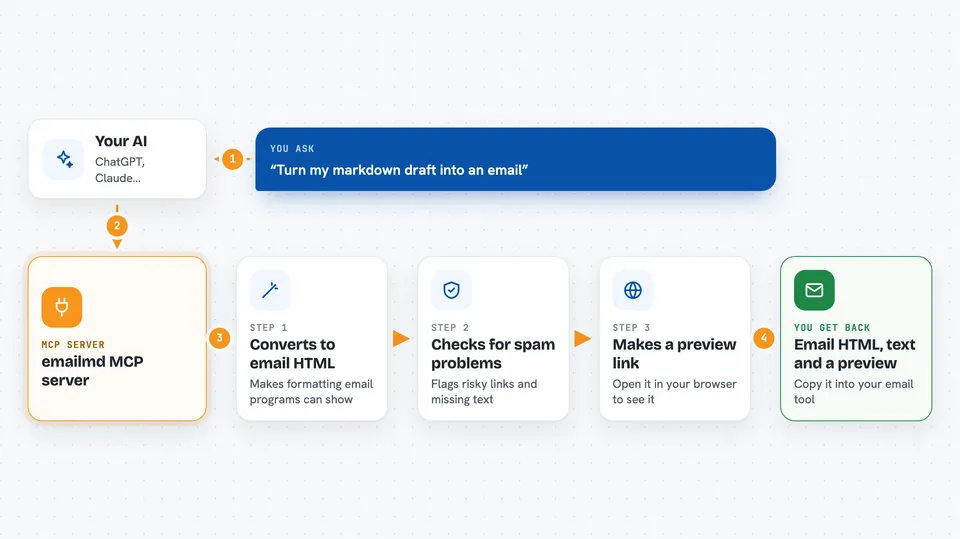
emailmd is a tool that turns simple markdown text into HTML that looks right in email apps like Gmail and Outlook. This MCP server lets your AI assistant use emailmd for you, so you can describe an email in plain words and get back something you can actually send. It is handy for anyone who writes newsletters, announcements, or customer emails and does not want to fight with HTML.
What is an MCP server? The 30-second version
On its own, your AI can only chat with you. An MCP server is a small helper program that gives your AI a new skill or a connection to another service. This one connects your AI to emailmd, so when you ask for an email, the AI can hand your markdown to emailmd and get back ready-to-send HTML. You never have to touch the tool yourself; you just ask in the chat.
What this MCP server does
You write your email as plain markdown, the same simple formatting you might already use in notes. You ask your AI to turn it into an email. The AI passes it to this emailmd helper, which converts it into HTML that email programs can display properly. If you want, it can also check the draft for common problems that make emails land in spam. You get the finished HTML, a plain text version, or a preview link back in the chat.
 Click to zoom
What you can do with it
- Turn a markdown draft into email-safe HTML
- Get a plain text version of the same email
- Check a draft for deliverability problems before sending
- Look up the correct emailmd syntax when you are unsure
- Preview the email in your browser with a link
- Build simple charts and progress bars from a markdown list
What it gives back to you
You get the finished HTML as text you can copy, plus a plain text version when you ask for it. The lint step gives you a short list of warnings, like missing text versions or risky links. If you ask for a preview, you get a link you can open in your browser. Everything shows up right in the chat, so you can copy it into your email tool.
Before you start
What you need
- The Claude desktop app or another AI tool that supports MCP servers
- Node.js 20 or newer if you run it on your own computer
- Nothing extra if you use the hosted version
Good to know
The tool is under active development, so its behavior may change between versions until it reaches 1.0.
Install it with your AI
Add emailmd MCP server to your AI, no technical skills needed
You don't install anything by hand. You copy one prompt, paste it into an AI that can work on your computer, and it checks, installs and connects the server for you, asking you when it needs something.
Sign in to get the install prompt
Members get a ready-made prompt that lets the Claude desktop app check emailmd MCP server, install it and connect it for them, step by step. You don't need any technical skills: you copy, paste and answer a few questions. Your connected AI can also find and install any of the 4,361 MCP servers here for you.
Who it's for
Marketing and communications people, founders, and anyone who sends newsletters or customer emails without wanting to write HTML.