
MCP server · Analytics
CockroachDB MCP server
Ask your AI to look at, query, and manage your CockroachDB database in plain English.
This is a helper that connects your AI assistant to a CockroachDB database. Once it is set up, you can ask questions and give instructions in normal words instead of writing database code yourself. It is handy for anyone who works with data stored in CockroachDB but does not want to memorize commands.
What is an MCP server? The 30-second version
On its own, your AI can only chat with you. An MCP server is a small helper program that gives your AI a new skill or a connection to another app. This one connects your AI to CockroachDB, the place where your data lives. So when you ask a question, the AI can go look things up or make changes in that database for you.
What this MCP server does
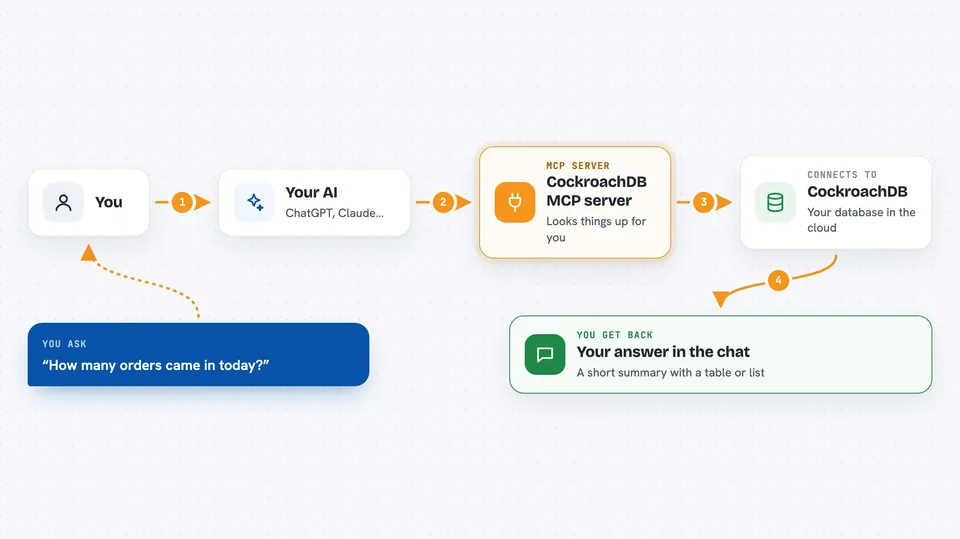
You ask your AI something about your CockroachDB data, like how many orders came in today. The AI passes your request to this helper program. The helper talks to your CockroachDB database, runs the needed query or action, and brings the result back. Then the AI shows you the answer in the chat, in a table, list, or short summary. For changes, it can also create tables, add users, or run backups when you ask.
 Click to zoom
What you can do with it
- Check the health of your database cluster and its nodes
- Run SQL queries and see results as a table, CSV, or JSON
- Create, rename, or drop tables and columns
- List databases and switch between them
- Find slow queries and get index suggestions
- Create and manage database users and their permissions
- Take backups and restore them from cloud storage
Try asking your AI
- “Show me the health of my CockroachDB cluster right now”
- “List all tables in the defaultdb database”
- “Find the ten slowest queries from the last day”
- “Create a backup of the sales database to this storage location”
What it gives back to you
You get answers in the chat, usually as a short summary plus a table or list of rows. For queries, you can ask for the result as a table, CSV, or JSON. For actions like creating a table or a user, it tells you what it did. For monitoring, it gives you numbers and statuses, like node health or slow query counts.
Before you start
What you need
- A CockroachDB database you can connect to
- The connection details for that database (host, port, database name, user, password)
- The uv tool installed on your computer to run the server
- An MCP client like Claude Desktop or Cursor
Good to know
This server can change or delete things in your database, so be careful with destructive actions and always double-check before confirming them.
Install it with your AI
Add CockroachDB MCP server to your AI, no technical skills needed
You don't install anything by hand. You copy one prompt, paste it into an AI that can work on your computer, and it checks, installs and connects the server for you, asking you when it needs something.
Sign in to get the install prompt
Members get a ready-made prompt that lets the Claude desktop app check CockroachDB MCP server, install it and connect it for them, step by step. You don't need any technical skills: you copy, paste and answer a few questions. Your connected AI can also find and install any of the 4,609 MCP servers here for you.
Who it's for
People who work with CockroachDB data but are not database experts, such as analysts, support staff, or operations folks who want quick answers without writing SQL.


