
MCP server · Analytics
Redis Monitor MCP server
Ask your AI about your Redis queues, memory use, and connected clients, without touching any data.
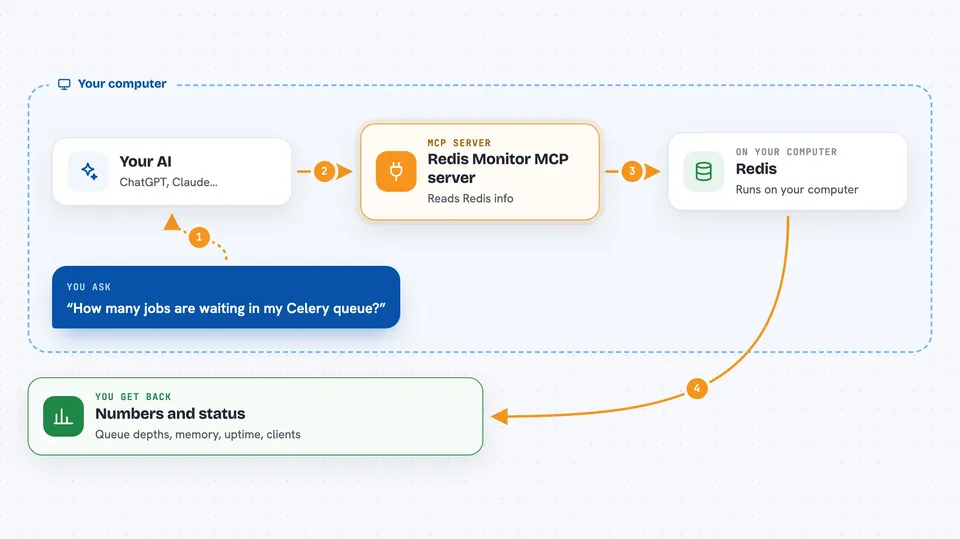
This is a small helper that lets your AI look inside a Redis server and tell you what is going on. Redis is a fast storage system many teams use to hold queues and short-lived data, and this tool only reads it. It is handy if you keep an eye on background jobs or a busy app and want quick answers in plain chat.
What is an MCP server? The 30-second version
On its own, your AI can only chat with you. An MCP server is a small helper program that gives your AI a new skill or a connection to another app or service. This one connects your AI to a Redis server, so it can look up queue sizes, memory use, and client counts for you. You ask a question in normal words, and the helper goes and fetches the numbers.
What this MCP server does
You ask your AI something like how many jobs are waiting in the Celery queue. The AI passes that request to this helper, which connects to your Redis server and reads the information. It only reads, so it never adds, changes, or removes anything. Then it hands the numbers back to your AI, which explains them to you in the chat. You get a quick picture of your queues and server health without opening a separate dashboard.
 Click to zoom
What you can do with it
- Check how many items are waiting in a queue
- See the status of your Celery queues, including the oldest pending task
- Count how many clients are connected right now
- Look at memory use, uptime, and keyspace stats
- Get a count of keys in each database
- Inspect queue depths by type inside a specific database
Try asking your AI
- “How many jobs are waiting in my Celery queue right now?”
- “How much memory is my Redis server using and how long has it been up?”
- “How many clients are connected to Redis?”
- “Show me the key count for each database.”
What it gives back to you
You get short answers in the chat: numbers for queue depths, a list of Celery queue names with pending counts, the connected client count, and memory and uptime figures. For key counts, you get a small table of databases and how many keys each one holds. Everything is read-only, so nothing in Redis changes.
Before you start
What you need
- A Redis server you can reach (host and port)
- The Redis password, if your server uses one
- Python with uvx or pip to run the helper
Good to know
It only reads, but it can see private data stored in your Redis server, so point it at a Redis account with as few permissions as possible.
Install it with your AI
Add Redis Monitor MCP server to your AI, no technical skills needed
You don't install anything by hand. You copy one prompt, paste it into an AI that can work on your computer, and it checks, installs and connects the server for you, asking you when it needs something.
Sign in to get the install prompt
Members get a ready-made prompt that lets the Claude desktop app check Redis Monitor MCP server, install it and connect it for them, step by step. You don't need any technical skills: you copy, paste and answer a few questions. Your connected AI can also find and install any of the 4,609 MCP servers here for you.
Who it's for
Anyone who watches background jobs or app health, like support engineers, developers on call, and operations folks who want quick answers without a dashboard.



