
MCP server · Analytics
Apple Ads MCP server
by AppVisionOS
Lets your AI manage your Apple Ads campaigns, keywords, ads and reports for you, right from the chat.
This is a helper that connects your AI assistant to Apple Ads (the ads you run on the App Store, once called Apple Search Ads). Once it is set up, you can ask your AI in plain words to look at campaigns, add keywords, change budgets or pull reports, and it does the clicking for you. It is handy for anyone who runs App Store ads but does not want to live inside Apple's web dashboard all day.
What is an MCP server? The 30-second version
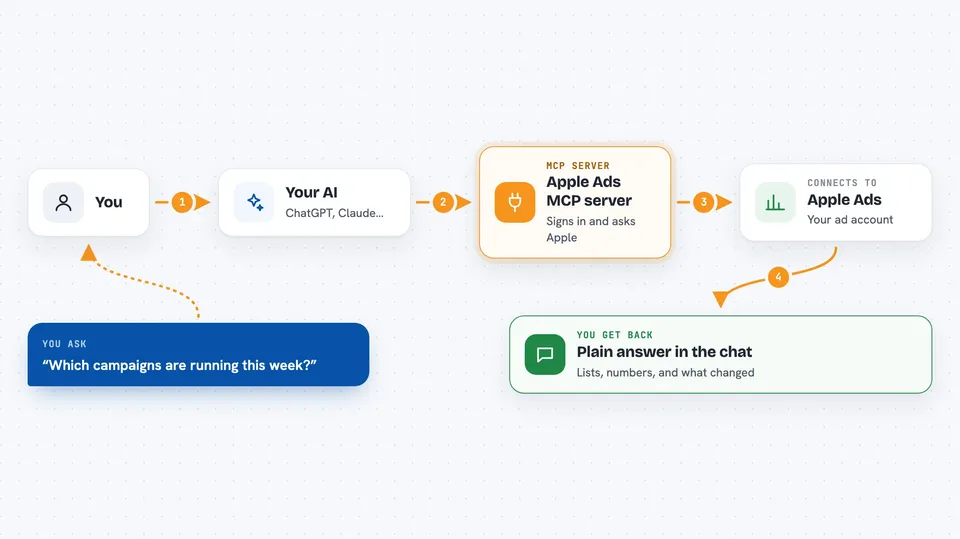
On its own, your AI can only chat. It cannot log into Apple Ads or see your campaigns. An MCP server is a small helper program that gives your AI a new skill, in this case a connection to your Apple Ads account. You ask your AI something, the AI passes the request to this helper, the helper talks to Apple, and the answer comes back into your chat.
What this MCP server does
You type a request in plain words, like asking which campaigns are running this week. Your AI sends that request to this helper. The helper signs in to Apple Ads with your saved credentials, asks Apple for the information or makes the change you wanted, and sends the result back. Your AI then explains it to you in the chat, in normal sentences. It works both ways: it can read things (campaigns, keywords, reports) and change things (create, update, delete).
 Click to zoom
What you can do with it
- List your campaigns and see which ones are enabled
- Create a new campaign with a daily budget and country targeting
- Add or update keywords and their bids in an ad group
- Add negative keywords so your ads stop showing on bad searches
- Pull a report of clicks, spend and installs for a date range
- Check why Apple rejected a creative
- Look up your app's Apple ID and available countries
Try asking your AI
- “List all my active campaigns and their daily budgets”
- “Create a new campaign for my app in the US with a 50 dollar daily budget”
- “Add these keywords to my main ad group with a 1 dollar bid: puzzle game, word game, brain teaser”
- “Show me the search terms report for last week so I can find new negative keywords”
- “Which creatives got rejected and why?”
What it gives back to you
You get answers in the chat: lists of campaigns or keywords, numbers like spend and taps, short summaries of what changed, and report tables for a date range. When it makes a change, it tells you what it did, for example that a campaign was created or a keyword was updated. Reports can be grouped by day, week or month, and by things like country or device.
Before you start
What you need
- An Apple Ads account with permission to use the API
- An API user set up in Apple Ads (a separate Apple ID invited with an API role)
- A private key file (.p8) you generate on your computer, plus the Client ID, Team ID and Key ID Apple gives you
- Node.js installed on the computer that runs the helper
Good to know
It can change and delete real campaigns, keywords and ads, and it can spend your ad budget, so check before you let it make changes.
Install it with your AI
Add Apple Ads MCP server to your AI, no technical skills needed
You don't install anything by hand. You copy one prompt, paste it into an AI that can work on your computer, and it checks, installs and connects the server for you, asking you when it needs something.
Sign in to get the install prompt
Members get a ready-made prompt that lets the Claude desktop app check Apple Ads MCP server, install it and connect it for them, step by step. You don't need any technical skills: you copy, paste and answer a few questions. Your connected AI can also find and install any of the 4,609 MCP servers here for you.
Who it's for
App marketers, user acquisition managers and small app teams who run Apple Ads and want to check or change things without opening the Apple dashboard.




