
MCP server · Developer tools
Spot.io MCP server
by arnstarn
Let your AI look up and manage your Spot.io cloud clusters, costs, and instances for you.
This is a small helper that connects your AI assistant to Spot.io, the service many teams use to run cloud servers at lower cost. Once it is set up, you can ask your AI questions about your clusters, costs, and nodes in plain English instead of clicking around the Spot.io website. It is handy for anyone who helps run cloud infrastructure but does not want to memorize the Spot.io dashboard.
What is an MCP server? The 30-second version
On its own, your AI can only chat. It cannot see your Spot.io account or do anything there. An MCP server is a small helper program that gives your AI a new skill, in this case a connection to Spot.io. When you ask a question, the AI sends it through this helper to Spot.io, gets the answer back, and explains it to you.
What this MCP server does
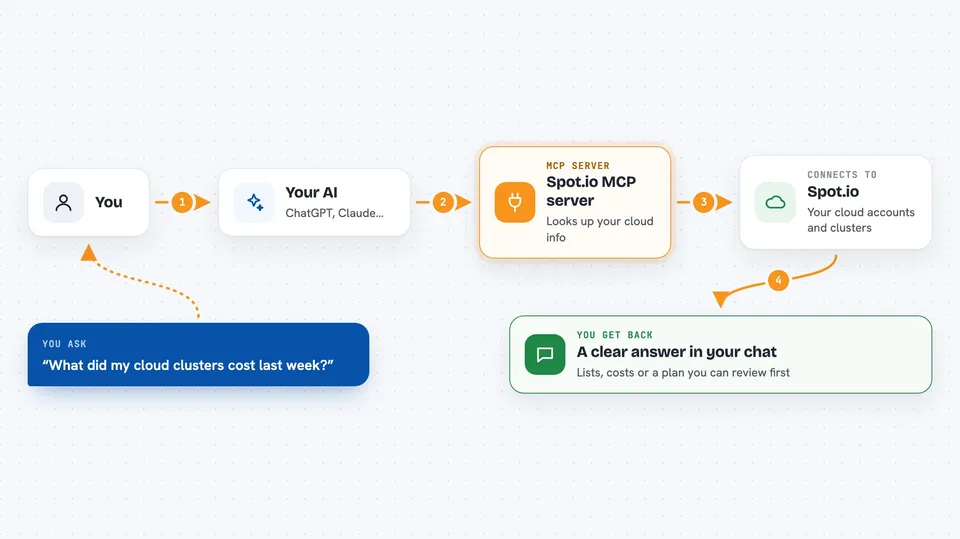
You ask your AI something like how many clusters you have or what your costs looked like last week. The AI passes that request to this helper program. The helper talks to the Spot.io service using your account token. Spot.io sends back the information, and the helper hands it to the AI. The AI then turns it into a clear answer in your chat, or, if you asked for a change, shows you a plan first and waits for your OK.
 Click to zoom
What you can do with it
- List all your Spot.io clusters across AWS and Azure accounts
- Check costs and savings for the last 30 days
- See which nodes are running in a cluster
- Look up right-sizing suggestions to save money
- Export a cluster or node group setup as a YAML file
- Filter clusters or node groups by tag
- Remove or replace instances with a safe, reviewable plan
Try asking your AI
- “List all my Spot.io clusters across every account”
- “What did my Ocean cluster o-abc123 cost last week compared to the week before?”
- “Show me the nodes in cluster o-abc123 on Azure”
- “Give me right-sizing suggestions for my AWS clusters”
What it gives back to you
You get back plain answers in the chat: lists of clusters, node names, cost numbers, savings summaries, or health checks. If you ask for an export, it gives you a YAML file you can save. For changes like removing an instance, it first shows you a step-by-step plan so you can review it before anything happens.
Before you start
What you need
- A Spot.io (Spotinst) account
- A Spot.io API token (a kind of password for apps; you create it in your Spot.io settings)
- Your Spot.io account ID, which looks like act-xxxxxxxx
Good to know
Some tools can change or remove cloud instances, so always read the plan it shows you before setting confirm=true.
Install it with your AI
Add Spot.io MCP server to your AI, no technical skills needed
You don't install anything by hand. You copy one prompt, paste it into an AI that can work on your computer, and it checks, installs and connects the server for you, asking you when it needs something.
Sign in to get the install prompt
Members get a ready-made prompt that lets the Claude desktop app check Spot.io MCP server, install it and connect it for them, step by step. You don't need any technical skills: you copy, paste and answer a few questions. Your connected AI can also find and install any of the 4,609 MCP servers here for you.
Who it's for
Cloud engineers, DevOps people, and anyone who manages Spot.io clusters and wants quick answers without opening the dashboard.



