MCP server · Design tools
Photopea MCP server
by attalla1
Let your AI edit images and design posters in Photopea, then export the finished file.
This is a small helper that connects your AI to Photopea, a free image editor that runs in your web browser and works a lot like Photoshop. Once it is set up, you can just describe the picture you want and your AI does the clicking for you. It is handy for anyone who needs quick posters, photo touch-ups, or simple graphics without learning a design program.
What is an MCP server? The 30-second version
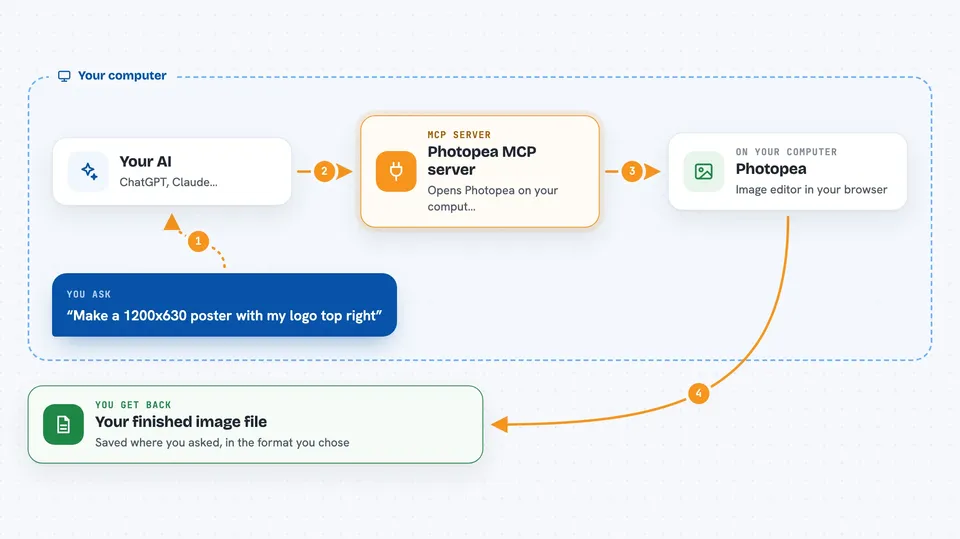
On its own, your AI can only chat. An MCP server is a small helper program that gives your AI a new skill or a connection to another app. This one connects your AI to Photopea, the free browser-based image editor. So when you ask for a poster or a photo fix, your AI can actually open Photopea, make the edits, and hand you back the file.
What this MCP server does
You tell your AI what image you want, in plain words. Your AI passes that request to this helper program. The helper opens Photopea in a browser window on your computer and gives it the exact editing steps, like adding a layer, typing text, or applying a blur. Photopea does the work, and the helper sends the result back to your AI. You then see a short answer in the chat, and the finished image is saved where you asked.
 Click to zoom
What you can do with it
- Create a new blank document at any size you need
- Open a photo from your computer or from a web link
- Add and arrange layers, groups, text, and shapes
- Adjust brightness, contrast, hue, saturation, levels, and curves
- Apply filters like gaussian blur, sharpen, noise, and motion blur
- Move, resize, rotate, flip, and duplicate layers
- Export your finished work as PNG, JPG, WebP, PSD, or SVG
Try asking your AI
- “Create a 1920x1080 document with a dark blue background, add the title Hello World in white 72px Arial, and export it as a PNG to my Desktop”
- “Open my portrait photo, increase the brightness by 30, apply a slight gaussian blur of 2px, and export it as a JPG”
- “Make a 1200x630 image, place my background picture as the base, then place my logo and move it to the top-right corner”
- “Open my sunset photo, boost the saturation by 20, apply an unsharp mask, and export it as a PNG”
What it gives back to you
You get a short written reply in the chat, like a note saying the document was created or the export finished. Along with that, you get the actual file saved to the folder you named, in the format you asked for. If you ask for information, such as the document size or the list of layers, you get that as a simple answer or list. You can also ask it to undo or redo steps if something does not look right.
Before you start
What you need
- Node.js version 18 or newer installed on your computer
- A modern web browser like Chrome, Firefox, Edge, or Safari
- An AI app that supports MCP, such as Claude Code, Claude Desktop, Cursor, VS Code, or Windsurf
Good to know
It can change or overwrite files on your computer and one of its tools runs raw code inside Photopea, so keep an eye on what your AI is asked to do and export your work before refreshing the browser.
Install it with your AI
Add Photopea MCP server to your AI, no technical skills needed
You don't install anything by hand. You copy one prompt, paste it into an AI that can work on your computer, and it checks, installs and connects the server for you, asking you when it needs something.
Sign in to get the install prompt
Members get a ready-made prompt that lets the Claude desktop app check Photopea MCP server, install it and connect it for them, step by step. You don't need any technical skills: you copy, paste and answer a few questions. Your connected AI can also find and install any of the 4,361 MCP servers here for you.
Who it's for
People who need quick image edits or simple designs, like marketers, small business owners, students, and anyone making posters or social media pictures without design software.