
MCP server · Security
cmdxray MCP server
Your AI can check any shell command for danger and explain every flag before it runs.
cmdxray is a small tool that reads a shell command and tells you what each part means and whether it is risky. It works fully offline, so nothing you paste leaves your computer. It is handy for anyone who copies commands from the internet or runs scripts they did not write.
What is an MCP server? The 30-second version
On its own, your AI can only chat. It cannot look at a command and tell you if it is safe. An MCP server is a small helper program that gives your AI a new skill. This one connects your AI to cmdxray, so when you ask about a command, the AI can send it to cmdxray and get back a plain-English breakdown and a danger rating.
What this MCP server does
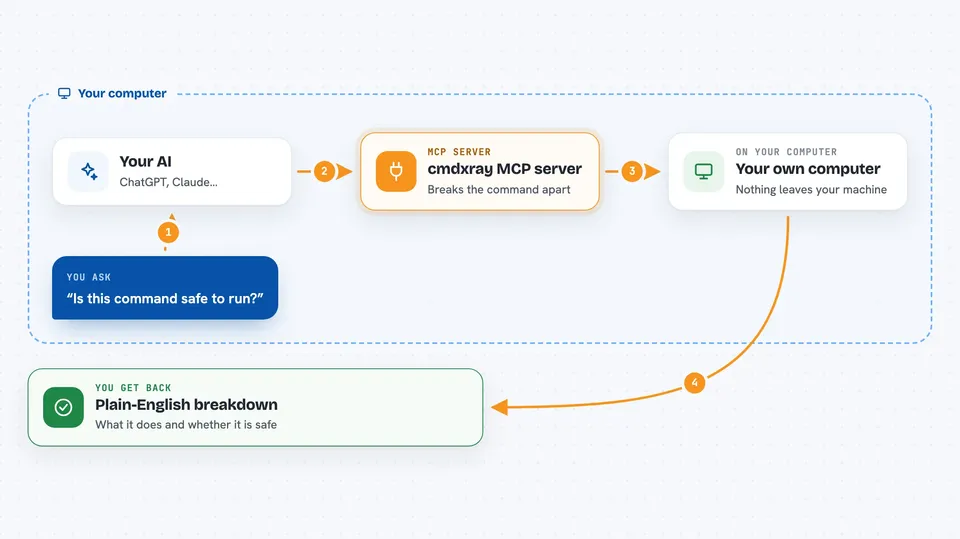
You paste a command into your chat and ask your AI to check it. The AI sends that command to the cmdxray helper running on your machine. cmdxray breaks the command into pieces, explains each flag, pipe, redirect and subshell, and rates the whole thing as danger, caution or none. The AI then tells you what the command does and whether it is safe to run. Nothing is uploaded anywhere; it all happens on your computer.
 Click to zoom
What you can do with it
- Explain what every flag and argument in a command does
- Rate a command as danger, caution or none
- Warn you about commands that download and run code unread
- Point out commands that run as root or delete critical files
- Show what a pipe, redirect or subshell is doing
- Give you a safer alternative for a risky command
What it gives back to you
You get a plain-English breakdown of the command, piece by piece. You also get a risk rating: danger, caution or none. If something is risky, you get a short explanation of why. All of this shows up right in your chat, so you can read it before you decide to run anything.
Before you start
What you need
- Node.js 18 or newer installed on your computer
- The cmdxray MCP server added to your AI app
Good to know
cmdxray only reads and explains commands; it does not run them, but its risk ratings are best-effort and may miss something, so always read the explanation before running a command.
Install it with your AI
Add cmdxray MCP server to your AI, no technical skills needed
You don't install anything by hand. You copy one prompt, paste it into an AI that can work on your computer, and it checks, installs and connects the server for you, asking you when it needs something.
Sign in to get the install prompt
Members get a ready-made prompt that lets the Claude desktop app check cmdxray MCP server, install it and connect it for them, step by step. You don't need any technical skills: you copy, paste and answer a few questions. Your connected AI can also find and install any of the 4,609 MCP servers here for you.
Who it's for
Anyone who copies shell commands from the internet, runs scripts they did not write, or wants a second opinion before hitting Enter.



