
MCP server · Analytics
SEO Performance MCP server
Ask your AI which blog posts to refresh, expand, merge, or drop, based on real numbers from your analytics.
This is a helper that pulls your SEO and analytics numbers together and gives each blog post one clear verdict: refresh it, expand it, merge it, drop it, push it harder, or leave it alone. It is made for people who write or manage a blog and want to stop guessing which posts are worth their time. If you already have Search Console, Matomo, GA4, or Clarity, this puts them to work in one place.
What is an MCP server? The 30-second version
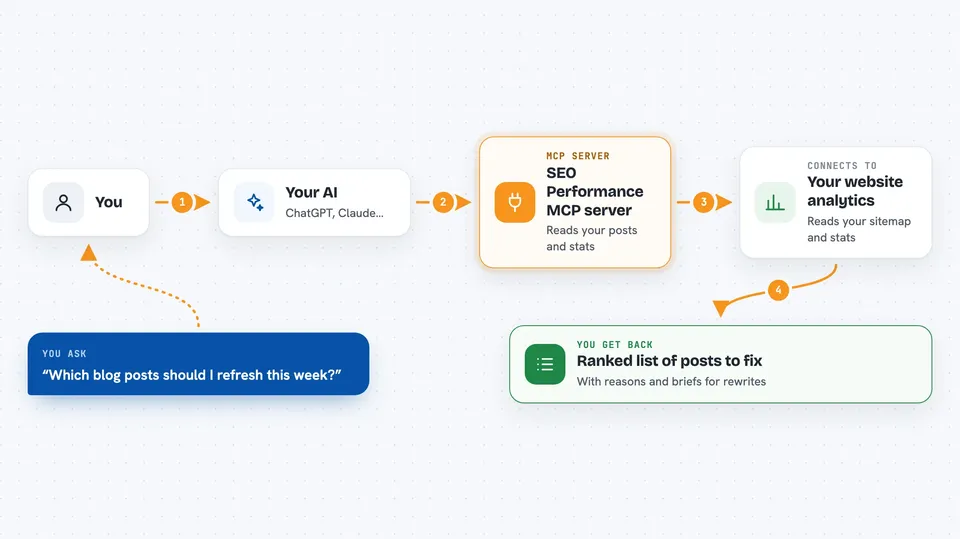
On its own, your AI can only chat with you. An MCP server is a small helper program that gives your AI a new skill or a connection to an app or service. This one connects your AI to your SEO and analytics tools, so it can look up how your posts are actually doing and tell you what to do next. You ask a question in plain English, and the AI uses this helper behind the scenes to fetch the numbers and reason about them.
What this MCP server does
You ask your AI something like which posts need attention this week. The AI calls this helper, which goes out and reads your sitemap to find your posts, then pulls clicks, impressions, visits, scroll depth, and citation signals for each one. It runs those numbers through a fixed set of rules and comes back with a verdict per post, plus the reasons behind it. You get a ranked list and, for the posts flagged for a rewrite, a short brief you can hand to a writer. It only reports. It never changes or deletes anything on your site.
 Click to zoom
What you can do with it
- Get a ranked list of which posts to refresh, expand, merge, or drop
- See the top search queries and click-through numbers behind each verdict
- Spot quick wins: queries sitting just off page one with weak click rates
- Check which AI assistants cited your posts last month and stopped
- Read a markdown brief for any post flagged for a rewrite
- Run the same audit on a schedule and post the result to a GitHub issue
Try asking your AI
- “Which three posts should I update this week?”
- “Give me a refresh brief for my post about email marketing”
- “Show me quick wins on my site: queries at positions 5 to 15 with low click rates”
- “Which of my posts lost AI citations since last month?”
What it gives back to you
You get a table of your posts with a verdict and a confidence score for each one, sorted so the most urgent sit at the top. For posts flagged for a rewrite, you also get a short markdown brief with the numbers, the top queries, and suggested next steps. Everything shows up right in your chat as text you can read or copy. Nothing on your site is changed.
Before you start
What you need
- The address of your site's sitemap (a file most sites publish automatically, like yoursite.com/sitemap.xml)
- A Google service account key for Search Console (a kind of password file Google gives you, pasted in as text)
- Optional: login details for Matomo, GA4, or Microsoft Clarity if you want those signals too
- Node.js installed if you run it yourself, or a Claude or Cursor app that supports MCP servers
Good to know
It reads your analytics accounts and your site's sitemap, so only connect accounts you are comfortable sharing with the tool, and keep your access keys private.
Install it with your AI
Add SEO Performance MCP server to your AI, no technical skills needed
You don't install anything by hand. You copy one prompt, paste it into an AI that can work on your computer, and it checks, installs and connects the server for you, asking you when it needs something.
Sign in to get the install prompt
Members get a ready-made prompt that lets the Claude desktop app check SEO Performance MCP server, install it and connect it for them, step by step. You don't need any technical skills: you copy, paste and answer a few questions. Your connected AI can also find and install any of the 4,609 MCP servers here for you.
Who it's for
Content marketers, SEO consultants, and indie bloggers who run a decent-sized blog and want a clear, numbers-backed answer on what to fix next.




