MCP server · Generative art
avots.ai MCP server
by avotsai
Lets your AI make images, videos, music and voiceovers, and chat with many AI models, all from one place.
This is a helper that connects your AI assistant to avots.ai, an online service that can make pictures, videos, music and voiceovers for you. Once it is connected, you can just ask your AI in normal words and it will go and create those things for you. It is handy if you make content for social media, ads or videos and you do not want to jump between five different websites.
What is an MCP server? The 30-second version
On its own, your AI can only chat with you. An MCP server is a small helper program that gives your AI a new skill or a connection to another service. This one connects your AI to avots.ai, so it can ask avots.ai to make an image, a video or a song for you. You stay in your chat window, and the helper does the running around behind the scenes.
What this MCP server does
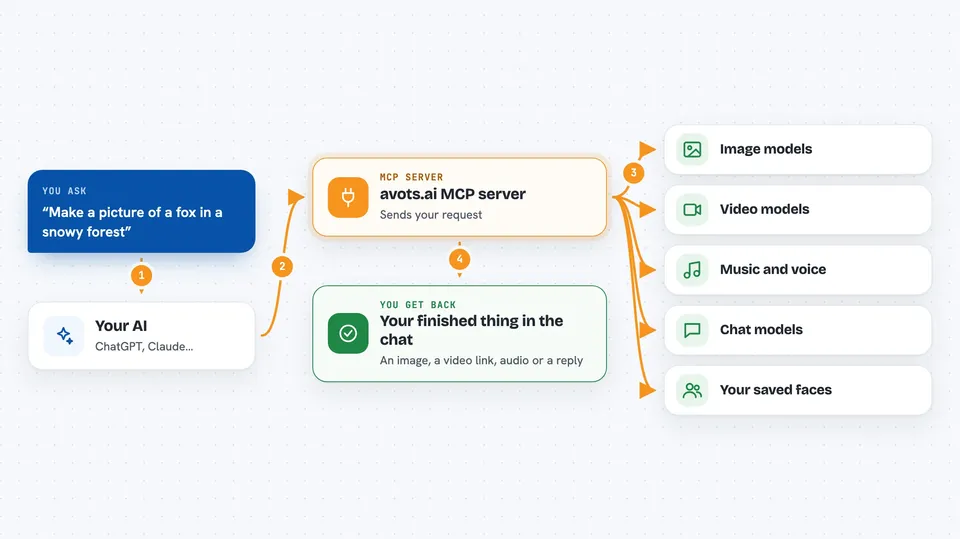
You type a request in your AI chat, like asking for a picture of a fox in a snowy forest. Your AI sends that request to this helper, which passes it on to avots.ai. avots.ai picks one of its image or video models and makes the thing you asked for. When it is done, the result comes back into your chat, usually as a link or a preview you can look at. Some things, like videos, take a few minutes, so the helper checks back until the job is finished.
 Click to zoom
What you can do with it
- Generate images from a text description, or edit a photo you already have
- Create short videos, including ones where a photo of a face talks or gets swapped into a clip
- Make music, background tracks or spoken narration, including in a cloned voice
- Save a reusable face identity so you can use the same person in many videos
- Turn 4 to 25 photos into a slideshow reel with music
- Turn a face photo into a vintage travel poster for any country
- Chat with other AI models like Claude, GPT, Gemini or DeepSeek and compare answers
- Check your balance and see what each model costs before you spend
Try asking your AI
- “Generate an image of a fox in a snowy forest”
- “Make a 10 second video of a coffee cup rotating on a wooden table”
- “Create a 15 second music bed for a vertical video”
- “Turn this photo of me into a vintage travel poster for Japan”
- “Ask DeepSeek to review this plan and tell me what it would change”
What it gives back to you
You get the finished thing back in your chat: an image you can view, a link to a video, an audio file, or a short written answer. For videos and music, which take a while, the helper first shows you a preview with the price and asks you to confirm before it spends anything. For chat requests, you just get the model's reply as text. It can also show you lists, like your saved faces or the available models and their prices.
Before you start
What you need
- An avots.ai account (you sign up on their website)
- An MCP key from your avots.ai settings page, which looks like av_mcp_ followed by a long string of letters and numbers
- A balance of tokens on your avots.ai account, since each creation costs some
- An AI app that supports MCP, like Claude, Cursor or Cline
Good to know
Every creation costs tokens from your avots balance, and video jobs can cost a lot, so check the price preview before you confirm.
Install it with your AI
Add avots.ai MCP server to your AI, no technical skills needed
You don't install anything by hand. You copy one prompt, paste it into an AI that can work on your computer, and it checks, installs and connects the server for you, asking you when it needs something.
Sign in to get the install prompt
Members get a ready-made prompt that lets the Claude desktop app check avots.ai MCP server, install it and connect it for them, step by step. You don't need any technical skills: you copy, paste and answer a few questions. Your connected AI can also find and install any of the 4,361 MCP servers here for you.
Who it's for
Content creators, social media managers, small business owners and marketers who make images, videos or audio and want to do it from one chat instead of many separate tools.