MCP server · Generative art
OpenAI GPT Image MCP server
by SureScaleAI
Lets your AI create and edit images with OpenAI's image models, right from the chat.
This is a small helper that connects your AI assistant to OpenAI's image models. Once it is set up, you can ask your AI to draw a picture or change one you already have, and it will do it for you. It is handy for anyone who needs quick images for slides, posts, or mockups without opening a separate design tool.
What is an MCP server? The 30-second version
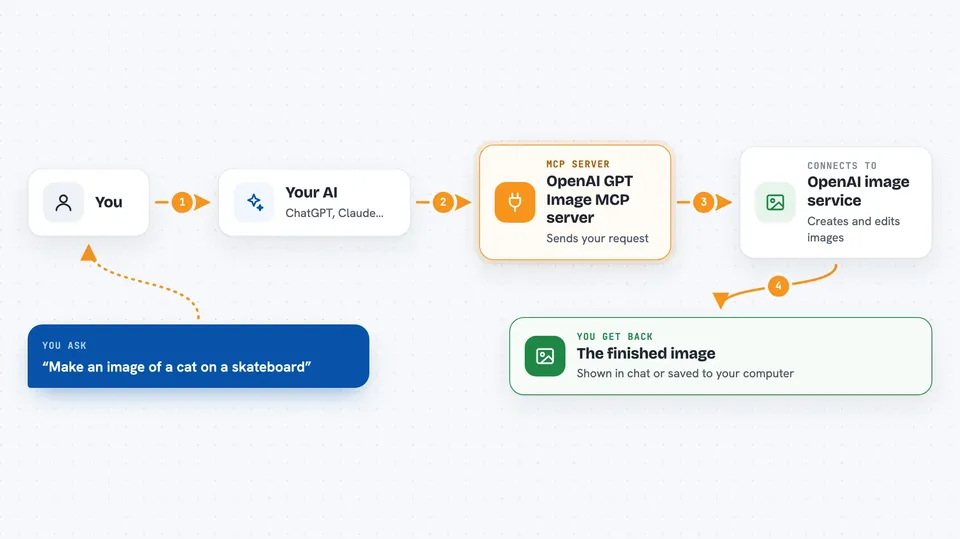
On its own, your AI can only talk and write text. An MCP server is a small helper program that gives your AI one new skill. This helper gives your AI a connection to OpenAI's image models. So when you ask for a picture, your AI sends the request through this helper to OpenAI and brings the result back to your chat.
What this MCP server does
You type a request in plain words, like asking for a picture of a cat on a skateboard. Your AI passes that request to this helper. The helper talks to OpenAI's image service and asks it to make the image. When the image is ready, the helper sends it back to your chat, either as a picture or as a file saved on your computer. You can also ask it to change an existing image, for example to remove something or extend the background.
 Click to zoom
What you can do with it
- Create a new image from a text description
- Edit an existing image with a written instruction
- Extend an image beyond its original edges
- Apply changes only to a chosen part of an image using a mask
- Generate several versions of the same idea at once
- Save the finished image to a folder on your computer
- Choose the size and quality of the image
Try asking your AI
- “Make an image of a cozy reading nook with a rainy window”
- “Edit this photo and remove the trash can in the corner”
- “Extend this picture so the sky shows more clouds”
- “Create three logo ideas for a small coffee shop”
What it gives back to you
You get the image back in your chat, or a note telling you where the file was saved on your computer. If the image is large, it is saved to a folder and you get the file path instead. You can also ask for several versions at once and get them all. The chat may show a short confirmation with the file location.
Before you start
What you need
- An OpenAI account with a verified organization (image access can take 15 to 20 minutes to turn on after verifying)
- An OpenAI API key (a kind of password for apps; you get it from your OpenAI account)
- Node.js installed on your computer
- The Claude desktop app or another app that supports MCP servers
Good to know
Using this spends money on your OpenAI account, since each image request is billed, so keep an eye on your usage.
Install it with your AI
Add OpenAI GPT Image MCP server to your AI, no technical skills needed
You don't install anything by hand. You copy one prompt, paste it into an AI that can work on your computer, and it checks, installs and connects the server for you, asking you when it needs something.
Sign in to get the install prompt
Members get a ready-made prompt that lets the Claude desktop app check OpenAI GPT Image MCP server, install it and connect it for them, step by step. You don't need any technical skills: you copy, paste and answer a few questions. Your connected AI can also find and install any of the 4,361 MCP servers here for you.
Who it's for
Anyone who needs images for work, like marketers, designers, writers, or teachers, and who already uses an AI assistant and wants it to make pictures too.