MCP server · Generative art
GlianaAI MCP server
by Gliana-Labs
Run paid AI models for images, video, music, speech and more straight from your chat, paying per call from your own wallet.
This is a connector that lets your AI make pictures, videos, voice clips, songs and chats through many different ready-made models. It also adds some practical helpers like website reading, screen captures and currency rate checks. It suits anyone curious about trying lots of AI services quickly without signing up anywhere or handing over personal details.
What is an MCP server? The 30-second version
On its own, your AI can only talk based on what it already knows. An MCP server is a little helper program that plugs into your AI and teaches it a brand-new trick. Here, that helper connects your AI to the GlianaAI service, where dozens of models wait behind each door. When you ask for something, the AI knocks on those doors for you instead of saying "I cannot draw."
What this MCP server does
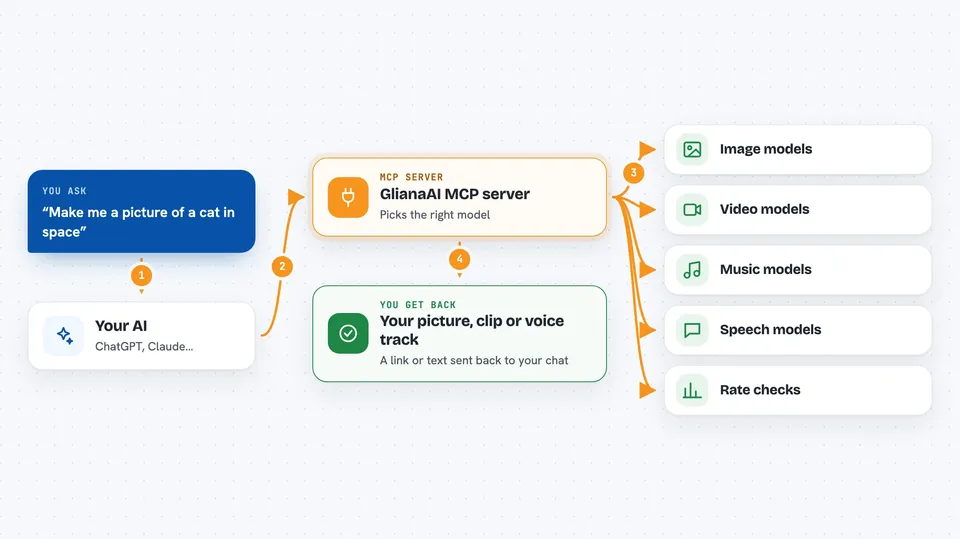
When you request a picture, a clip or a spoken answer, your AI sends the job to this helper along with instructions. The helper picks the right model, tells the GlianaAI gatekeeper how much it costs, then pays tiny amounts directly from your digital wallet stored safely on your computer. Once accepted, the far side makes whatever you asked for and hands back a link or piece of writing. Some extra chores such as checking exchange rates happen instantly because they come completely free. Everything stays between three parties quietly chatting until done.
 Click to zoom
What you can do with it
- Generate original artwork or photos using names like flux-schnell
- Turn existing snapshots slowly panning around into moving sequences
- Produce narration tracks speaking typed paragraphs aloud naturally sounding voices
- Compose background tunes fitting moods described briefly within seconds flatly delivered melodies too perhaps surprisingly pleasant results overall though quality varies widely across providers honestly stated expectations remain modest given constraints exist inherently always somewhere somehow ine
What it gives back to you
Install it with your AI
Add GlianaAI MCP server to your AI, no technical skills needed
You don't install anything by hand. You copy one prompt, paste it into an AI that can work on your computer, and it checks, installs and connects the server for you, asking you when it needs something.
Sign in to get the install prompt
Members get a ready-made prompt that lets the Claude desktop app check GlianaAI MCP server, install it and connect it for them, step by step. You don't need any technical skills: you copy, paste and answer a few questions. Your connected AI can also find and install any of the 4,361 MCP servers here for you.