
MCP server · Social media
ViralTransformer MCP server
by BelleKou
Give your AI a link and it writes two ready-to-post social media drafts for you.
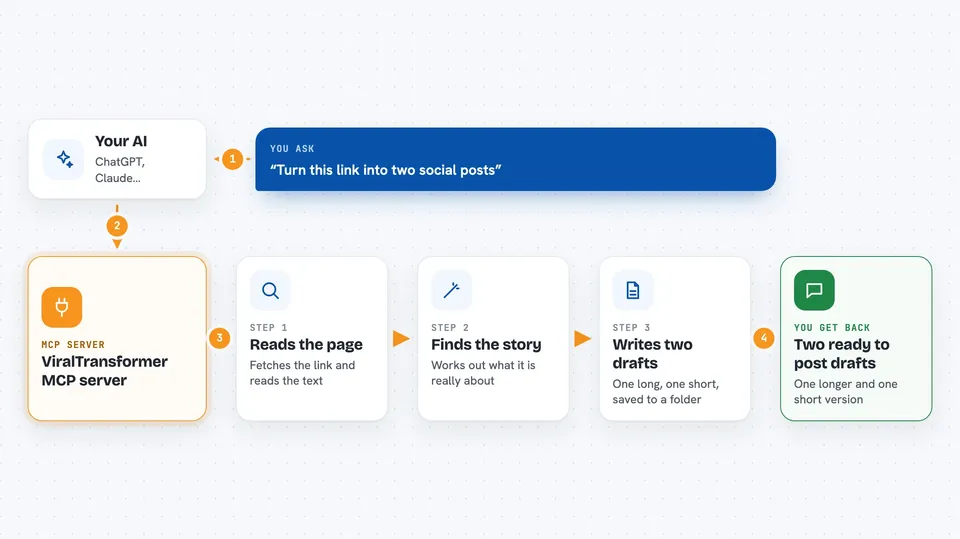
ViralTransformer is a small helper that plugs into your AI and turns a web link into social media posts. You hand it a URL, and it reads the page, thinks about the story, and writes two versions for you. It is handy if you post on LinkedIn, X, or similar platforms and want a head start on the wording.
What is an MCP server? The 30-second version
On its own, your AI can only chat with you. An MCP server is a small helper program that gives your AI a new skill or a connection to another service. This one connects your AI to a tool that reads web pages and writes social posts. So when you ask, your AI can fetch the page and draft the posts for you.
What this MCP server does
You paste a link into your chat and ask your AI to remake it. Your AI passes the link to this helper program. The helper fetches the page, reads the text, and works out what the story is about. Then it writes two drafts: one longer, thoughtful version and one short, punchy version. It also saves each draft as a file in a drafts folder on your computer so nothing gets lost.
 Click to zoom
What you can do with it
- Turn any article link into two social media drafts
- Get a longer, thoughtful version for LinkedIn
- Get a short, punchy version for X or similar platforms
- Save every draft automatically to a local drafts folder
- Ask for a fresh angle or rewrite of the same link
- Reuse a link you already turned into a post earlier
Try asking your AI
- “Remake this link into a LinkedIn post and a short X post: https://example.com/news”
- “Turn this article into two versions, one deep and one high energy”
- “Read this page and write me a punchy social post about it”
- “Take this link and give me a fresh angle for my next post”
What it gives back to you
You get two written drafts in the chat: one longer version and one short version, each with a title and body text. It also tells you the file it saved, so you can find the draft later in the drafts folder. You can copy the text straight into your social platform, or ask for changes.
Before you start
What you need
- Python 3.10 or newer installed on your computer
- The uv tool (a helper for running Python programs)
- An Anthropic API key (a kind of password for apps; you get one from the Anthropic console)
- The Claude desktop app, if you want to use it there
Good to know
It reads the web pages you give it and saves draft files to a drafts folder on your computer, so be mindful of what links you share and where the drafts end up.
Install it with your AI
Add ViralTransformer MCP server to your AI, no technical skills needed
You don't install anything by hand. You copy one prompt, paste it into an AI that can work on your computer, and it checks, installs and connects the server for you, asking you when it needs something.
Sign in to get the install prompt
Members get a ready-made prompt that lets the Claude desktop app check ViralTransformer MCP server, install it and connect it for them, step by step. You don't need any technical skills: you copy, paste and answer a few questions. Your connected AI can also find and install any of the 4,361 MCP servers here for you.
Who it's for
People who post on LinkedIn, X, or similar platforms and want a fast first draft from any link.





