
MCP server · Productivity
Greenhouse MCP server
by benmonopoli
Ask your AI about your Greenhouse recruiting data and let it handle pipeline, candidate and bulk tasks for you.
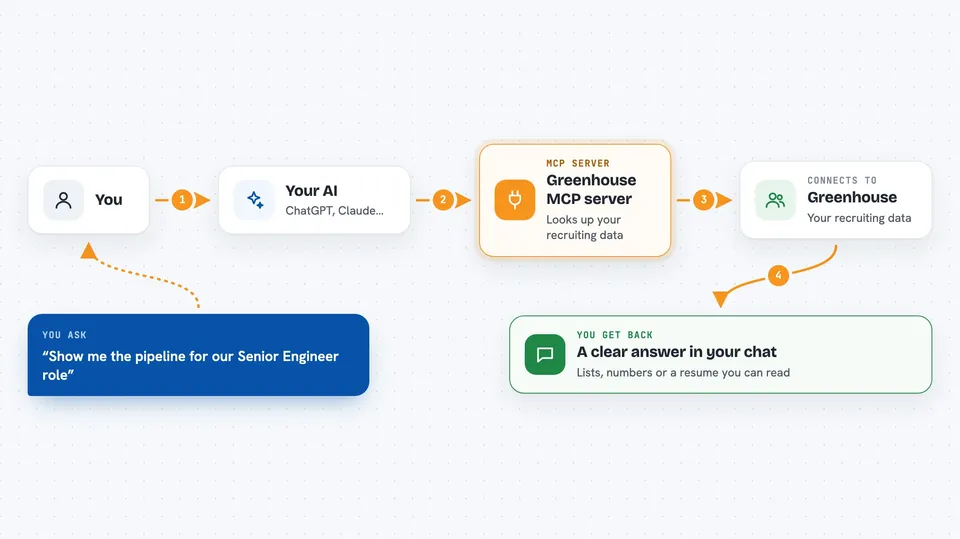
This is a helper that connects your AI assistant to Greenhouse, the system many recruiting teams use to track candidates and jobs. Once it is set up, you can just ask questions in plain English instead of clicking through screens. It is made for recruiters, hiring managers and recruiting operations people.
What is an MCP server? The 30-second version
On its own, your AI can only chat. An MCP server is a small helper program that gives your AI a new skill or a connection to an app. This one connects your AI to Greenhouse, so when you ask about a role or a candidate, the AI can actually look it up in your Greenhouse account and bring the answer back. You stay in the chat, and the helper does the running around.
What this MCP server does
You ask your AI something like "show me the pipeline for our Senior Engineer role". The AI passes that request to this helper. The helper talks to Greenhouse using your API key and pulls the data it needs. It then hands the result back to the AI, which explains it to you in normal words. For some tasks, like tagging or rejecting candidates, it can also make the change in Greenhouse for you.
 Click to zoom
What you can do with it
- See the full pipeline for a job, grouped by stage
- Find candidates by name, email or resume keywords
- Check conversion rates and time to hire for a role
- Spot applications that have gone stale or need action
- See which sources are actually producing hires
- Bulk reject, tag or advance applications in one go
- Pull up a candidate's resume and screening answers
Try asking your AI
- “Show me the pipeline for our Senior Engineer role”
- “Who needs my attention this week?”
- “What are our conversion rates for the Backend Intern role?”
- “Find Sarah Chen and pull up her resume”
- “Which sources are actually producing hires?”
What it gives back to you
You get answers in the chat: lists of candidates, pipeline views grouped by stage, numbers like conversion rates and time to hire, or a candidate's resume text. When it makes a change, like rejecting or tagging, it tells you what it did. Everything shows up as a normal reply you can read or copy.
Before you start
What you need
- A Greenhouse account with API access
- A Greenhouse Harvest API key (found under Configure > Dev Center > API Credential Management)
- Python 3.10 or newer installed on your computer
- An MCP client like Claude Desktop or Cursor
Good to know
The recruiter and full profiles can change things in Greenhouse, including rejecting or advancing candidates, so start with the read-only profile and only turn on write access when you are ready.
Install it with your AI
Add Greenhouse MCP server to your AI, no technical skills needed
You don't install anything by hand. You copy one prompt, paste it into an AI that can work on your computer, and it checks, installs and connects the server for you, asking you when it needs something.
Sign in to get the install prompt
Members get a ready-made prompt that lets the Claude desktop app check Greenhouse MCP server, install it and connect it for them, step by step. You don't need any technical skills: you copy, paste and answer a few questions. Your connected AI can also find and install any of the 4,361 MCP servers here for you.
Who it's for
Recruiters, hiring managers and recruiting operations people who already use Greenhouse and want to ask questions or run tasks without clicking through the app.





