MCP server · Productivity
Haypile document search MCP server
by BenyD
Lets your AI search your own PDFs, Word files and notes by meaning, with file and page citations.

Haypile is a small program you install on your own computer. It reads the folders you point it at, builds a searchable index of your documents, and lets your AI assistant search that index. It is handy if you work with lots of contracts, reports, papers or meeting notes and want answers with a source you can check.
What is an MCP server? The 30-second version
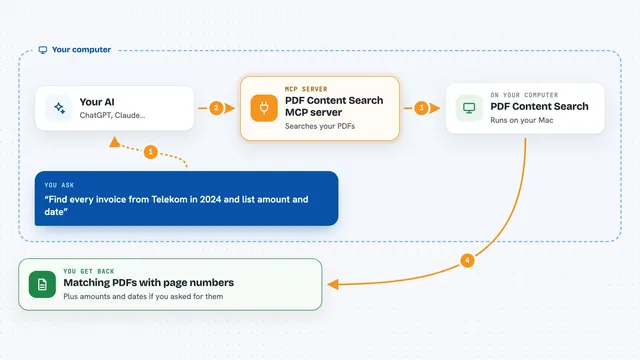
On its own, your AI can only chat with you. It cannot see the files on your computer unless you paste them in. An MCP server is a small helper program that gives your AI one new skill. Here, the helper is Haypile: it sits on your machine, keeps an index of your documents, and answers your AI's search requests with the right passages and where they came from.
What this MCP server does
You install Haypile and tell it which folders to watch. It reads the documents in those folders, including PDF, Word, PowerPoint, Markdown, text and HTML files, and stores a searchable copy on your disk. When you ask your AI a question, the AI asks Haypile to search. Haypile looks for passages that match the meaning of your words, not just the exact words, and sends back the best matches with the file name and page number. Your AI then writes its answer using those passages.
 Click to zoom
What you can do with it
- Search your documents by meaning, so a question about cancellation finds termination clauses
- Get every result with the source file name and page number
- Keep an index that updates within seconds when you save a file
- Search several folders at once, each with its own tag
- Ask a question and get an answer written from your own documents
- Use it from Claude Code, Cursor, or any tool that speaks MCP
- Run everything on your own computer, with no files uploaded anywhere
What it gives back to you
You get back a ranked list of passages from your documents, each one showing the file it came from and the page number. If you use the ask command with a local AI model, you also get a written answer built from those passages. In the chat, this looks like a short answer followed by the sources it used, so you can open the file and check.
Before you start
What you need
- A Mac, Linux or Windows computer (a single program file, about 56MB)
- Homebrew on Mac, or the install script on Windows and Linux
- For written answers, a local AI model such as Ollama (Haypile can set this up for you)
Good to know
Haypile reads the folders you point it at, so only add folders you are comfortable having indexed, and remember that answers come from your own files and should still be checked.
Install it with your AI
Add Haypile document search MCP server to your AI, no technical skills needed
You don't install anything by hand. You copy one prompt, paste it into an AI that can work on your computer, and it checks, installs and connects the server for you, asking you when it needs something.
Sign in to get the install prompt
Members get a ready-made prompt that lets the Claude desktop app check Haypile document search MCP server, install it and connect it for them, step by step. You don't need any technical skills: you copy, paste and answer a few questions. Your connected AI can also find and install any of the 4,361 MCP servers here for you.
Who it's for
People who work with many documents, such as lawyers, researchers, analysts and anyone who needs to find things in their own files.