MCP server · Productivity · official
MinerU document parser MCP server
by opendatalab · official
Turn PDFs, Word files, slides and images into clean Markdown your AI can read and work with.
This is a small helper that lets your AI read documents that are not plain text. You hand it a PDF, a Word file, a PowerPoint deck, an image or a spreadsheet, and it turns the content into Markdown, which is simple formatted text your AI can actually read. It is handy for anyone who deals with reports, papers, contracts or slide decks and wants their AI to summarize or answer questions about them.
What is an MCP server? The 30-second version
On its own, your AI can only chat about what you type or paste in. An MCP server is a small helper program that gives your AI a new skill or a connection to another service. This one connects your AI to MinerU, a document parsing service, so your AI can send it a file and get readable text back. Once it is set up, you just ask in normal words and your AI does the rest.
What this MCP server does
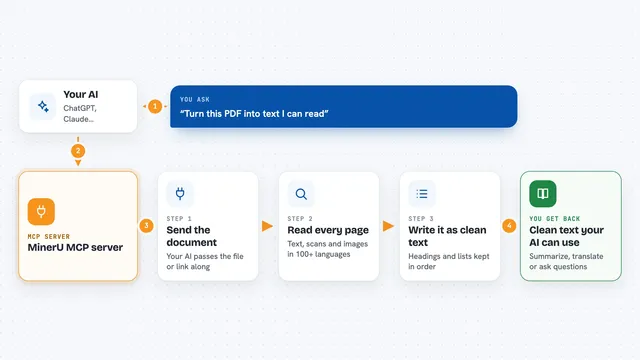
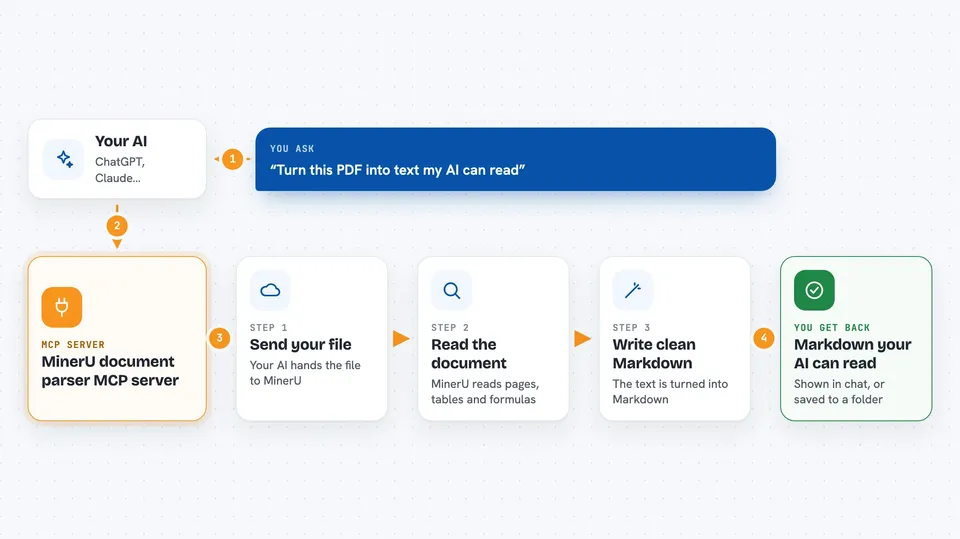
You ask your AI to parse a document, either a file on your computer or a link to a file online. Your AI passes that request to this helper, which uploads the file to the MinerU service. MinerU reads the document and converts it into Markdown, keeping tables and formulas where it can. The result comes back to your AI, which can then summarize it, answer questions or save the text for you. For single files you often see the Markdown right in the chat; for batches you get files saved on your computer.
 Click to zoom
What you can do with it
- Convert a PDF into Markdown your AI can read
- Parse Word, PowerPoint and image files into text
- Extract just a page range, like pages 3 to 5
- Parse a file straight from a web link
- Handle several files at once, each with its own pages
- List the OCR languages MinerU supports
- Save the parsed Markdown to a folder you choose
Try asking your AI
- “Parse the 3rd to 5th pages of this PDF into markdown: /Users/me/Documents/report.pdf”
- “Extract the contents of this paper: https://arxiv.org/pdf/2509.22186”
- “Parse /Users/me/contract.docx and save the markdown to /Users/me/output”
- “Use the pipeline model to parse this Korean file /Users/me/notes.pdf”
What it gives back to you
For a single file, you usually get the Markdown text right in the chat, plus a path to the saved file and a download link for a zip. For batches, the results are saved to disk and you get file details instead of the full text. If the text is very long, it is saved locally and you get a path to it. Your AI can then summarize, quote or analyze whatever came back.
Before you start
What you need
- An MCP-compatible AI client, such as Claude Desktop, Cursor or Windsurf
- The uv tool installed, so the uvx command works (the README recommends this way)
- Optional: a MinerU API token from mineru.net for higher limits and extra formats
Good to know
Your document content is sent to the MinerU service for parsing, so avoid uploading anything you are not allowed to share with a third party.
Install it with your AI
Add MinerU document parser MCP server to your AI, no technical skills needed
You don't install anything by hand. You copy one prompt, paste it into an AI that can work on your computer, and it checks, installs and connects the server for you, asking you when it needs something.
Sign in to get the install prompt
Members get a ready-made prompt that lets the Claude desktop app check MinerU document parser MCP server, install it and connect it for them, step by step. You don't need any technical skills: you copy, paste and answer a few questions. Your connected AI can also find and install any of the 4,361 MCP servers here for you.
Who it's for
Anyone who works with PDFs, Word files, slides or scanned images and wants their AI to read and summarize them, like researchers, analysts, students and office teams.