MCP server · Productivity
Decompose MCP server
by echology-io
Your AI can break any text into labelled pieces and show which parts are rules, risks, or just background.
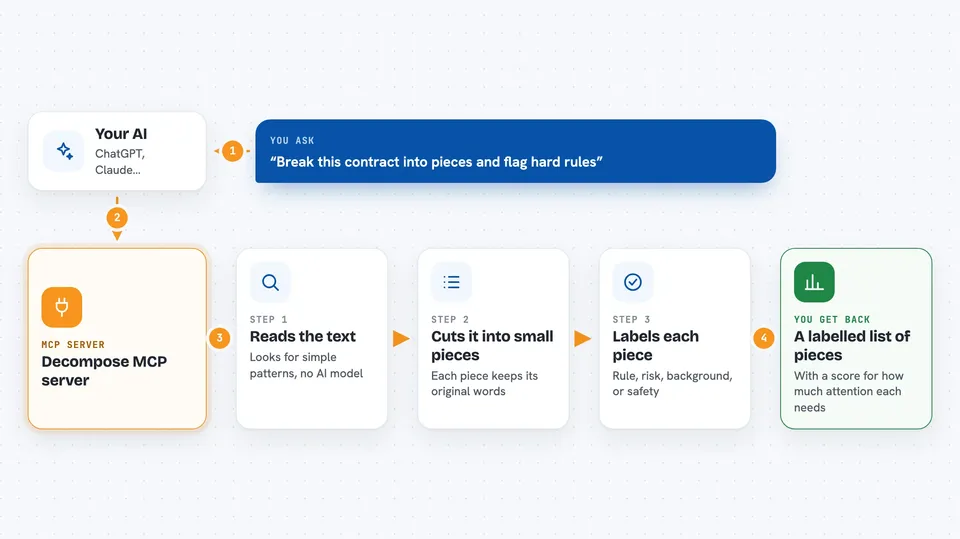
Decompose is a small helper that reads a piece of text and splits it into separate sentences or short blocks, then labels each one. It tells your AI which parts are hard rules, which are risky, and which are just filler. It is handy if you deal with contracts, specs, policies, or any long document where you need to know what actually matters.
What is an MCP server? The 30-second version
On its own, your AI can only chat with you. An MCP server is a small helper program that gives your AI a new skill or a connection to something useful. This one connects your AI to Decompose, a text-sorting tool. Once it is connected, you can paste a document into the chat and ask your AI to break it down, and the helper does the sorting behind the scenes.
What this MCP server does
You paste some text into your AI chat, or give it a web address. Your AI sends that text to this helper. The helper reads it with simple pattern rules, no AI model involved, and cuts it into small units. Each unit gets labels like mandatory, prohibitive, safety critical, or informational, plus a score for how much attention it deserves. Your AI then shows you the labelled list or a summary of it.
 Click to zoom
What you can do with it
- Split a long contract or spec into short, labelled pieces
- Spot which sentences are hard requirements and which are just background
- Flag safety, security, or money-related lines so you do not miss them
- Pull out formal references like standards and codes (for example ASTM C150-20)
- Fetch a web page and break its content down the same way
- Filter out boilerplate so only the important lines are left
- Get a rough score for how much attention each piece deserves
Try asking your AI
- “Break this contract into pieces and tell me which parts are hard requirements.”
- “Which lines in this spec are safety critical?”
- “Pull out every standard or code mentioned in this document.”
- “Decompose this web page and show me only the parts that need action.”
What it gives back to you
You get back a list of units, each with the original text and its labels: authority, risk, type, whether it must be kept word for word, an attention score from 0 to 10, and any standards or codes it mentions. Your AI can show this as a table, a bullet list, or a short summary of the risky parts. If you ask for filtering, you also get a shorter version with the filler removed and a note about how much was dropped.
Before you start
What you need
- Python installed on your computer (the free programming tool this runs on)
- The uvx tool, which comes with the uv package manager (a free installer for Python helpers)
- An AI app that supports MCP servers, such as Claude Code, Cursor, or Windsurf
Good to know
It only sorts and labels text with simple pattern rules, so its labels can be wrong or miss context, and you should still read important documents yourself.
Install it with your AI
Add Decompose MCP server to your AI, no technical skills needed
You don't install anything by hand. You copy one prompt, paste it into an AI that can work on your computer, and it checks, installs and connects the server for you, asking you when it needs something.
Sign in to get the install prompt
Members get a ready-made prompt that lets the Claude desktop app check Decompose MCP server, install it and connect it for them, step by step. You don't need any technical skills: you copy, paste and answer a few questions. Your connected AI can also find and install any of the 4,361 MCP servers here for you.
Who it's for
People who read a lot of contracts, engineering specs, policies, or regulations and want their AI to point out what actually matters.