
MCP server · Developer tools
Image Dimensions MCP server
by Bishop81
Lets your AI check the images on a web page and flag the ones that are too big for their spot.
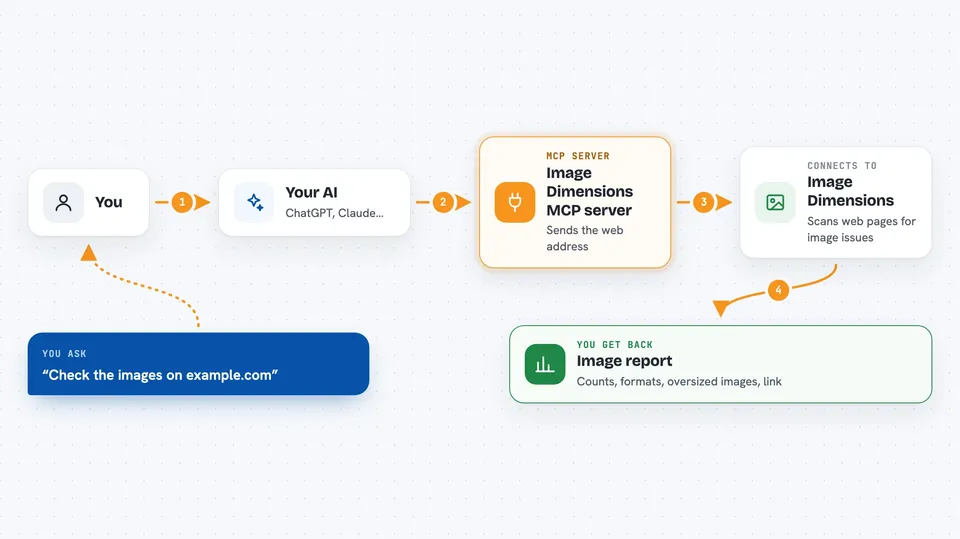
This is a small helper that lets your AI look at the images on any public web page and tell you how they are doing. It checks whether each image is bigger than the space it actually shows up in, which is a common reason pages feel slow. It is handy if you work on websites or just want a quick picture check without opening a browser tool.
What is an MCP server? The 30-second version
On its own, your AI can only chat with you. An MCP server is a small helper program that gives your AI a new skill or a connection to an app or service. This one connects your AI to imagedimensions.com, a service that inspects images on web pages. Once it is connected, you can ask your AI about a page's images and it will go check for you.
What this MCP server does
You give your AI a web address of a page you want to look at. Your AI passes that address to this helper. The helper sends it to imagedimensions.com, which scans the page on its own servers, so nothing needs to be installed on your computer. The service sends back a report, and your AI shows it to you in the chat as a readable summary. You also get a link to a fuller visual report on the imagedimensions.com site.
 Click to zoom
What you can do with it
- Count the images on a page, including ones shown as background images
- Compare each image's real size with the size it is displayed at
- Flag images that are much larger than the space they appear in
- Show the share of images using newer formats like WebP and AVIF
- Break down which image formats the page uses
- Give you a link to a full visual report on imagedimensions.com
Try asking your AI
- “Audit the images on https://example.com”
- “Which images on this page are oversized and could be slowing it down?”
- “What percentage of this site's images use modern formats like WebP or AVIF?”
- “Give me a format breakdown of the images on this page”
What it gives back to you
You get a text report in the chat, plus the same information in a structured form your AI can read. It includes how many images were found, how many are visible, how many are background images, the format breakdown, and the share using modern formats. It also lists the oversized images with their real size, their displayed size, how much bigger they are, their format, and their address. A link to the full visual report is included too.
Before you start
What you need
- An MCP client that can run this server, such as the Claude desktop app
- Node.js installed on your computer so the npx command can run
Good to know
It only reads public web pages, so do not point it at private or internal pages you would not want sent to an outside service.
Install it with your AI
Add Image Dimensions MCP server to your AI, no technical skills needed
You don't install anything by hand. You copy one prompt, paste it into an AI that can work on your computer, and it checks, installs and connects the server for you, asking you when it needs something.
Sign in to get the install prompt
Members get a ready-made prompt that lets the Claude desktop app check Image Dimensions MCP server, install it and connect it for them, step by step. You don't need any technical skills: you copy, paste and answer a few questions. Your connected AI can also find and install any of the 4,609 MCP servers here for you.
Who it's for
Web developers, designers, and anyone who checks page speed or image quality and wants a quick answer without opening a separate tool.



