
MCP server · Productivity
Bitrix24 MCP server
by bit2beat
Connect Claude to your Bitrix24 portal so it can read and change CRM records, tasks, files and more.
This is a small helper that connects Claude to your Bitrix24 portal. Once it is set up, you can just ask Claude in normal words to look things up or make changes in Bitrix24, and it will do it for you. It is handy for anyone who spends their day inside Bitrix24 and wants to skip the clicking.
What is an MCP server? The 30-second version
On its own, Claude can only chat. An MCP server is a small helper program that gives Claude a new skill or a connection to another app. This one connects Claude to your Bitrix24 portal, so Claude can look things up there or do things for you when you ask. You set it up once, and after that it just works in the background.
What this MCP server does
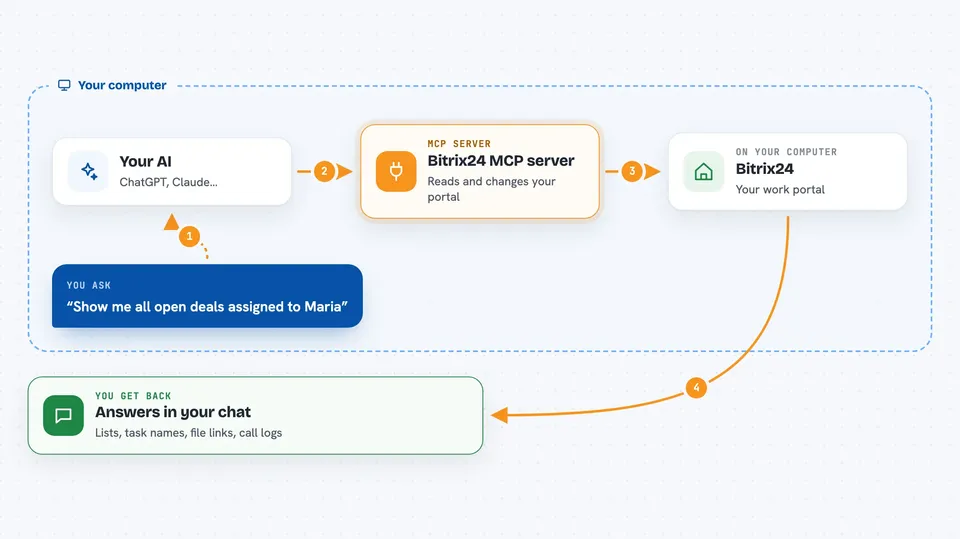
You type a request in Claude, like asking for your open deals or telling it to create a task. Claude passes that request to this helper program running on your computer. The helper then talks to your Bitrix24 portal through a special web address called a webhook. Bitrix24 sends the answer back, and Claude shows it to you in the chat in plain words. If you asked for a change, like creating a task, the helper makes that change in Bitrix24 for you.
 Click to zoom
What you can do with it
- List, create, update and delete deals, contacts, companies and leads
- Create, update and complete tasks
- Browse your Bitrix24 disk and get file download links
- List and create calendar events
- Send chat messages and personal notifications
- Look up products in your catalog
- Query the call history log
- Export your portal configuration to a file
Try asking your AI
- “Show me all open deals assigned to Maria”
- “Create a task for Tom to review the contract, due Friday”
- “What calls came in from company X this week?”
- “Send a message to the sales chat saying the report is ready”
What it gives back to you
You get answers right in the chat: lists of records, single record details, task summaries, file links, or call logs. When you ask for a change, Claude tells you what it did, like the name of the task it created. For bigger jobs, like exporting your portal setup, it can give you a file you can save. Everything shows up as normal text in the conversation.
Before you start
What you need
- Node.js version 18 or newer installed on your computer
- The Claude desktop app or Claude Code
- A Bitrix24 incoming webhook URL, which only a Bitrix24 administrator can create
Good to know
This helper can change and delete things in your Bitrix24 portal, so be careful with requests that modify or remove records.
Install it with your AI
Add Bitrix24 MCP server to your AI, no technical skills needed
You don't install anything by hand. You copy one prompt, paste it into an AI that can work on your computer, and it checks, installs and connects the server for you, asking you when it needs something.
Sign in to get the install prompt
Members get a ready-made prompt that lets the Claude desktop app check Bitrix24 MCP server, install it and connect it for them, step by step. You don't need any technical skills: you copy, paste and answer a few questions. Your connected AI can also find and install any of the 4,361 MCP servers here for you.
Who it's for
Bitrix24 users, sales teams, project managers and Bitrix24 consultants who want to work with their portal through Claude instead of clicking around.





