MCP server · Design tools
MotionLint MCP server
by bobaba99
Your AI can check how a web page's animations look and behave, and tell you what to fix.
MotionLint is a tool that looks at the animations on a web page and gives them a score. It watches things like how long a popup takes to appear, whether buttons react when you hover, and whether the page respects people who prefer less motion. It is handy if you build or review websites and want a second pair of eyes on the moving parts.
What is an MCP server? The 30-second version
On its own, your AI can only chat. It cannot open a web page and watch it move. An MCP server is a small helper program that gives your AI a new skill, and here that skill is connecting to MotionLint. Once connected, your AI can ask MotionLint to inspect a page and then explain the results to you in plain words.
What this MCP server does
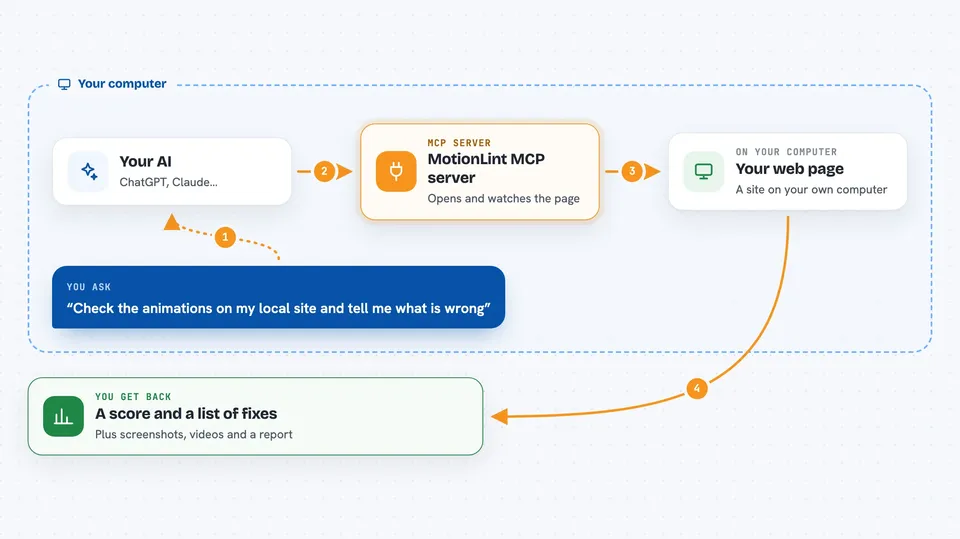
You ask your AI to check the animations on a page, for example your local site or a staging link. Your AI passes that request to MotionLint. MotionLint opens the page in a hidden browser, watches the animations, and measures things like speed, easing, and hover behavior. Then it sends the findings back to your AI, which turns them into a short report with scores and suggested fixes.
 Click to zoom
What you can do with it
- Audit a page's animations and get a score
- Find animations that are too slow or too fast
- Check if hover effects work on touch screens
- See if the page respects reduced-motion settings
- Review a whole user journey step by step
- Get ranked lists of animation problems
- Tune animations with live sliders in a browser
Try asking your AI
- “Check the animations on my local site at http://localhost:3000 and tell me what is wrong”
- “Review the signup flow on my staging site and list the top animation issues”
- “Does my pricing page respect reduced-motion preferences?”
- “Give me a score for the animations on this page and suggest three fixes”
What it gives back to you
You get back a score out of 10, a list of findings ranked by importance, and concrete suggestions for each one. For example, it might say a modal takes 600ms to appear and suggest shortening it. It can also save screenshots, videos, and an HTML report you can open in your browser.
Before you start
What you need
- Node.js 18 or newer
- A one-time browser install (the tool will tell you the command)
- Optional: an API key from Anthropic, OpenAI, or Google if you want the AI design review part
- Optional: Ollama running locally if you want to avoid API keys
Good to know
The AI review part sends screenshots of your page to an external AI provider, which may cost money and share your page content with that provider.
Install it with your AI
Add MotionLint MCP server to your AI, no technical skills needed
You don't install anything by hand. You copy one prompt, paste it into an AI that can work on your computer, and it checks, installs and connects the server for you, asking you when it needs something.
Sign in to get the install prompt
Members get a ready-made prompt that lets the Claude desktop app check MotionLint MCP server, install it and connect it for them, step by step. You don't need any technical skills: you copy, paste and answer a few questions. Your connected AI can also find and install any of the 4,361 MCP servers here for you.
Who it's for
Web developers, designers, and anyone who reviews or builds websites and cares about how animations feel.