
MCP server · Developer tools
my-pi MCP server
by BoxBoxmari
Lets your AI read, search, and carefully edit the code in one project folder, with Git and code navigation built in.
my-pi is a helper program that gives your AI careful access to one folder of code on your own computer. It is made for developers who want an AI to look through a project and make small changes, without handing it a free run of your whole machine. If you use a coding assistant and want it to stay inside one project, this is for you.
What is an MCP server? The 30-second version
On its own, your AI can only chat with you. An MCP server is a small helper program that gives your AI a new skill or a connection to something, and here that something is a folder of code on your computer. Once my-pi is connected, your AI can look inside that folder, search it, and make edits when you ask. The helper sits between your AI and your files, and it only touches the folder you point it at.
What this MCP server does
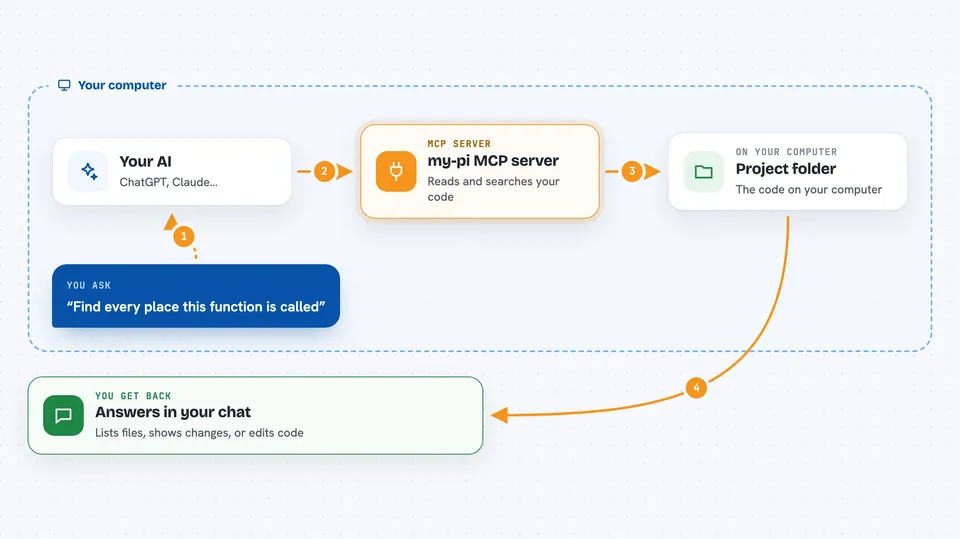
You tell your AI what you want, like finding where a function is used or fixing a small mistake. Your AI sends that request to my-pi instead of guessing. my-pi then looks inside the project folder you allowed, reads files, searches the code, or checks Git history. It sends the results back, and your AI explains them to you or makes the change you asked for. By default it can only read; changing files needs you to turn on a trusted mode first.
 Click to zoom
What you can do with it
- Read files inside one project folder
- Search the code for words or patterns
- Find code by its structure, not just text
- Look up where a function is defined and used
- Check for code errors and warnings
- See Git status and what changed
- Edit or patch files when trusted mode is on
Try asking your AI
- “Find every place this function is called in the project”
- “Show me what changed in Git since yesterday”
- “Are there any errors or warnings in this file”
- “Read the config file and tell me what it sets”
What it gives back to you
You get answers in the chat, like a list of matching files, a short summary of what changed, or the content of a file. For code navigation you get the location of a definition or the places something is used. If it edits a file, it tells you what it changed. Git checks come back as a status list or a diff you can read.
Before you start
What you need
- Node.js version 24 or newer installed on your computer
- The folder path of the project you want your AI to work on
- A coding app that can use MCP servers, like Claude Code or Cursor
Good to know
When you turn on trusted mode it can change or replace files in your project, so keep backups or use Git before letting it edit.
Install it with your AI
Add my-pi MCP server to your AI, no technical skills needed
You don't install anything by hand. You copy one prompt, paste it into an AI that can work on your computer, and it checks, installs and connects the server for you, asking you when it needs something.
Sign in to get the install prompt
Members get a ready-made prompt that lets the Claude desktop app check my-pi MCP server, install it and connect it for them, step by step. You don't need any technical skills: you copy, paste and answer a few questions. Your connected AI can also find and install any of the 4,609 MCP servers here for you.
Who it's for
Developers and programmers who use an AI coding assistant and want it to work safely inside one project folder.




