MCP server · Developer tools
SSH Manager MCP server
by bvisible
Let your AI run commands, move files, and check the health of your remote servers over SSH.
This is a helper that connects your AI assistant to your remote servers over SSH. SSH is the standard way to log in to another computer and run commands on it. If you look after one or more servers and want to ask your AI to do small jobs on them, this is for you.
What is an MCP server? The 30-second version
On its own, your AI can only chat. An MCP server is a small helper program that gives your AI a new skill or a connection to another app or service. This one connects your AI to your servers over SSH, so it can look things up and do things there when you ask. You stay in charge: you decide which servers it can reach and how much it is allowed to do on each one.
What this MCP server does
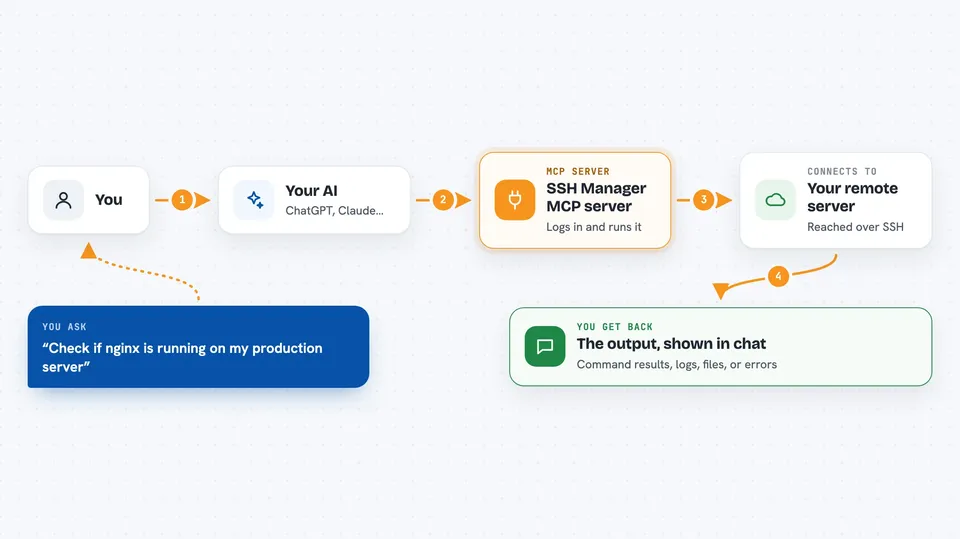
You tell your AI what you want, for example to check whether a service is running or to copy a file to a server. Your AI passes that request to this helper program. The helper logs in to the server you named and runs the command or transfer there. Then it sends the result back, and your AI shows it to you in the chat. You can also set rules per server, so on some servers the helper is only allowed to look, not to change anything.
 Click to zoom
What you can do with it
- Run a command on one of your servers and read the output
- Copy files to and from a server, or sync a folder with rsync
- Dump a database or run a read-only query and see the rows
- Make a backup of files or a database on a server
- Check whether a server is reachable and how it is doing
- Open a tunnel to a service that is only reachable from the server
- Run the same command on a group of servers at once
Try asking your AI
- “Check if nginx is running on my production server”
- “Show me the last 50 lines of the app log on staging”
- “Copy the file report.csv from my laptop to the backups folder on server 2”
- “Run a backup of the shop database on the production server”
What it gives back to you
You get the output of what ran, shown as text in the chat: command results, log lines, file lists, database rows, or a short summary of a transfer or backup. If something failed, you see the error message and the exit code. For actions that change things, like an upload or a backup, you get a short confirmation of what was done.
Before you start
What you need
- The server details you already use to log in: address, username, and a password or SSH key
- Node.js 18 or newer installed on your computer
- An MCP client such as Claude Code or another app that can add MCP servers
Good to know
This helper can run commands and change or delete files on your real servers, so set the read-only or restricted mode on any server you do not want touched.
Install it with your AI
Add SSH Manager MCP server to your AI, no technical skills needed
You don't install anything by hand. You copy one prompt, paste it into an AI that can work on your computer, and it checks, installs and connects the server for you, asking you when it needs something.
Sign in to get the install prompt
Members get a ready-made prompt that lets the Claude desktop app check SSH Manager MCP server, install it and connect it for them, step by step. You don't need any technical skills: you copy, paste and answer a few questions. Your connected AI can also find and install any of the 4,361 MCP servers here for you.
Who it's for
People who look after servers, like developers, system administrators, and small teams running their own websites or apps.