
MCP server · Browser automation
Browser MCP server
by bytedance
Lets your AI open web pages, click, type, and read what is on the screen for you.
This is a small helper that gives your AI its own web browser. You ask it to go to a page, look around, fill in a form, or grab some text, and it does that for you. It is handy for anyone who spends time copying things from websites into their work.
What is an MCP server? The 30-second version
On its own, your AI can only chat with you. An MCP server is a small helper program that gives your AI one new skill. This helper gives your AI a web browser it can control, so it can visit pages and do things there. You still just talk to your AI in normal words, and the helper does the clicking behind the scenes.
What this MCP server does
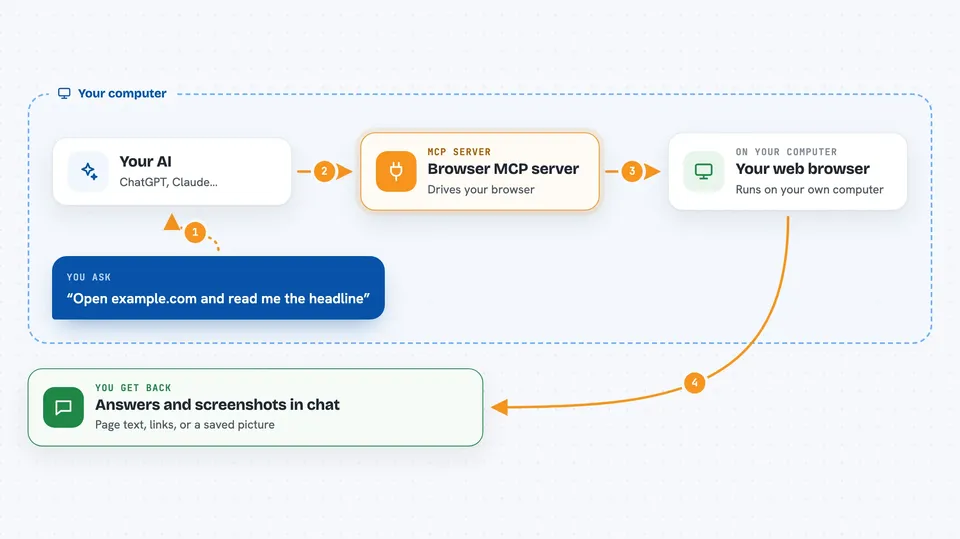
You tell your AI what you want on the web, in plain words. Your AI passes that to this helper, which opens a real browser on your computer. The helper goes to the page, clicks buttons, types into boxes, scrolls, and reads the text. Then your AI tells you back what it found or what it did.
 Click to zoom
What you can do with it
- Open a web address and read the page for you
- Click buttons and links on a page
- Fill in forms and text boxes
- Take screenshots of a page or a single element
- List all the links on a page
- Scroll down and go back to earlier pages
- Download files and show you what was downloaded
Try asking your AI
- “Go to example.com and tell me what the main headline says”
- “Open our supplier's site and find their contact email”
- “Fill in the search box on this page with 'invoice template' and show me the first five results”
- “Take a screenshot of the pricing page and save it”
What it gives back to you
You get answers in the chat: the text of a page, a list of links, a short summary, or a screenshot. If it filled in a form or clicked something, it tells you what it did. Downloads and screenshots are saved as files you can open.
Before you start
What you need
- Node.js 18 or newer installed on your computer
- An MCP client like Claude Desktop, Cursor, VS Code, or Windsurf
- A browser such as Chrome, Edge, or Firefox
Good to know
It can click and type on real websites, so check what it is about to do before it submits a form or downloads a file.
Install it with your AI
Add Browser MCP server to your AI, no technical skills needed
You don't install anything by hand. You copy one prompt, paste it into an AI that can work on your computer, and it checks, installs and connects the server for you, asking you when it needs something.
Sign in to get the install prompt
Members get a ready-made prompt that lets the Claude desktop app check Browser MCP server, install it and connect it for them, step by step. You don't need any technical skills: you copy, paste and answer a few questions. Your connected AI can also find and install any of the 4,361 MCP servers here for you.
Who it's for
Office workers who often copy information from websites, fill in web forms, or check pages by hand.


