
MCP server · Finance and crypto
AllRatesToday currency rates MCP server
by cahthuranag
Lets your AI look up live currency exchange rates, convert amounts, and show rate history.
This is a small helper that connects your AI assistant to AllRatesToday, a service that tracks currency exchange rates. Once it is set up, you can just ask your AI things like what the dollar is worth in euros today, and it will look up a real number instead of guessing. It is handy for anyone who deals with money in more than one currency.
What is an MCP server? The 30-second version
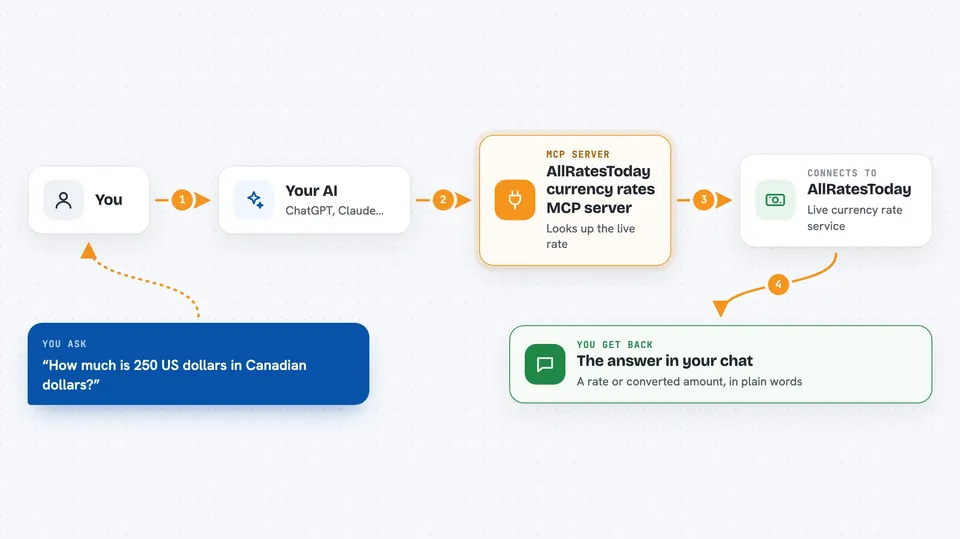
On its own, your AI can only chat. It cannot check today's exchange rate, because it has no live connection to the outside world. An MCP server is a small helper program that gives your AI a new skill, and this one connects it to AllRatesToday. So when you ask about a currency rate, your AI quietly asks this helper, the helper asks AllRatesToday, and you get a real answer back in the chat.
What this MCP server does
You ask your AI a question about currency, like how much 250 US dollars is in Canadian dollars. Your AI passes that request to this helper program. The helper then asks the AllRatesToday service for the current rate. AllRatesToday sends back the number, and your AI turns it into a normal sentence for you. You never have to open a website or do the math yourself.
 Click to zoom
What you can do with it
- Look up the current exchange rate between any two currencies
- Convert an amount from one currency into another
- See how a currency pair moved over the last day, week, month, or year
- Compare one currency against several others at once
- Check the full list of supported currencies and their codes
- Look up a rate at a specific past date or time
Try asking your AI
- “What is the current USD to EUR rate?”
- “Convert 250 USD into CAD at a real rate.”
- “Show me how GBP/JPY moved over the last 30 days.”
- “Compare USD against EUR, GBP, and JPY at the same time.”
What it gives back to you
You get answers in plain language in your chat, like a rate number or a converted amount. For history questions, your AI can show a list of dates and rates, or describe the trend in words. For multi-currency questions, you get a small list of each currency and its rate. Everything shows up right in the conversation, no extra files to open.
Before you start
What you need
- A free AllRatesToday account if you want live rates (register at allratestoday.com, no credit card needed)
- An API key from your AllRatesToday dashboard (a kind of password for apps; the site gives you one for free)
- An MCP-compatible AI client like Claude Desktop, Claude Code, Cursor, or Windsurf
- Node.js 18 or newer, if you install it on your own computer
Good to know
Rates here are mid-market rates, which are good for everyday conversions but are not the official rates a tax office or auditor may require.
Install it with your AI
Add AllRatesToday currency rates MCP server to your AI, no technical skills needed
You don't install anything by hand. You copy one prompt, paste it into an AI that can work on your computer, and it checks, installs and connects the server for you, asking you when it needs something.
Sign in to get the install prompt
Members get a ready-made prompt that lets the Claude desktop app check AllRatesToday currency rates MCP server, install it and connect it for them, step by step. You don't need any technical skills: you copy, paste and answer a few questions. Your connected AI can also find and install any of the 4,609 MCP servers here for you.
Who it's for
Anyone who works with more than one currency, like freelancers billing overseas, small business owners, travelers, or finance and admin staff.



