
MCP server · Notes
Workspace Qdrant MCP server
by ChrisGVE
Lets your AI search your project's code and notes and remember what it learned between sessions.
This is a helper that gives your AI assistant a memory for your project. It reads your code and documents, keeps them in a searchable store, and lets the AI look things up quickly. It is handy if you work on a codebase with ChatGPT or Claude and keep re-explaining the same things.
What is an MCP server? The 30-second version
On its own, your AI can only chat with what you paste in. An MCP server is a small helper program that gives your AI a new skill or a connection to an app or service. This one connects your AI to a local search store for your project's files, so the AI can look things up or save notes there when you ask. Think of it as giving your assistant a filing cabinet for your project.
What this MCP server does
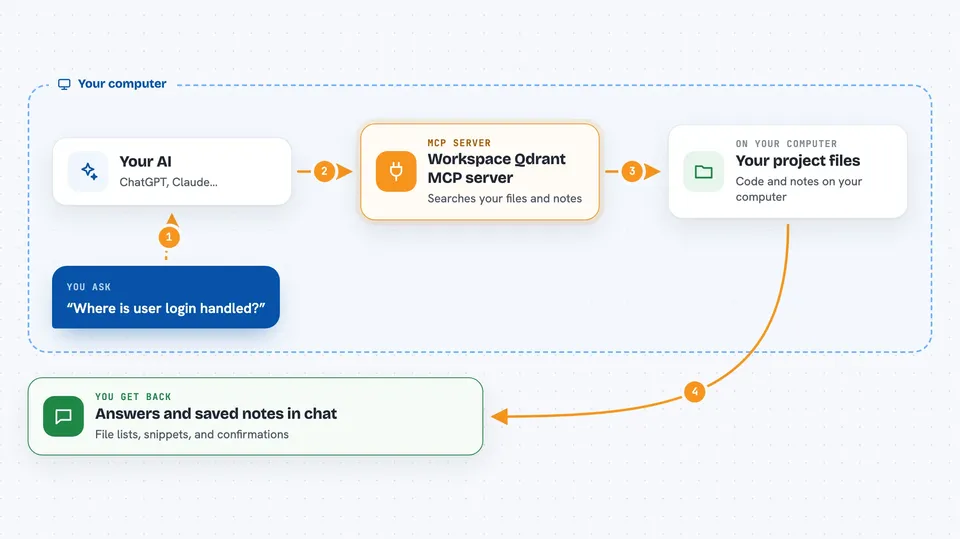
You ask your AI a question about your project, like where a function lives or how something works. The AI uses this helper to search an index of your code and documents. The helper talks to a local search store called Qdrant, which holds the indexed content. It can also save new findings, notes, or reference documents so they are there next time. You get back answers, file lists, or saved notes right in the chat.
 Click to zoom
What you can do with it
- Search your project's code and docs by meaning, not just exact words
- Find exact strings or patterns in your files
- List files and folder structure in a project
- Save notes, findings, or design reasons for later sessions
- Store external reference docs so they are searchable next to your code
- Keep persistent rules that the AI follows across sessions
- Look up a document directly by its ID or a filter
Try asking your AI
- “Search my project for where user login is handled”
- “Find every file that mentions the word invoice”
- “List the files in the src folder as a summary”
- “Save this note: we chose Postgres because of the reporting needs”
What it gives back to you
You get answers in plain chat: short summaries, lists of matching files, or snippets from your code and notes. When you save something, the AI confirms it stored the note. When you search, it shows the most relevant matches with a bit of context. Over time, the AI can pull up things from earlier sessions that you would otherwise have to repeat.
Before you start
What you need
- Qdrant running locally (the README shows a one-line Docker command to start it)
- A C compiler installed so the code-reading parts can be built the first time
- Claude Desktop or Claude Code, or another app that supports MCP servers
Good to know
It reads your project files and stores them in a local search index, so be mindful of anything private in the folders you point it at.
Install it with your AI
Add Workspace Qdrant MCP server to your AI, no technical skills needed
You don't install anything by hand. You copy one prompt, paste it into an AI that can work on your computer, and it checks, installs and connects the server for you, asking you when it needs something.
Sign in to get the install prompt
Members get a ready-made prompt that lets the Claude desktop app check Workspace Qdrant MCP server, install it and connect it for them, step by step. You don't need any technical skills: you copy, paste and answer a few questions. Your connected AI can also find and install any of the 4,609 MCP servers here for you.
Who it's for
Developers and technical teams who use an AI assistant on a codebase and want it to remember context between sessions.


