
MCP server · Developer tools
Shrimp Task Manager MCP server
by cjo4m06
Lets your AI plan, track and finish coding tasks without losing its place between sessions.
Shrimp Task Manager is a helper program that gives your AI a memory for tasks. Instead of forgetting what you were working on, it keeps a list of jobs, breaks big ones into smaller steps, and remembers where you stopped. It is handy if you use an AI coding assistant and your projects take more than one sitting.
What is an MCP server? The 30-second version
On its own, your AI can only chat. It reads what you type and answers, but it cannot remember a to-do list from yesterday or keep track of ten steps in a row. An MCP server is a small helper program that gives your AI a new skill. This one gives it a task notebook, so your AI can write down what needs doing, tick things off, and pick up where it left off.
What this MCP server does
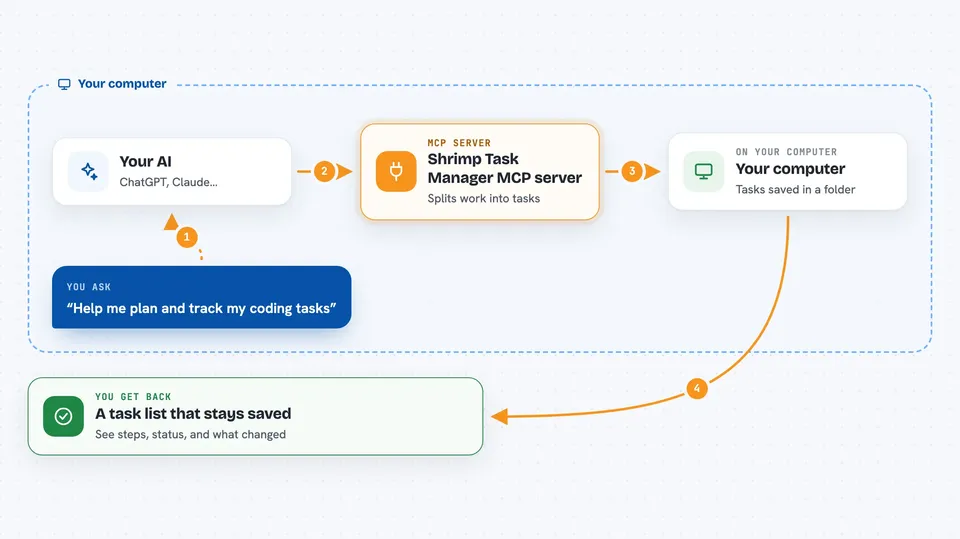
You tell your AI what you want to build or fix, in normal words. Your AI passes that to Shrimp, which studies the request and splits it into smaller tasks with an order. Shrimp stores those tasks in a folder on your computer, along with notes about what was done. When you come back later, your AI can look at that list again and continue, so nothing gets lost between sessions.
 Click to zoom
What you can do with it
- Plan a piece of work and get it broken into smaller steps
- See the full list of tasks and their current status
- Run through tasks one after another without stopping
- Track which tasks depend on which other tasks
- Research a topic before deciding how to build something
- Review a finished task and improve it
- Keep project rules and coding standards in one place
What it gives back to you
You get back a list of tasks with short descriptions and a status for each one, like pending or done. When your AI plans something, you see the smaller steps it came up with and the order it suggests. When a task runs, you see what was changed or produced. Everything stays in your chat, and the list is saved on your computer so it is still there next time.
Before you start
What you need
- Node.js 18 or newer installed on your computer
- An MCP-compatible AI client, such as Claude Code
- A folder on your computer where the task data can be saved
Good to know
It saves task data in a folder you choose, and it can change files in your project when it runs tasks, so keep a backup of your work.
Install it with your AI
Add Shrimp Task Manager MCP server to your AI, no technical skills needed
You don't install anything by hand. You copy one prompt, paste it into an AI that can work on your computer, and it checks, installs and connects the server for you, asking you when it needs something.
Sign in to get the install prompt
Members get a ready-made prompt that lets the Claude desktop app check Shrimp Task Manager MCP server, install it and connect it for them, step by step. You don't need any technical skills: you copy, paste and answer a few questions. Your connected AI can also find and install any of the 4,361 MCP servers here for you.
Who it's for
People who use an AI coding assistant on projects that take more than one session and want the AI to remember the plan.





