MCP server · Research
Oravan MCP server
by cm2489
Ask your AI who represents you in Congress and what bills are moving, in plain English or Spanish.
Oravan is a free, nonpartisan service that explains what the U.S. Congress is doing in everyday words. It also offers an MCP server, which is a way to let your AI assistant look things up in Oravan for you. It is handy if you want to know who your representatives are, what a bill actually says, or which bills are moving right now.
What is an MCP server? The 30-second version
On its own, your AI can only chat with you using what it already learned. An MCP server is a small helper program that gives your AI a new skill or a connection to an outside service. This one connects your AI to Oravan, a public database about Congress. So when you ask about a bill or your representative, your AI can go ask Oravan and bring the answer back to you.
What this MCP server does
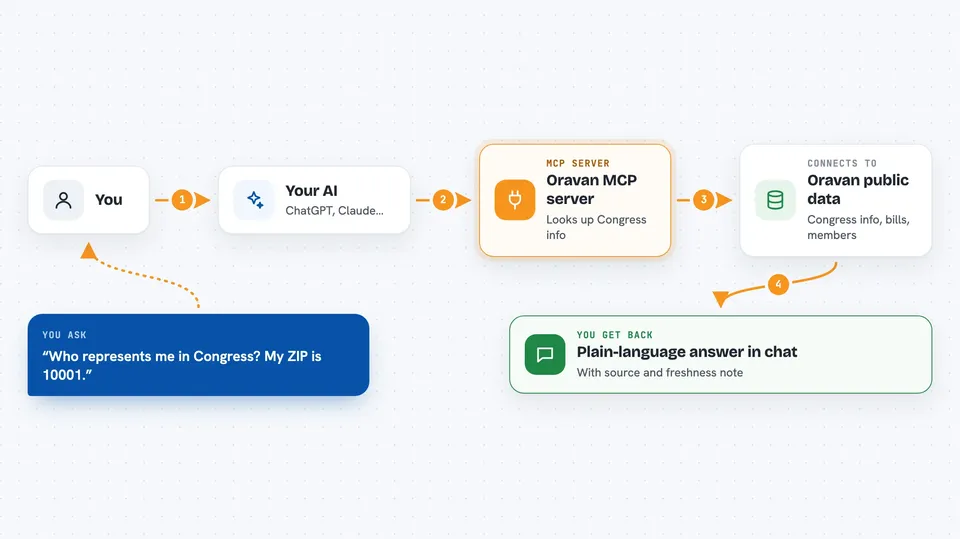
You ask your AI a question about Congress, like who represents your ZIP code or what a bill does. Your AI sends that question to the Oravan helper, which looks it up in Oravan's public data. Oravan sends back a plain-language answer, plus a note about where the information came from and how fresh it is. Your AI then shows you that answer in the chat. Everything is read-only, so nothing on Oravan changes and no account is needed.
 Click to zoom
What you can do with it
- Look up your senators and House member by ZIP code
- Get a plain-language summary of a specific bill
- Search bills by topic or keyword
- See which bills are moving right now, ranked by urgency
- Get details about a specific member of Congress
- Read summaries in English or Spanish
- See the source and freshness note attached to each answer
Try asking your AI
- “Who represents me in Congress? My ZIP code is 10001.”
- “What does the bill about student loans actually do?”
- “Which bills are moving this week?”
- “Tell me about my senator, and what committees they are on.”
What it gives back to you
You get back plain-language answers in the chat, like a list of your representatives with their names and roles, or a short summary of a bill. Each answer also comes with a small note about the source, when it was last updated, and a label saying the summary was written by AI. If you asked in Spanish, the answer comes back in Spanish.
Before you start
What you need
- An AI assistant that can connect to MCP servers, like the Claude desktop app
- Nothing else: no account, no password, no API key
Good to know
It is read-only and keyless, so it cannot change or delete anything, but the bill summaries are written by AI and should be checked against the official record before you rely on them.
Install it with your AI
Add Oravan MCP server to your AI, no technical skills needed
You don't install anything by hand. You copy one prompt, paste it into an AI that can work on your computer, and it checks, installs and connects the server for you, asking you when it needs something.
Sign in to get the install prompt
Members get a ready-made prompt that lets the Claude desktop app check Oravan MCP server, install it and connect it for them, step by step. You don't need any technical skills: you copy, paste and answer a few questions. Your connected AI can also find and install any of the 4,609 MCP servers here for you.
Who it's for
Anyone who wants to understand Congress without reading legal text, including voters, students, journalists, and community organizers.