
MCP server · Coding · official
SounnyForms MCP server
by sounny · official
Let your AI build contact forms and send form submissions to any email inbox, no API keys needed.
SounnyForms is a service that handles the forms on websites, like contact or signup forms, and sends whatever people type into them to your email. This MCP server connects your AI assistant to SounnyForms so it can write form code for you and even send test submissions. It is handy if you build or maintain a website and want your AI to help with the boring form parts.
What is an MCP server? The 30-second version
On its own, your AI can only chat with you. An MCP server is a small helper program that gives your AI a new skill or a connection to another service. This one connects your AI to SounnyForms, so when you ask for a contact form or a test submission, the AI can actually create it or send it instead of just describing it. You do not need to write any code or get any special keys to make that happen.
What this MCP server does
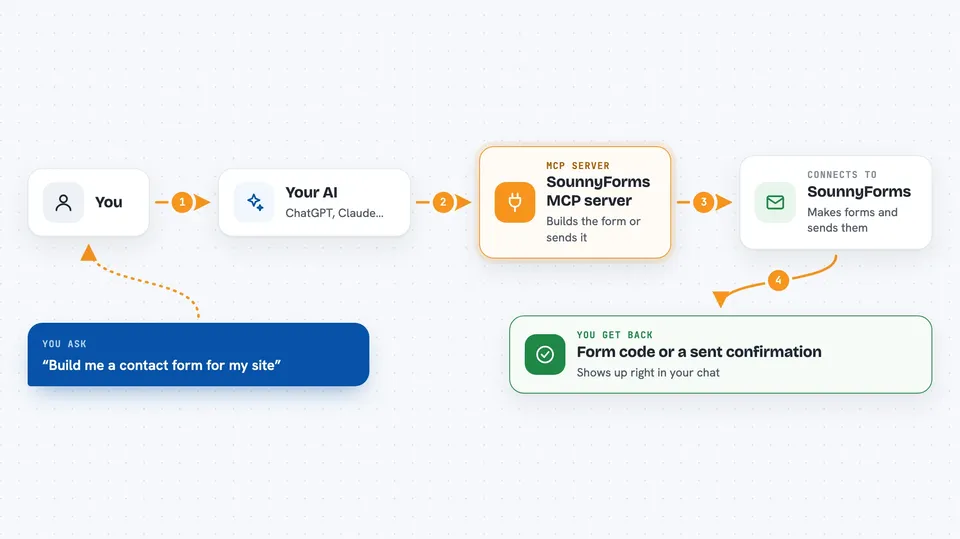
You ask your AI for something, like a contact form for your website or a test message sent to your inbox. The AI uses this helper to talk to SounnyForms. SounnyForms then either writes the form code in the style you asked for, or takes the message you gave and delivers it to the email address you named. You get the code or a confirmation right back in your chat.
 Click to zoom
What you can do with it
- Generate a ready-to-paste contact form in React, Next.js, plain HTML, or Tailwind
- Send a test form submission to any email address to check delivery
- Add custom fields like phone, company, or budget to a generated form
- Check whether the SounnyForms servers are up and responding
- Create a form that sends leads straight to a client's inbox with a reply-to address
- Include basic spam protection automatically in the generated form
Try asking your AI
- “Build me a Tailwind contact form in Next.js that sends leads to client@agency.com using SounnyForms”
- “Submit a test inquiry to my contact form so I can check that the email arrives”
- “Generate a plain HTML form with fields for name, email, phone, and budget”
- “Is the SounnyForms endpoint healthy right now?”
What it gives back to you
You get back either a block of form code you can copy into your website, or a short confirmation that your test submission was sent. If you ask about server health, you get a simple status answer with basic timing info. Everything shows up as normal text in your chat window.
Before you start
What you need
- The Claude desktop app or another AI tool that supports MCP servers
- Node.js installed on your computer (the free software that runs the helper)
- An email address you want form submissions sent to
Good to know
The submit_form tool really sends email to whatever address you give it, so double-check the address before you ask your AI to submit anything.
Install it with your AI
Add SounnyForms MCP server to your AI, no technical skills needed
You don't install anything by hand. You copy one prompt, paste it into an AI that can work on your computer, and it checks, installs and connects the server for you, asking you when it needs something.
Sign in to get the install prompt
Members get a ready-made prompt that lets the Claude desktop app check SounnyForms MCP server, install it and connect it for them, step by step. You don't need any technical skills: you copy, paste and answer a few questions. Your connected AI can also find and install any of the 4,361 MCP servers here for you.
Who it's for
Web developers, freelancers, and small agency folks who build sites with forms and want their AI to handle the form code and testing.




