
MCP server · Analytics
CoreMCP database server
by corebasehq
Lets your AI ask safe, read-only questions to your SQL Server or PostgreSQL database and get answers back.
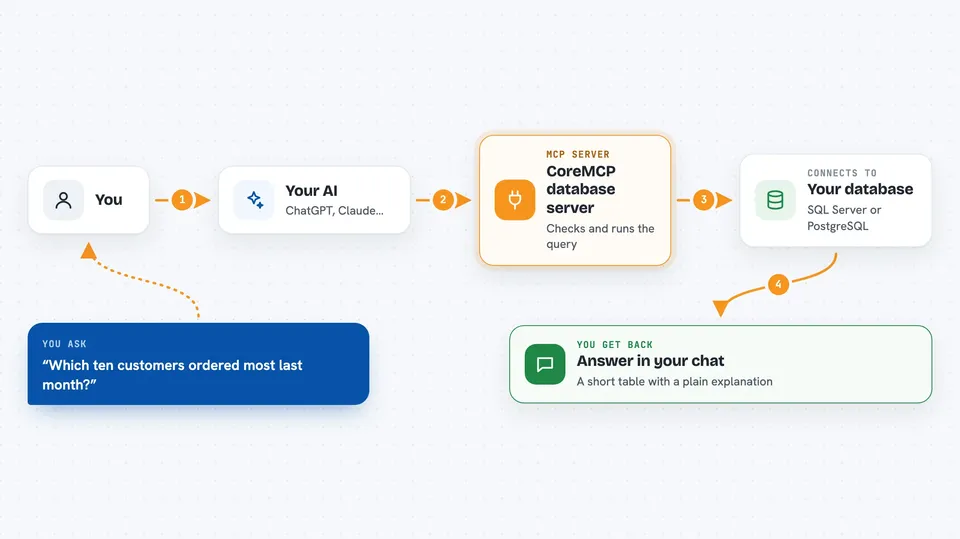
CoreMCP is a small helper program that connects your AI assistant to a real database, such as Microsoft SQL Server or PostgreSQL. It is made for people who need answers from company data but do not want to write SQL by hand. It is handy if your database sits on a company server or an older system that is hard to reach.
What is an MCP server? The 30-second version
On its own, your AI can only chat with you. An MCP server is a small helper program that gives your AI a new skill or a connection to an app or service. This one connects your AI to your database, so it can look things up for you when you ask. You stay in the chat, and the helper does the talking to the database.
What this MCP server does
You ask your AI a question in normal words, like which customers ordered most last month. The AI turns that into a database query and sends it to CoreMCP. CoreMCP checks the query is safe, runs it against your database, and limits how many rows come back. It also hides things like emails and card numbers if you turn that on. Then it hands the results back to your AI, which explains them to you in the chat.
 Click to zoom
What you can do with it
- Ask questions about your data in plain English and get answers
- List the tables in a database and see what columns they have
- Look up the full details of one table, including keys and comments
- See all views and stored procedures in the database
- Run saved queries you set up in advance, like daily sales
- Keep results small with an automatic row limit
- Hide private details like emails and card numbers before you see them
Try asking your AI
- “Which ten customers placed the most orders last month?”
- “Show me the columns and data types in the orders table.”
- “List all stored procedures in the erp_db database.”
- “Run the get_daily_sales tool for 2024-05-01.”
What it gives back to you
You get answers in the chat, usually as a short table or a list of rows. Your AI often adds a plain sentence explaining what the numbers mean. If you asked about the structure of the database, you get a list of tables, columns, or procedures. Nothing is changed in your database unless you deliberately turn on write access.
Before you start
What you need
- A database you can reach, such as SQL Server or PostgreSQL
- A database username and password with read-only access
- The CoreMCP program, either downloaded or run with Docker
- A config file that lists your database connection details
Good to know
It is read-only by default, but if you turn that off it can run stored procedures that may change data, so use a database account with only the permissions you really need.
Install it with your AI
Add CoreMCP database server to your AI, no technical skills needed
You don't install anything by hand. You copy one prompt, paste it into an AI that can work on your computer, and it checks, installs and connects the server for you, asking you when it needs something.
Sign in to get the install prompt
Members get a ready-made prompt that lets the Claude desktop app check CoreMCP database server, install it and connect it for them, step by step. You don't need any technical skills: you copy, paste and answer a few questions. Your connected AI can also find and install any of the 4,609 MCP servers here for you.
Who it's for
Office workers, analysts, and support teams who need quick answers from company databases without writing SQL themselves.


