MCP server · GitHub
OSS Autopilot MCP server
by costajohnt
Keep track of your open source pull requests and get help replying to maintainers and fixing broken builds.
OSS Autopilot is a helper for people who contribute to open source projects on GitHub. It watches all your open pull requests and tells you which ones need your attention, like when a maintainer asked a question or the automated tests broke. It is handy if you have more than a couple of PRs open and keep losing track of them.
What is an MCP server? The 30-second version
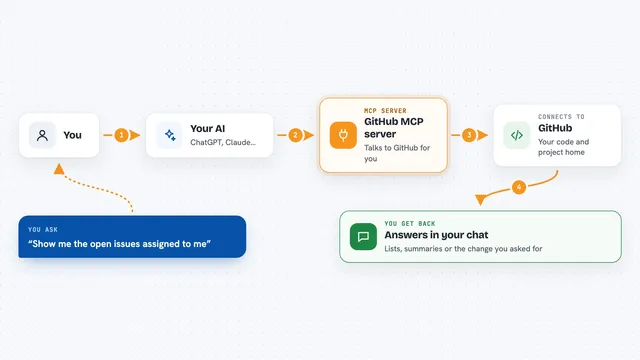
On its own, your AI can only chat with you. An MCP server is a small helper program that gives your AI a new skill or a connection to an app, and here it connects your AI to your GitHub pull requests. Once it is connected, you can ask your AI about your PRs and it can look them up through this helper. The helper talks to GitHub for you and brings the answers back into the chat.
What this MCP server does
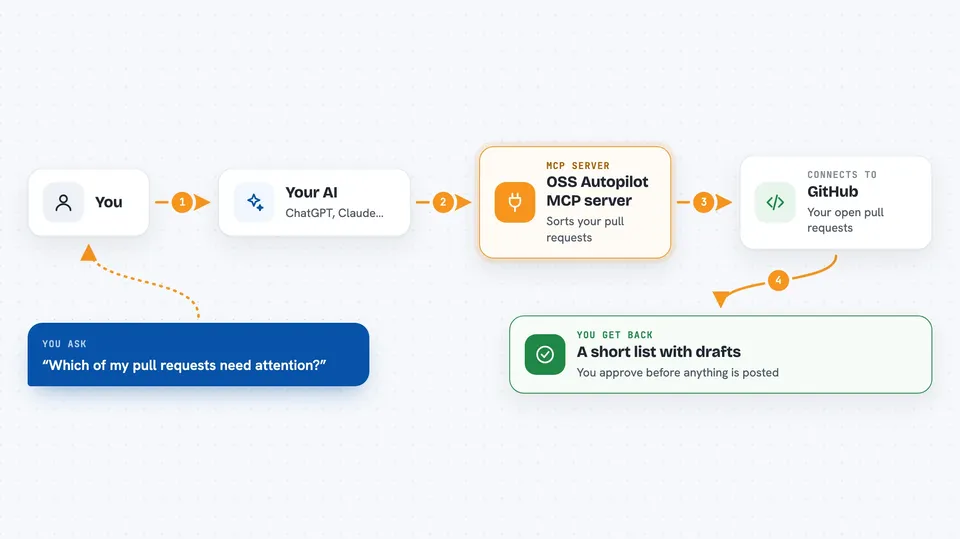
You ask your AI to check your pull requests. The AI uses this helper, which fetches your open PRs from GitHub and sorts them into ones that need you and ones that are waiting on someone else. For the ones that need you, it can look at the conversation and the code changes and draft a reply, explain why the tests failed, or suggest a fix. You read the draft and decide whether to approve it. Nothing gets posted or pushed to GitHub until you say yes.
 Click to zoom
What you can do with it
- See which of your pull requests need a reply or a fix
- Draft a response to a maintainer's comment
- Find out why the automated tests failed on your PR
- Search for new issues that match your skills and interests
- Check whether a project is friendly to outside contributors before you start
- Prepare a fix branch locally while you sleep and read a report in the morning
- Review your own code changes before you commit them
Try asking your AI
- “Check my open pull requests and tell me which ones need attention”
- “Draft a reply to the maintainer on my pull request about the missing test”
- “Why did the tests fail on my latest pull request?”
- “Find me some good first issues in Python projects”
What it gives back to you
You get a short list of your pull requests, sorted with the ones that need you first. Each one comes with a plain explanation of what is going on, like failing tests or an unanswered question. When you pick one, the AI shows you a draft reply or a suggested fix that you can edit, approve, or throw away. You also get search results for new issues, with notes on whether the project is worth your time.
Before you start
What you need
- Node.js 22 or newer
- The GitHub CLI installed and logged in, or a GitHub token (a kind of password for apps)
- Your GitHub username, saved once with a setup command
- An MCP client like Claude Desktop, Cursor, or Claude Code
Good to know
It can read your private pull requests and repository data, and in interactive use it can push branches or post comments, but only after you approve each specific action.
Install it with your AI
Add OSS Autopilot MCP server to your AI, no technical skills needed
You don't install anything by hand. You copy one prompt, paste it into an AI that can work on your computer, and it checks, installs and connects the server for you, asking you when it needs something.
Sign in to get the install prompt
Members get a ready-made prompt that lets the Claude desktop app check OSS Autopilot MCP server, install it and connect it for them, step by step. You don't need any technical skills: you copy, paste and answer a few questions. Your connected AI can also find and install any of the 4,609 MCP servers here for you.
Who it's for
Open source contributors and developers who have several pull requests open at once and want help keeping up with them.