
MCP server · Research
TRINV MCP server
by cqtrinv
Let your AI look up French communes and cadastral parcels by name and surface area.
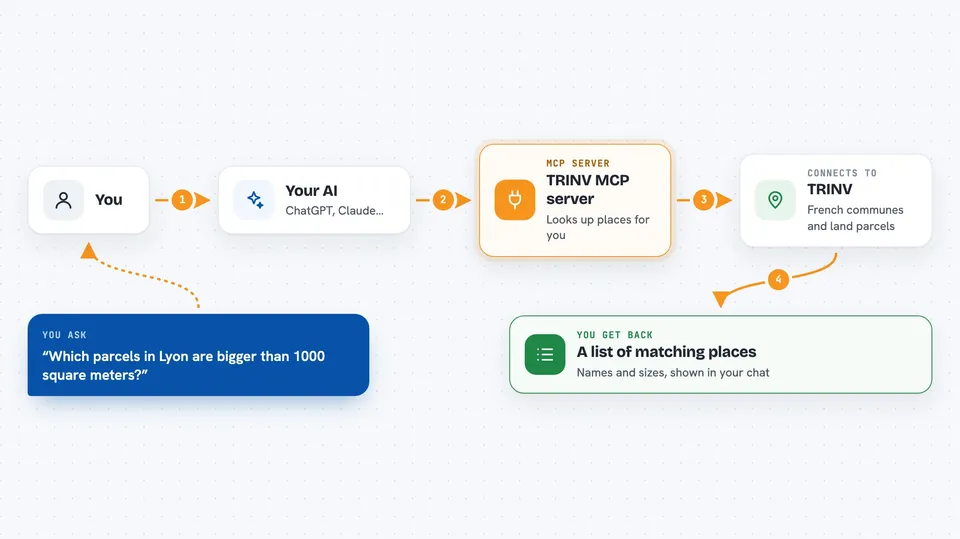
This is a small helper that connects your AI assistant to TRINV, a French website about communes and land parcels. You can ask your AI in plain words to find a town or a plot of land, and it will go and check for you. It is handy if you work with French addresses, land records, or local geography.
What is an MCP server? The 30-second version
On its own, your AI can only chat with you using what it already knows. An MCP server is a small helper program that gives your AI a new skill or a connection to an app or service. This one connects your AI to TRINV, so it can look up French communes and cadastral parcels for you. You just ask in normal words, and the helper does the looking up.
What this MCP server does
You ask your AI something like which communes start with a certain name, or which parcels in a town have a certain surface area. The AI passes your request to this helper, and the helper talks to the TRINV website. TRINV sends back the matching communes or parcels. The AI then shows you the results in the chat, in a readable list or summary.
 Click to zoom
What you can do with it
- Find French communes by part of their name
- Look up cadastral parcels inside a chosen commune
- Filter parcels by a given surface area
- Get a short list of matching places to review
- Check which commune a parcel belongs to
- Compare parcels of similar size in the same area
Try asking your AI
- “Find French communes whose name starts with Saint-R”
- “Which cadastral parcels in that commune have a surface area around 500 square meters”
- “List parcels in the town of Lyon with a surface area bigger than 1000 square meters”
- “Show me communes named Beaumont and then their parcels of about 800 square meters”
What it gives back to you
You get back a list of matching communes or parcels, usually with their names and surface areas. The AI may also give you a short summary of what it found. Everything appears right in the chat, so you can read it, copy it, or ask follow-up questions.
Before you start
What you need
- Node.js installed on your computer
- The mcp-trinv-server package installed
- The Claude desktop app or Gemini set up on your machine
- A small edit to your assistant's settings file to point it at this server
Good to know
It only reads public information from TRINV, so it does not change or delete anything, but the results depend on what TRINV has and may not be complete.
Install it with your AI
Add TRINV MCP server to your AI, no technical skills needed
You don't install anything by hand. You copy one prompt, paste it into an AI that can work on your computer, and it checks, installs and connects the server for you, asking you when it needs something.
Sign in to get the install prompt
Members get a ready-made prompt that lets the Claude desktop app check TRINV MCP server, install it and connect it for them, step by step. You don't need any technical skills: you copy, paste and answer a few questions. Your connected AI can also find and install any of the 4,609 MCP servers here for you.
Who it's for
People who work with French land records, real estate, urban planning, or local geography, and want quick lookups without leaving their AI chat.



