MCP server · Health and learning
Moodle MCP server
by csmediapro
Ask your AI about your Moodle site and get back courses, users, assignments and site info.
This is a small helper that connects your AI assistant to a Moodle learning site. Once it is set up, you can ask questions in plain English instead of clicking through reports or building spreadsheets. It is handy for teachers, trainers and administrators who work with Moodle every day.
What is an MCP server? The 30-second version
On its own, your AI can only chat with you. An MCP server is a small helper program that gives your AI one new skill or one new connection. This helper connects your AI to your Moodle site, so it can look things up there and bring answers back to the chat. You just ask a question, and the AI uses this helper behind the scenes.
What this MCP server does
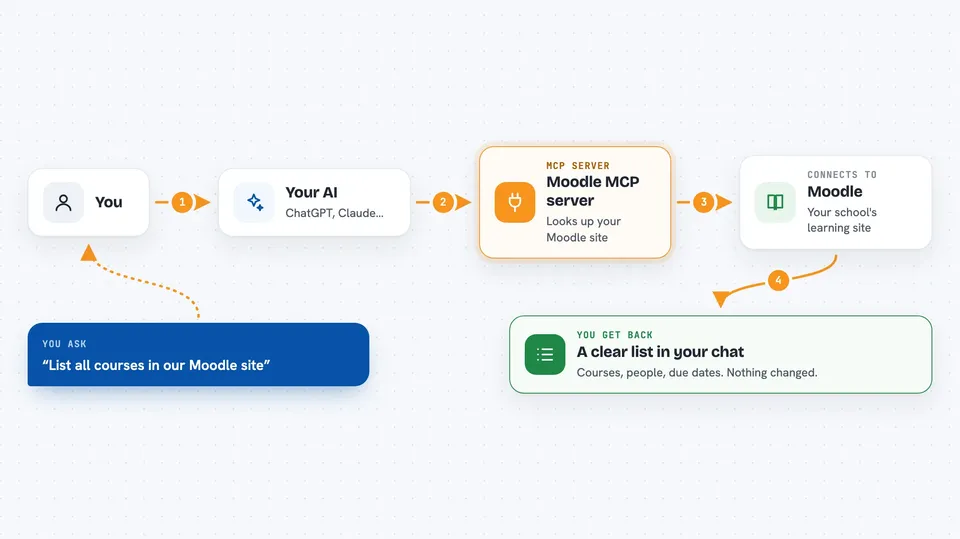
You type a question about your Moodle site, like which courses exist or who is enrolled. Your AI passes that question to this helper. The helper talks to your Moodle site using Moodle's own web services, which is the built-in way Moodle shares information with other programs. Moodle sends the data back, and the helper hands it to your AI. Your AI then shows you the result as a clear answer or list in the chat.
 Click to zoom
What you can do with it
- List all courses in your Moodle site with their categories
- See who is enrolled in a course and what role they have
- Find all assignments in a course with their due dates
- Look up a specific user's details and their courses
- Search for users by name or other standard fields
- Browse the full category structure of your site
- Check basic site info like the site name, version and course count
Try asking your AI
- “List all courses in our Moodle site”
- “Who is enrolled in the Biology 101 course and what roles do they have?”
- “Show me every assignment in the Marketing course with due dates”
- “Find the user called Jane Doe and tell me which courses she is in”
What it gives back to you
You get back plain answers in the chat, usually as a list or a short summary. For example, a list of course names, a table of enrolled users with roles, or assignments with their due dates. It only reads data, so nothing on your Moodle site gets changed. If it cannot find something, it tells you instead of guessing.
Before you start
What you need
- Node.js 20 or newer on the computer running the helper
- A Moodle site with Web Services turned on
- A Moodle API token, which is a kind of password your Moodle admin creates for you in the site settings
- An MCP client such as Claude Desktop, or the project's own chat client
Good to know
This helper only reads your Moodle data and never changes it, but the answers still contain private student and staff information, so treat the chat output with care.
Install it with your AI
Add Moodle MCP server to your AI, no technical skills needed
You don't install anything by hand. You copy one prompt, paste it into an AI that can work on your computer, and it checks, installs and connects the server for you, asking you when it needs something.
Sign in to get the install prompt
Members get a ready-made prompt that lets the Claude desktop app check Moodle MCP server, install it and connect it for them, step by step. You don't need any technical skills: you copy, paste and answer a few questions. Your connected AI can also find and install any of the 4,609 MCP servers here for you.
Who it's for
Teachers, trainers, course administrators and anyone who manages a Moodle site and wants quick answers without building reports.