MCP server · Developer tools
SSH MCP server (cygnus-ssh-mcp)
Let your AI log into your own remote servers over SSH to check, edit, and manage things for you.
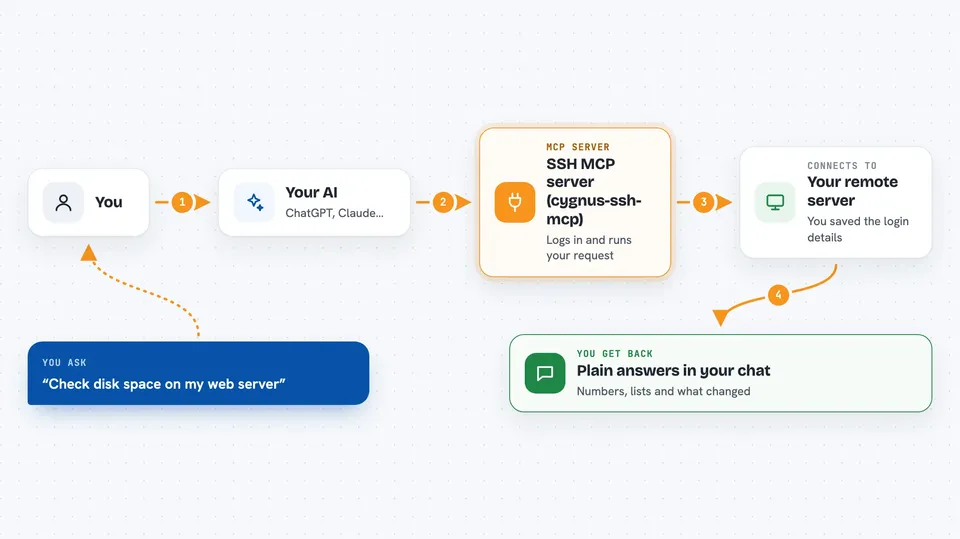
This is a helper that connects your AI assistant to your own remote servers over SSH, the same way you would log in yourself. You can ask it to check disk space, edit a config file, or restart a service, and it does it on the actual machine. It is handy for anyone who looks after a few servers, whether Linux, macOS, or Windows.
What is an MCP server? The 30-second version
On its own, your AI can only chat with you. An MCP server is a small helper program that gives your AI a new skill or a connection to something outside the chat. This one gives your AI a connection to your servers over SSH, so it can look things up or make changes there when you ask. You set it up once, and after that your AI can reach your machines for you.
What this MCP server does
You tell your AI something like "check disk space on my web server". Your AI uses this helper, and the helper logs into that server over SSH using the details you saved. It runs the commands or edits the files you asked about, then sends the results back. Your AI reads those results and explains them to you in plain words, right in the chat.
 Click to zoom
What you can do with it
- Check disk space, memory, uptime, and recent logs on a server
- Edit a config file line by line and show you the difference
- Upload a file, extract it, and restart a service
- Start a command in the background and fetch its output later
- Run commands with sudo when you need admin rights
- Look at running processes on a Windows SSH host
- Create or extract archives and work with folders
Try asking your AI
- “Connect to PROD and tell me about the machine, hardware, status, everything”
- “Edit /etc/nginx/nginx.conf and change worker_connections to 2048”
- “Find all .log files larger than 100MB in /var/log”
- “Start this command in the background and fetch the output later”
What it gives back to you
You get back answers in the chat: lists of files, summaries of what is running, numbers like free disk space, and the output of commands. If it changed or created something, it tells you what it did. For file edits, it can show you the difference before and after. Everything is explained in normal sentences, not raw machine output.
Before you start
What you need
- An SSH server already running on each machine you want to manage
- The login details for those machines (password or key file)
- An MCP-compatible AI client, like Claude Desktop or Claude Code
- Python installed and on your PATH, if you use the pip option
Good to know
This tool can change or delete files and run commands with admin rights on your real servers, so be careful with what you ask it to do.
Install it with your AI
Add SSH MCP server (cygnus-ssh-mcp) to your AI, no technical skills needed
You don't install anything by hand. You copy one prompt, paste it into an AI that can work on your computer, and it checks, installs and connects the server for you, asking you when it needs something.
Sign in to get the install prompt
Members get a ready-made prompt that lets the Claude desktop app check SSH MCP server (cygnus-ssh-mcp), install it and connect it for them, step by step. You don't need any technical skills: you copy, paste and answer a few questions. Your connected AI can also find and install any of the 4,361 MCP servers here for you.
Who it's for
People who look after their own servers or small infrastructure, like sysadmins, developers, and homelab fans.